This discussion has been locked.
You can no longer post new replies to this discussion. If you have a question you can start a new discussion

The document cannot be processed since it contains unexpected contents

Hello,

I get the above error message when I try to open a large .docx document (German) in Trados Studio. I have tried with Trados Studio 2017 Professional on my work computer, and with Trados Studio 2019 Freelance Starter version on my home laptop but the same message appears. I have tried converting the document to rtf, same problem. I have tried "open and repair" in word, same problem. The document is 265 pages long and has hundreds of footnotes. When I converted it to a PDF I could open it in Trados, but this is not a good solution as when I convert back to Word the footnotes are not properly formatted footnotes.

Any other ideas?


[locked by: Steven Whale at 9:44 AM (GMT 0) on 9 Jan 2020]
Parents
  • Hello ,

    Are you able to post the full error stack please- this might contain some useful information.

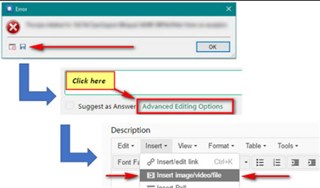
    Error dialog box with 'OK' button, and Trados Studio interface showing 'Click here' and 'Advanced Editing Options' highlighted.

    Maybe its worth trying to split the Word document and then opening each smaller file in Studio (single file translation) then immediately 'save target as' to see if this works (and keep splitting and repeating until you find the section that is causing the issue).

    Oana Nagy | QA Engineer | RWS Group

    emoji


    Generated Image Alt-Text
    [edited by: Trados AI at 7:42 PM (GMT 0) on 28 Feb 2024]
  • <SDLErrorDetails time="08/01/2020 13:24:07">
      <ErrorMessage>The document cannot be processed since it contains unexpected contents.</ErrorMessage>
      <Exception>
        <Type>Sdl.LanguagePlatform.Core.LanguagePlatformException, Sdl.LanguagePlatform.Core, Version=1.6.0.0, Culture=neutral, PublicKeyToken=c28cdb26c445c888</Type>
        <HelpLink />
        <Source>Sdl.LanguagePlatform.TranslationMemoryTools</Source>
        <HResult>-2146233088</HResult>
        <StackTrace><![CDATA[   at Sdl.LanguagePlatform.TranslationMemoryTools.LinguaSegmentBuilder.VisitSegment(ISegment segment)
       at Sdl.FileTypeSupport.Framework.Bilingual.Segment.AcceptVisitor(IMarkupDataVisitor visitor)
       at Sdl.LanguagePlatform.TranslationMemoryTools.LinguaSegmentBuilder.VisitChildNodes(IAbstractMarkupDataContainer container)
       at Sdl.LanguagePlatform.TranslationMemoryTools.LinguaSegmentBuilder.VisitTagPair(ITagPair tagPair)
       at Sdl.FileTypeSupport.Framework.Bilingual.TagPair.AcceptVisitor(IMarkupDataVisitor visitor)
       at Sdl.LanguagePlatform.TranslationMemoryTools.LinguaSegmentBuilder.VisitChildNodes(IAbstractMarkupDataContainer container)
       at Sdl.LanguagePlatform.TranslationMemoryTools.LinguaSegmentBuilder.VisitTagPair(ITagPair tagPair)
       at Sdl.FileTypeSupport.Framework.Bilingual.TagPair.AcceptVisitor(IMarkupDataVisitor visitor)
       at Sdl.LanguagePlatform.TranslationMemoryTools.LinguaSegmentBuilder.VisitChildNodes(IAbstractMarkupDataContainer container)
       at Sdl.LanguagePlatform.TranslationMemoryTools.TUConverter.AppendToLinguaSegment(IAbstractMarkupDataContainer data, Segment result, LinguaTuBuilderSettings flags, List`1& tagAssociations, List`1& textAssociations)
       at Sdl.LanguagePlatform.TranslationMemoryTools.TUConverter.BuildLinguaSegmentInternal(CultureInfo culture, ISegment segment, LinguaTuBuilderSettings settings, Boolean& hasTrackChanges, List`1& tagAssociations, List`1& textAssociations)
       at Sdl.LanguagePlatform.TranslationMemoryTools.TUConverter.BuildLinguaSegment(CultureInfo culture, ISegment segment, Boolean includeTrackChanges)
       at Sdl.TranslationStudio.Editor.RepetitionTableUpdater.GetSegmentIdentityHash(ISegmentPair segmentPair)
       at Sdl.TranslationStudio.Editor.RepetitionTableUpdater.ProcessSegment(ISegmentPair segmentPair)
       at Sdl.TranslationStudio.Editor.TranslationEditor.Processors.RepetitionProcessor.ProcessParagraphUnit(IParagraphUnit paragraphUnit)
       at Sdl.FileTypeSupport.Framework.Core.Utilities.BilingualApi.BilingualContentHandlerAdapter.ProcessParagraphUnit(IParagraphUnit paragraphUnit)
       at Sdl.FileTypeSupport.Framework.BilingualApi.AbstractBilingualContentProcessor.ProcessParagraphUnit(IParagraphUnit paragraphUnit)
       at Sdl.FileTypeSupport.Filters.Processors.SegmentRenumberingBilingualProcessor.ProcessParagraphUnit(IParagraphUnit paragraphUnit)
       at Sdl.FileTypeSupport.Framework.Core.Utilities.BilingualApi.BilingualContentHandlerAdapter.ProcessParagraphUnit(IParagraphUnit paragraphUnit)
       at Sdl.FileTypeSupport.Framework.Integration.AbstractBilingualProcessorContainer.ProcessParagraphUnit(IParagraphUnit paragraphUnit)
       at Sdl.FileTypeSupport.Framework.BilingualApi.AbstractBilingualContentProcessor.ProcessParagraphUnit(IParagraphUnit paragraphUnit)
       at Sdl.FileTypeSupport.Framework.Integration.LocationMarkerLocator.ProcessParagraphUnit(IParagraphUnit paragraphUnit)
       at Sdl.FileTypeSupport.Framework.BilingualApi.AbstractBilingualContentProcessor.ProcessParagraphUnit(IParagraphUnit paragraphUnit)
       at Sdl.FileTypeSupport.Framework.Integration.AbstractBilingualProcessorContainer.ProcessParagraphUnit(IParagraphUnit paragraphUnit)
       at Sdl.FileTypeSupport.Framework.Integration.FileExtractor.ProcessParagraphUnit(IParagraphUnit paragraphUnit)
       at Sdl.FileTypeSupport.Filters.MicrosoftOffice.Word.Services.ParagraphUnitOutputService.DirectOutput(IParagraphUnit paragraphUnit)
       at Sdl.FileTypeSupport.Filters.MicrosoftOffice.Word.Services.ParagraphUnitOutputService.Output()
       at Sdl.FileTypeSupport.Filters.MicrosoftOffice.Word.Routes.Parser.ParagraphRoute.Handle(Entity entity)
       at Sdl.FileTypeSupport.Filters.MicrosoftOffice.Word.Routes.Parser.WordDispatchRoute.Handle(Entity entity)
       at lambda_method(Closure , IMessage )
       at Sdl.FileTypeSupport.Filters.MicrosoftOffice.Core.Infrastructure.Dispatcher.Publish(IMessage message)
       at Sdl.FileTypeSupport.Filters.MicrosoftOffice.Core.Services.ParserService.Publish(Entity parsedEntity)
       at Sdl.FileTypeSupport.Filters.MicrosoftOffice.Core.Services.ParserService.Parse()
       at Sdl.FileTypeSupport.Filters.MicrosoftOffice.Core.Parser.DocumentParser.Parse()
       at Sdl.FileTypeSupport.Filters.MicrosoftOffice.Word.Parser.DocxParser.ParseNext()
       at Sdl.FileTypeSupport.Framework.Integration.FileExtractor.ParseNext()
       at Sdl.FileTypeSupport.Framework.Integration.MultiFileConverter.ParseNext()
       at Sdl.FileTypeSupport.Framework.Integration.MultiFileConverter.Parse()
       at Sdl.TranslationStudio.Editor.TranslationEditor.TranslatableDocument.Load(IJobExecutionContext context)
       at Sdl.Desktop.Platform.Services.JobRequest.Execute(IJobExecutionContext context)
       at Sdl.Desktop.Platform.Implementation.Services.Job.<_worker_DoWork>b__46_0()
       at Sdl.Desktop.Platform.Implementation.Services.Log.Resources(Object message, Action action)
       at Sdl.Desktop.Platform.Implementation.Services.Job._worker_DoWork(Object sender, DoWorkEventArgs e)
       at System.ComponentModel.BackgroundWorker.OnDoWork(DoWorkEventArgs e)
       at System.ComponentModel.BackgroundWorker.WorkerThreadStart(Object argument)]]></StackTrace>
      </Exception>
      <Environment>
        <ProductName>SDL Trados Studio</ProductName>
        <ProductVersion>14.0.0.0</ProductVersion>
        <EntryAssemblyFileVersion>14.1.10017.54688</EntryAssemblyFileVersion>
        <OperatingSystem>Microsoft Windows 10 Enterprise</OperatingSystem>
        <ServicePack>NULL</ServicePack>
        <OperatingSystemLanguage>1033</OperatingSystemLanguage>
        <CodePage>1252</CodePage>
        <LoggedOnUser>UZH\castep</LoggedOnUser>
        <DotNetFrameWork>4.0.30319.42000</DotNetFrameWork>
        <ComputerName>ZDUWN-515496</ComputerName>
        <ConnectedToNetwork>True</ConnectedToNetwork>
        <PhysicalMemory>33393864 MB</PhysicalMemory>
      </Environment>
    </SDLErrorDetails>

  • Thanks Steven. I've posted the error stack. Meanwhile I'll try splitting up the document

  • Hello ,

    Thank you for the error stack- this was really useful and allowed me to track this back to a previous logged case.

    The problem was a Studio defect, affecting only certain IDML files in certain CU's of 2017.

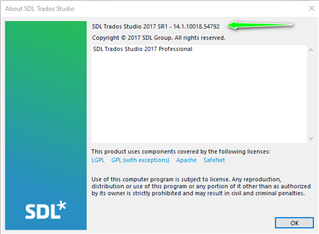
    I can see from the error stack you are using an older version of 2017- 14.1.10017.54688

    Please update to the latest release and this should resolve the problem-

    About SDL Trados Studio dialog box showing version 2017 SR1 - 14.1.10018.54792 with a green checkmark indicating the latest release.

    This issue was also tested in Studio 2019 and confirmed as resolved.

    Oana Nagy | QA Engineer | RWS Group

    emoji


    Generated Image Alt-Text
    [edited by: Trados AI at 7:42 PM (GMT 0) on 28 Feb 2024]
  • By splitting up the document, I've narrowed down the problem to one particular page, but I cannot see what is wrong with that page. Can you help any further?

  • Sorry, I just saw this. Okay, will try updating. The strange thing is though, I have the Studio 2019 Freelance Starter version on my home laptop, and I had exactly the same problem with that version

Reply Children
No Data