This discussion has been locked.
You can no longer post new replies to this discussion. If you have a question you can start a new discussion

Error when executing Setup Wizard

Former Member
Former Member

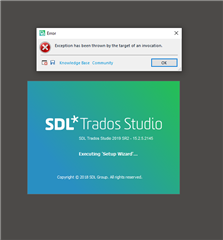
Error message 'Exception has been thrown by the target of an invocation' on SDL Trados Studio startup screen.

Any suggestions? 

Tried: SDL Trados repair 4 times, deleting 15.0.0.0, using SDL Freshstart, recursively removing projects and files, resetting SDL Trados license.....anything else I could try?

Windows 10 is OK (chkdsk OK, device drivers OK, scansoft OK, repair with DISM RestoreHealth, etc ....OK, ).

Tried with exeptions in Defender and Avira, tried without Defender and without Avira antivirus, reset firewall, no firewall at all.....

All other programs are running smoothly, the problem is just in last version SDL Trados. 


Generated Image Alt-Text
[edited by: Trados AI at 7:44 PM (GMT 0) on 28 Feb 2024]
emoji
Parents Reply Children
  • Former Member
    0 Former Member in reply to Oana Nagy

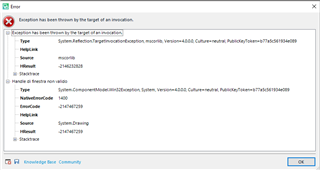
    Screenshot of Trados Studio error message stating 'Exception has been thrown by the target of an invocation' with details including source, target site, and stack trace information.

    same issue on another PC, fresh, Windows 10 Professional.

    The proboem on the first machine has not been solved in two different remote sessions. Is already one week down now.

    emoji


    Generated Image Alt-Text
    [edited by: Trados AI at 7:45 PM (GMT 0) on 28 Feb 2024]
  • Former Member
    0 Former Member in reply to Oana Nagy

    <SDLErrorDetails time="11/01/2020 02:00:31">
      <ErrorMessage>Exception has been thrown by the target of an invocation.</ErrorMessage>
      <Exception>
        <Type>System.Reflection.TargetInvocationException, mscorlib, Version=4.0.0.0, Culture=neutral, PublicKeyToken=b77a5c561934e089</Type>
        <HelpLink />
        <Source>mscorlib</Source>
        <HResult>-2146232828</HResult>
        <StackTrace><![CDATA[   at System.RuntimeMethodHandle.SerializationInvoke(IRuntimeMethodInfo method, Object target, SerializationInfo info, StreamingContext& context)
       at System.Runtime.Serialization.ObjectManager.CompleteISerializableObject(Object obj, SerializationInfo info, StreamingContext context)
       at System.Runtime.Serialization.ObjectManager.FixupSpecialObject(ObjectHolder holder)
       at System.Runtime.Serialization.ObjectManager.DoFixups()
       at System.Runtime.Serialization.Formatters.Binary.ObjectReader.Deserialize(HeaderHandler handler, __BinaryParser serParser, Boolean fCheck, Boolean isCrossAppDomain, IMethodCallMessage methodCallMessage)
       at System.Runtime.Serialization.Formatters.Binary.BinaryFormatter.Deserialize(Stream serializationStream, HeaderHandler handler, Boolean fCheck, Boolean isCrossAppDomain, IMethodCallMessage methodCallMessage)
       at System.Resources.ResourceReader.DeserializeObject(Int32 typeIndex)
       at System.Resources.ResourceReader._LoadObjectV2(Int32 pos, ResourceTypeCode& typeCode)
       at System.Resources.ResourceReader.LoadObjectV2(Int32 pos, ResourceTypeCode& typeCode)
       at System.Resources.ResourceReader.LoadObject(Int32 pos, ResourceTypeCode& typeCode)
       at System.Resources.RuntimeResourceSet.GetObject(String key, Boolean ignoreCase, Boolean isString)
       at System.Resources.RuntimeResourceSet.GetObject(String key, Boolean ignoreCase)
       at System.Resources.ResourceManager.GetObject(String name, CultureInfo culture, Boolean wrapUnmanagedMemStream)
       at System.Resources.ResourceManager.GetObject(String name, CultureInfo culture)
       at Sdl.TranslationStudio.Common.ImageResources.get_current_user()
       at Sdl.TranslationStudio.Common.SetupWizard.Wizard.AddWizardPages()
       at Sdl.Desktop.Platform.Wizard.AbstractWizard`1.InitializeWizardPages()
       at Sdl.Desktop.Platform.Wizard.AbstractWizard`1.get_HasAvailablePages()
       at Sdl.TranslationStudio.Common.SetupWizard.SetupWizardLauncher.Execute()
       at Sdl.Desktop.Platform.Implementation.Studio.ExecuteStartupExtensions()
       at Sdl.Desktop.Platform.Implementation.Studio.Run()
       at Sdl.TranslationStudio.Application.Launcher.RunApplication()]]></StackTrace>
        <InnerException>
          <Type>System.ComponentModel.Win32Exception, System, Version=4.0.0.0, Culture=neutral, PublicKeyToken=b77a5c561934e089</Type>
          <NativeErrorCode>1400</NativeErrorCode>
          <ErrorCode>-2147467259</ErrorCode>
          <HelpLink />
          <Source>System.Drawing</Source>
          <HResult>-2147467259</HResult>
          <StackTrace><![CDATA[   at System.Drawing.Icon.Initialize(Int32 width, Int32 height)
       at System.Drawing.Icon..ctor(SerializationInfo info, StreamingContext context)]]></StackTrace>
        </InnerException>
      </Exception>
      <Environment>
        <ProductName>SDL Trados Studio</ProductName>
        <ProductVersion>15.0.0.0</ProductVersion>
        <EntryAssemblyFileVersion>15.2.0.1041</EntryAssemblyFileVersion>
        <OperatingSystem>Microsoft Windows 10 Pro</OperatingSystem>
        <ServicePack>NULL</ServicePack>
        <OperatingSystemLanguage>1033</OperatingSystemLanguage>
        <CodePage>1252</CodePage>
        <LoggedOnUser>ZENBOOK\Luca</LoggedOnUser>
        <DotNetFrameWork>4.0.30319.42000</DotNetFrameWork>
        <ComputerName>ZENBOOK</ComputerName>
        <ConnectedToNetwork>True</ConnectedToNetwork>
        <PhysicalMemory>16624900 MB</PhysicalMemory>
      </Environment>
    </SDLErrorDetails>