PDF files converted to the translatable format for translation by Studio are converted back to PDF format when generating target files using the Batch Task "Export files" - however, they cannot be opened

When running the Batch Task "Export files" on a project containing PDF files, which have been converted to the translatable format by Studio itself, and you chose to export "Target version" files, you end up with target files in PDF format.

This could - at a first glace - seem as the perfect scenario (in case you don't need to handle possible layout issues in the target file).

However, these target PDF files cannot be opened at all.

The current workaround is to

1) change the file ending from *.pdf to *.docx,
2) open the file, which is now in Word file format and then
3) save the file in PDF format.

Could you please have a look at this, as it is a tedious procedure to do this if you are working with projects with a lot of PDF files.

Thanks in advance! Slight smile

  • Hello ,

    Is there a reason why you use the batch tasks and export function?

    When you import a PDF - this is converted to SDLXLIFF (for translation).

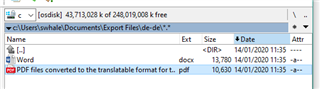
    As Studio does not have an inbuilt (export to PDF solution) although you see the PDF in the Export folder this will always be corrupted and unreadable. Below is an example of a small project with 1 word and 1 PDF file (and the resulting EXPORT folder)

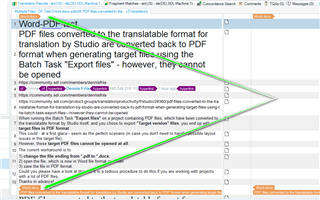
    Screenshot of Trados Studio forum post warning that PDF files converted to SDLXLIFF cannot be exported back to PDF using the 'Export files' batch task.

    Screenshot of a Windows file explorer showing a corrupted PDF file in the 'Export Files' folder of Trados Studio with a size of 10,640 bytes.

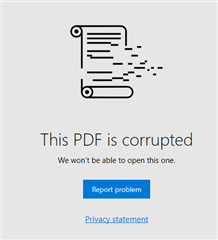
    Now when i try to open the PDF.... I get the error (which is to be expected)

    Screenshot of an error message stating 'This PDF is corrupted. We won't be able to open this one.' with options to report the problem or view the privacy statement.

    A much better way of handling the files would be to, simply- FILE>  SAVE TARGET AS 

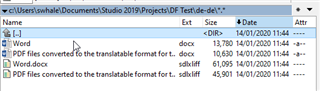
    Screenshot of a Windows file explorer showing a Trados Studio project folder with Word and SDLXLIFF files, including a corrupted PDF file.

    Now you have the Target Word files (and SDLXLIFFS).

    If the client really wants you to send back a PDF you can save the WORD as PDF and keep all the formatting (or simply send the client the Target Word file.

    Oana Nagy | QA Engineer | RWS Group

    emoji


    Generated Image Alt-Text
    [edited by: Trados AI at 7:48 PM (GMT 0) on 28 Feb 2024]
  • Hi Steven,

    Thanks for your suggested answer. Blush

    I’m well aware about the conversion of PDFs to SDLXLIFF. And that Studio, in order to do this, as a first step converts the PDF to a DOCX file, which is then converted into SDLXIFF.

    If you use the “SAVE TARGET AS” function, you will have to open every single file, save it as a target file, and then repeat this step for ALL files in a project, which could potentially be hundreds of files.

    If you instead use the Batch Task “GENERATE TARGET TRANSLATION”, all target files will be perfectly generated within the project’s target language folder. Using this Batch Task, you will get DOCX files instead of corrupt PDF files, which is great. However, you will then also have to make a copy of the target language folder and in this copy delete all the irrelevant SDLXLIFF files (if the client doesn’t want these, but only the target files). If the client on top of that wants to get PDF files (which could be the case, if a project consisting of lots of PDF files with ID numbers as a part of the file names, and this PDF file format is crucial for the client’s platform to accept the files, when uploading target versions on the client’s platform), you will have to manually open all DOCX files and save each of them individually as a PDF file. Then afterwards you need to “clean up” by deleting all the DOCX files, which have been converted into PDF files.

    All of the above is the reason for me wanting to use the Batch Task “EXPORT FILES”, because I actually – at the first glace only, though – end up with the perfect result: PDF files. However, these files are not useful at all. So I will have to chose among (in this case) cumbersome solutions.

  • Is there a reason why you use the batch tasks and export function?

    Perhaps simply because it's POSSIBLE... and therefore a user expects it to work the same as with other files...

    If by definition the functionality cannot be achieved - like in the case of PDF files - then the feature should not be available in the first place.
    I.e. the export function should be disabled, or show a message to the user, or whatever...

    But it definitely should NOT create Word files with .pdf extension (which seems to be happening right now).
    And that was the point of this post, I believe... to point out the usability issue.