The Trados cloud platform will be undergoing maintenance on Saturday, 9th May 2026 between 05:00 to 17:00 UTC. During this time, you will not be able to log in to the Trados platform.

Fail to save report

I am providing details for my recent question asked during Paul's recent excellent webinar.

For some time I can no longer save a Report in Excel format. The Knowledge Base comments are not appropriate.
I am working with Office Pro Plus 2016 and Studio 2019 SR2 15.2.5.2145
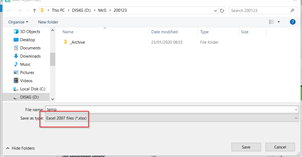
Save as dialog box with the file name 'Report 2021' and file type 'Excel Files' selected in Trados Studio.

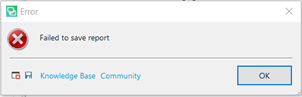
Error message pop-up in Trados Studio stating 'Failed to save report' with options for Knowledge Base and Community.


Generated Image Alt-Text
[edited by: Trados AI at 9:45 PM (GMT 0) on 28 Feb 2024]

emoji
Parents
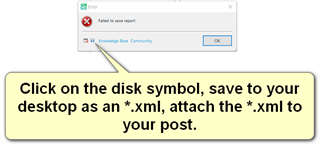
  • It s always a good idea to provide the error stack since the screenhot of the error dosn't tell us much:

    Error message popup in Trados Studio saying 'Failed to save report' with an OK button and Knowledge Base Community link.

    Paul Filkin | RWS

    Design your own training!
    You've done the courses and still need to go a little further, or still not clear? 
    Tell us what you need in our Community Solutions Hub

    emoji


    Generated Image Alt-Text
    [edited by: Trados AI at 9:45 PM (GMT 0) on 28 Feb 2024]
  • <SDLErrorDetails time="26/01/2020 14:24:38">
      <ErrorMessage>Failed to save report</ErrorMessage>
      <Exception>
        <Type>System.Reflection.TargetInvocationException, mscorlib, Version=4.0.0.0, Culture=neutral, PublicKeyToken=b77a5c561934e089</Type>
        <HelpLink />
        <Source>mscorlib</Source>
        <HResult>-2146232828</HResult>
        <StackTrace><![CDATA[   at System.RuntimeType.InvokeDispMethod(String name, BindingFlags invokeAttr, Object target, Object[] args, Boolean[] byrefModifiers, Int32 culture, String[] namedParameters)
       at System.RuntimeType.InvokeMember(String name, BindingFlags bindingFlags, Binder binder, Object target, Object[] providedArgs, ParameterModifier[] modifiers, CultureInfo culture, String[] namedParams)
       at Sdl.ProjectApi.Reporting.XmlReporting.Helper.ConvertToMht(Byte[] html, Encoding htmlEncoding)
       at Sdl.ProjectApi.Reporting.XmlReporting.ExcelReportRenderer.RenderReport(String xml, ReportDefinition reportDefinition, ReportFormat format)
       at Sdl.ProjectApi.Reporting.XmlReporting.XmlTaskReportRenderingEngine.RenderReport(ITaskReportInstance taskReportInstance, ReportFormat format)
       at Sdl.ProjectApi.Implementation.Report.SaveAs(String targetFilePath, ReportFormat format)
       at Sdl.TranslationStudio.Common.Reports.ReportUtil.ShowSaveAsDialog(IReport report, ReportFormat& format)]]></StackTrace>
        <InnerException>
          <Type>System.Runtime.InteropServices.COMException, mscorlib, Version=4.0.0.0, Culture=neutral, PublicKeyToken=b77a5c561934e089</Type>
          <ErrorCode>-2146644475</ErrorCode>
          <HelpLink />
          <Source>CDO.Message.1</Source>
          <HResult>-2146644475</HResult>
          <StackTrace><![CDATA[]]></StackTrace>
        </InnerException>
      </Exception>
      <Environment>
        <ProductName>SDL Trados Studio</ProductName>
        <ProductVersion>15.0.0.0</ProductVersion>
        <EntryAssemblyFileVersion>15.2.5.2145</EntryAssemblyFileVersion>
        <OperatingSystem>Microsoft Windows 10 Pro</OperatingSystem>
        <ServicePack>NULL</ServicePack>
        <OperatingSystemLanguage>2057</OperatingSystemLanguage>
        <CodePage>1252</CodePage>
        <LoggedOnUser>DESKTOP-ASJBLNL\Rudd</LoggedOnUser>
        <DotNetFrameWork>4.0.30319.42000</DotNetFrameWork>
        <ComputerName>DESKTOP-ASJBLNL</ComputerName>
        <ConnectedToNetwork>True</ConnectedToNetwork>
        <PhysicalMemory>8315872 MB</PhysicalMemory>
      </Environment>
    </SDLErrorDetails>

    Thanks Paul, 

    I have included the log

  • Thank you.  Can you check this first:

    https://gateway.rws.com/csm?id=kb_article_view&sysparm_article=KB0029589

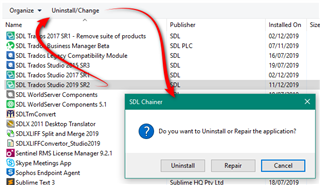
    If that doesn't help can you try running a repair of Excel?  And if that doesn't help I'll speak to support and see what we can do to help.

    Paul Filkin | RWS

    Design your own training!
    You've done the courses and still need to go a little further, or still not clear? 
    Tell us what you need in our Community Solutions Hub

  • The KnowledgeBase article is not applicable - I have no Excel Addins

    Unfortunately, the Repair made no improvement. I have attached the new log.

    <SDLErrorDetails time="26/01/2020 14:51:13">
      <ErrorMessage>Failed to save report</ErrorMessage>
      <Exception>
        <Type>System.Reflection.TargetInvocationException, mscorlib, Version=4.0.0.0, Culture=neutral, PublicKeyToken=b77a5c561934e089</Type>
        <HelpLink />
        <Source>mscorlib</Source>
        <HResult>-2146232828</HResult>
        <StackTrace><![CDATA[   at System.RuntimeType.InvokeDispMethod(String name, BindingFlags invokeAttr, Object target, Object[] args, Boolean[] byrefModifiers, Int32 culture, String[] namedParameters)
       at System.RuntimeType.InvokeMember(String name, BindingFlags bindingFlags, Binder binder, Object target, Object[] providedArgs, ParameterModifier[] modifiers, CultureInfo culture, String[] namedParams)
       at Sdl.ProjectApi.Reporting.XmlReporting.Helper.ConvertToMht(Byte[] html, Encoding htmlEncoding)
       at Sdl.ProjectApi.Reporting.XmlReporting.ExcelReportRenderer.RenderReport(String xml, ReportDefinition reportDefinition, ReportFormat format)
       at Sdl.ProjectApi.Reporting.XmlReporting.XmlTaskReportRenderingEngine.RenderReport(ITaskReportInstance taskReportInstance, ReportFormat format)
       at Sdl.ProjectApi.Implementation.Report.SaveAs(String targetFilePath, ReportFormat format)
       at Sdl.TranslationStudio.Common.Reports.ReportUtil.ShowSaveAsDialog(IReport report, ReportFormat& format)]]></StackTrace>
        <InnerException>
          <Type>System.Runtime.InteropServices.COMException, mscorlib, Version=4.0.0.0, Culture=neutral, PublicKeyToken=b77a5c561934e089</Type>
          <ErrorCode>-2146644475</ErrorCode>
          <HelpLink />
          <Source>CDO.Message.1</Source>
          <HResult>-2146644475</HResult>
          <StackTrace><![CDATA[]]></StackTrace>
        </InnerException>
      </Exception>
      <Environment>
        <ProductName>SDL Trados Studio</ProductName>
        <ProductVersion>15.0.0.0</ProductVersion>
        <EntryAssemblyFileVersion>15.2.5.2145</EntryAssemblyFileVersion>
        <OperatingSystem>Microsoft Windows 10 Pro</OperatingSystem>
        <ServicePack>NULL</ServicePack>
        <OperatingSystemLanguage>2057</OperatingSystemLanguage>
        <CodePage>1252</CodePage>
        <LoggedOnUser>DESKTOP-ASJBLNL\Rudd</LoggedOnUser>
        <DotNetFrameWork>4.0.30319.42000</DotNetFrameWork>
        <ComputerName>DESKTOP-ASJBLNL</ComputerName>
        <ConnectedToNetwork>True</ConnectedToNetwork>
        <PhysicalMemory>8315872 MB</PhysicalMemory>
      </Environment>
    </SDLErrorDetails>
     

Reply
  • The KnowledgeBase article is not applicable - I have no Excel Addins

    Unfortunately, the Repair made no improvement. I have attached the new log.

    <SDLErrorDetails time="26/01/2020 14:51:13">
      <ErrorMessage>Failed to save report</ErrorMessage>
      <Exception>
        <Type>System.Reflection.TargetInvocationException, mscorlib, Version=4.0.0.0, Culture=neutral, PublicKeyToken=b77a5c561934e089</Type>
        <HelpLink />
        <Source>mscorlib</Source>
        <HResult>-2146232828</HResult>
        <StackTrace><![CDATA[   at System.RuntimeType.InvokeDispMethod(String name, BindingFlags invokeAttr, Object target, Object[] args, Boolean[] byrefModifiers, Int32 culture, String[] namedParameters)
       at System.RuntimeType.InvokeMember(String name, BindingFlags bindingFlags, Binder binder, Object target, Object[] providedArgs, ParameterModifier[] modifiers, CultureInfo culture, String[] namedParams)
       at Sdl.ProjectApi.Reporting.XmlReporting.Helper.ConvertToMht(Byte[] html, Encoding htmlEncoding)
       at Sdl.ProjectApi.Reporting.XmlReporting.ExcelReportRenderer.RenderReport(String xml, ReportDefinition reportDefinition, ReportFormat format)
       at Sdl.ProjectApi.Reporting.XmlReporting.XmlTaskReportRenderingEngine.RenderReport(ITaskReportInstance taskReportInstance, ReportFormat format)
       at Sdl.ProjectApi.Implementation.Report.SaveAs(String targetFilePath, ReportFormat format)
       at Sdl.TranslationStudio.Common.Reports.ReportUtil.ShowSaveAsDialog(IReport report, ReportFormat& format)]]></StackTrace>
        <InnerException>
          <Type>System.Runtime.InteropServices.COMException, mscorlib, Version=4.0.0.0, Culture=neutral, PublicKeyToken=b77a5c561934e089</Type>
          <ErrorCode>-2146644475</ErrorCode>
          <HelpLink />
          <Source>CDO.Message.1</Source>
          <HResult>-2146644475</HResult>
          <StackTrace><![CDATA[]]></StackTrace>
        </InnerException>
      </Exception>
      <Environment>
        <ProductName>SDL Trados Studio</ProductName>
        <ProductVersion>15.0.0.0</ProductVersion>
        <EntryAssemblyFileVersion>15.2.5.2145</EntryAssemblyFileVersion>
        <OperatingSystem>Microsoft Windows 10 Pro</OperatingSystem>
        <ServicePack>NULL</ServicePack>
        <OperatingSystemLanguage>2057</OperatingSystemLanguage>
        <CodePage>1252</CodePage>
        <LoggedOnUser>DESKTOP-ASJBLNL\Rudd</LoggedOnUser>
        <DotNetFrameWork>4.0.30319.42000</DotNetFrameWork>
        <ComputerName>DESKTOP-ASJBLNL</ComputerName>
        <ConnectedToNetwork>True</ConnectedToNetwork>
        <PhysicalMemory>8315872 MB</PhysicalMemory>
      </Environment>
    </SDLErrorDetails>
     

Children