


The Trados cloud platform will be undergoing maintenance on Saturday, 9th May 2026 between 05:00 to 17:00 UTC. During this time, you will not be able to log in to the Trados platform.

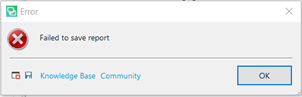
Fail to save report

I am providing details for my recent question asked during Paul's recent excellent webinar.

For some time I can no longer save a Report in Excel format. The Knowledge Base comments are not appropriate.
I am working with Office Pro Plus 2016 and Studio 2019 SR2 15.2.5.2145
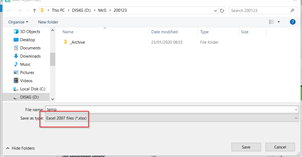
Save as dialog box with the file name 'Report 2021' and file type 'Excel Files' selected in Trados Studio.

Error message pop-up in Trados Studio stating 'Failed to save report' with options for Knowledge Base and Community.


Generated Image Alt-Text
[edited by: Trados AI at 9:45 PM (GMT 0) on 28 Feb 2024]

emoji
Parents
  • Hi, I'm having this issue as well with Studio 2019 SR2.

    Any suggestions on how to resolve it? Thanks!

    here is the error stack:

    <SDLErrorDetails time="08/07/2020 10:48:08">
    <ErrorMessage>Failed to save report</ErrorMessage>
    <Exception>
    <Type>System.Reflection.TargetInvocationException, mscorlib, Version=4.0.0.0, Culture=neutral, PublicKeyToken=b77a5c561934e089</Type>
    <HelpLink />
    <Source>mscorlib</Source>
    <HResult>-2146232828</HResult>
    <StackTrace><![CDATA[ at System.RuntimeType.InvokeDispMethod(String name, BindingFlags invokeAttr, Object target, Object[] args, Boolean[] byrefModifiers, Int32 culture, String[] namedParameters)
    at System.RuntimeType.InvokeMember(String name, BindingFlags bindingFlags, Binder binder, Object target, Object[] providedArgs, ParameterModifier[] modifiers, CultureInfo culture, String[] namedParams)
    at Sdl.ProjectApi.Reporting.XmlReporting.Helper.ConvertToMht(Byte[] html, Encoding htmlEncoding)
    at Sdl.ProjectApi.Reporting.XmlReporting.ExcelReportRenderer.RenderReport(String xml, ReportDefinition reportDefinition, ReportFormat format)
    at Sdl.ProjectApi.Reporting.XmlReporting.XmlTaskReportRenderingEngine.RenderReport(ITaskReportInstance taskReportInstance, ReportFormat format)
    at Sdl.ProjectApi.Implementation.Report.SaveAs(String targetFilePath, ReportFormat format)
    at Sdl.TranslationStudio.Common.Reports.ReportUtil.ShowSaveAsDialog(IReport report, ReportFormat& format)]]></StackTrace>
    <InnerException>
    <Type>System.Runtime.InteropServices.COMException, mscorlib, Version=4.0.0.0, Culture=neutral, PublicKeyToken=b77a5c561934e089</Type>
    <ErrorCode>-2146644475</ErrorCode>
    <HelpLink />
    <Source>CDO.Message.1</Source>
    <HResult>-2146644475</HResult>
    <StackTrace><![CDATA[]]></StackTrace>
    </InnerException>
    </Exception>
    <Environment>
    <ProductName>SDL Trados Studio</ProductName>
    <ProductVersion>15.0.0.0</ProductVersion>
    <EntryAssemblyFileVersion>15.2.5.2145</EntryAssemblyFileVersion>
    <OperatingSystem>Microsoft Windows 10 Pro</OperatingSystem>
    <ServicePack>NULL</ServicePack>
    <OperatingSystemLanguage>1036</OperatingSystemLanguage>
    <CodePage>1252</CodePage>
    <LoggedOnUser>PRODBRU1\User</LoggedOnUser>
    <DotNetFrameWork>4.0.30319.42000</DotNetFrameWork>
    <ComputerName>PRODBRU1</ComputerName>
    <ConnectedToNetwork>True</ConnectedToNetwork>
    <PhysicalMemory>12476288 MB</PhysicalMemory>
    </Environment>
    </SDLErrorDetails>

Reply
  • Hi, I'm having this issue as well with Studio 2019 SR2.

    Any suggestions on how to resolve it? Thanks!

    here is the error stack:

    <SDLErrorDetails time="08/07/2020 10:48:08">
    <ErrorMessage>Failed to save report</ErrorMessage>
    <Exception>
    <Type>System.Reflection.TargetInvocationException, mscorlib, Version=4.0.0.0, Culture=neutral, PublicKeyToken=b77a5c561934e089</Type>
    <HelpLink />
    <Source>mscorlib</Source>
    <HResult>-2146232828</HResult>
    <StackTrace><![CDATA[ at System.RuntimeType.InvokeDispMethod(String name, BindingFlags invokeAttr, Object target, Object[] args, Boolean[] byrefModifiers, Int32 culture, String[] namedParameters)
    at System.RuntimeType.InvokeMember(String name, BindingFlags bindingFlags, Binder binder, Object target, Object[] providedArgs, ParameterModifier[] modifiers, CultureInfo culture, String[] namedParams)
    at Sdl.ProjectApi.Reporting.XmlReporting.Helper.ConvertToMht(Byte[] html, Encoding htmlEncoding)
    at Sdl.ProjectApi.Reporting.XmlReporting.ExcelReportRenderer.RenderReport(String xml, ReportDefinition reportDefinition, ReportFormat format)
    at Sdl.ProjectApi.Reporting.XmlReporting.XmlTaskReportRenderingEngine.RenderReport(ITaskReportInstance taskReportInstance, ReportFormat format)
    at Sdl.ProjectApi.Implementation.Report.SaveAs(String targetFilePath, ReportFormat format)
    at Sdl.TranslationStudio.Common.Reports.ReportUtil.ShowSaveAsDialog(IReport report, ReportFormat& format)]]></StackTrace>
    <InnerException>
    <Type>System.Runtime.InteropServices.COMException, mscorlib, Version=4.0.0.0, Culture=neutral, PublicKeyToken=b77a5c561934e089</Type>
    <ErrorCode>-2146644475</ErrorCode>
    <HelpLink />
    <Source>CDO.Message.1</Source>
    <HResult>-2146644475</HResult>
    <StackTrace><![CDATA[]]></StackTrace>
    </InnerException>
    </Exception>
    <Environment>
    <ProductName>SDL Trados Studio</ProductName>
    <ProductVersion>15.0.0.0</ProductVersion>
    <EntryAssemblyFileVersion>15.2.5.2145</EntryAssemblyFileVersion>
    <OperatingSystem>Microsoft Windows 10 Pro</OperatingSystem>
    <ServicePack>NULL</ServicePack>
    <OperatingSystemLanguage>1036</OperatingSystemLanguage>
    <CodePage>1252</CodePage>
    <LoggedOnUser>PRODBRU1\User</LoggedOnUser>
    <DotNetFrameWork>4.0.30319.42000</DotNetFrameWork>
    <ComputerName>PRODBRU1</ComputerName>
    <ConnectedToNetwork>True</ConnectedToNetwork>
    <PhysicalMemory>12476288 MB</PhysicalMemory>
    </Environment>
    </SDLErrorDetails>

Children
No Data