Object reference not set to an instance of an object

I got this message when I tried to open a .pdf and a .docx file in Trados 2019 (Windows 10 64bt). I had chosen the solution of translating a single file and not creating a project.  When I decided to create a new project with the same file to see what happens, the message did not appear and I was able to verify my segments. Isn't it weird?

Parents
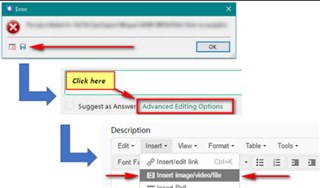
  • Hello ,

    Its always helpful when you get an error message, to attach the whole error stack.

    This way we can often see what might be the issue-

    Error dialog box with an 'OK' button, a red arrow pointing to 'Click here' link, and a blue arrow indicating 'Advanced Editing Options' in a forum post editor.

    You can just save the error stack to your desktop and then attach to the thread.

    You have two options in Studio-

    1) Translate a single file 

    2) Create a project (using one or more files).

    As you have more than one file, then use the project creation option.

    Oana Nagy | QA Engineer | RWS Group

    emoji


    Generated Image Alt-Text
    [edited by: Trados AI at 8:03 PM (GMT 0) on 28 Feb 2024]
  • I know the difference between project and file. In the file I am attaching I used a test file that I created (the sentences are too simple) to show you the problem.

    <SDLErrorDetails time="27/01/2020 17:33:48">
      <ErrorMessage>Object reference not set to an instance of an object.</ErrorMessage>
      <Exception>
        <Type>System.NullReferenceException, mscorlib, Version=4.0.0.0, Culture=neutral, PublicKeyToken=b77a5c561934e089</Type>
        <HelpLink />
        <Source>Sdl.TranslationStudio.Editor</Source>
        <HResult>-2147467261</HResult>
        <StackTrace><![CDATA[   at Sdl.TranslationStudio.Editor.TranslationMemory.TranslationMemoryViewPart.UpdateIcon()
       at Sdl.TranslationStudio.Editor.TranslationMemory.TranslationMemoryViewPart.UpdateTranslationProvider()
       at Sdl.TranslationStudio.Editor.TranslationMemory.TranslationMemoryViewPart.OnActiveDocumentChanged()
       at Sdl.TranslationStudio.Editor.TranslationMemory.TranslationMemoryViewPart.editorService_ActiveDocumentChanged(IDocument document)
       at Sdl.TranslationStudio.Api.Editor.DocumentEventHandler.Invoke(IDocument document)
       at Sdl.TranslationStudio.Editor.EditorService.set_ActiveDocument(IDocument value)
       at Sdl.TranslationStudio.Editor.EditorView.OnActiveViewPartChanged(IViewPartReference viewPartReference)
       at Sdl.Desktop.Platform.AbstractViewWithParts.Control_ActiveViewPartChanged(IViewWithParts view, IViewPartReference viewPartReference)
       at Sdl.Desktop.Platform.WinForms.DockingViewContentControl.OnActiveViewPartChanged(IViewPartReference viewPartReference)
       at Sdl.Desktop.Platform.WinForms.DockingViewContentControl.InternalActivateViewPart(IViewPartReference viewPartToActivate)
       at Sdl.Desktop.Platform.WinForms.DockingViewContentControl._tabControl_SelectedTabChanged(Object sender, SelectedTabChangedEventArgs e)
       at Infragistics.Win.UltraWinTabControl.UltraTabControlBase.OnSelectedTabChanged(SelectedTabChangedEventArgs e)
       at Infragistics.Win.UltraWinTabControl.UltraTabControlBase.RaiseEvent(UltraTabControlEventId id, EventArgs e)
       at Infragistics.Win.UltraWinTabControl.UltraTabControlBase.OnManagerSelectedTabItemChanged(Object sender, SelectedTabItemChangedEventArgs e)
       at Infragistics.Win.UltraWinTabs.TabManager.set_SelectedTabItem(ITabItem value)
       at Infragistics.Win.UltraWinTabControl.UltraTabControlBase.SetSelectedTab(UltraTab tab)
       at Infragistics.Win.UltraWinTabControl.UltraTabControlBase.set_SelectedTab(UltraTab value)
       at Sdl.Desktop.Platform.WinForms.DockingViewContentControl.AddViewPartTab(IViewPartReference viewPartReference)
       at Sdl.Desktop.Platform.WinForms.DockingViewContentControl.AddViewPart(IViewPartReference viewPartReference)
       at Sdl.Desktop.Platform.WinForms.DockingViewContentControl.NotifyViewPartAdded(IViewPartReference viewPartReference)
       at Sdl.Desktop.Platform.AbstractViewWithParts.AddViewPart(IViewPartReference viewPartReference)
       at Sdl.Desktop.Platform.AbstractDockingView.AddViewPart(IViewPartReference viewPartReference)
       at Sdl.TranslationStudio.Editor.Shared.InternalEditorContext.AddDocumentViewPart(IDocumentViewPart documentViewPart)
       at Sdl.TranslationStudio.Api.Editor.AbstractInternalDocument.AfterLoad(IJob job)]]></StackTrace>
      </Exception>
      <Environment>
        <ProductName>SDL Trados Studio</ProductName>
        <ProductVersion>15.0.0.0</ProductVersion>
        <EntryAssemblyFileVersion>15.2.5.2145</EntryAssemblyFileVersion>
        <OperatingSystem>Microsoft Windows 10 Pro</OperatingSystem>
        <ServicePack>NULL</ServicePack>
        <OperatingSystemLanguage>1033</OperatingSystemLanguage>
        <CodePage>1252</CodePage>
        <LoggedOnUser>DESKTOP-CE0KHKG\life_</LoggedOnUser>
        <DotNetFrameWork>4.0.30319.42000</DotNetFrameWork>
        <ComputerName>DESKTOP-CE0KHKG</ComputerName>
        <ConnectedToNetwork>True</ConnectedToNetwork>
        <PhysicalMemory>8179916 MB</PhysicalMemory>
      </Environment>
    </SDLErrorDetails>

  • Hello ,

    In this instance I would suggest repairing your installation of Studio

    https://gateway.rws.com/csm?id=kb_article_view&sysparm_article=KB0039395

    You can also use the following free app

    https://appstore.sdl.com/language/app/sdl-freshstart/876/

    If repairing Studio doesnt help, please reset Studio to its default settings as in the above link.

    Oana Nagy | QA Engineer | RWS Group

Reply Children