Trados Studio 2019 Bugs

A couple bugs I encountered recently. They might be already reported but I have no way of verifying that.

  1. After you change the user interface language, some of the UI components (mostly tabbed windows) do not update until you run “Reset Window Layout” or set the focus to them

Example:

In the following screenshot, I switch from Japanese to English, but only the active window was updated (below is the editor view).

 Screenshot showing Trados Studio UI with tabbed windows, some tabs in Japanese and one in English indicating a language update issue.

  1. In the “Open Trados Groupshare Project” view if you click “Next” and then “Back”, the “Finish” button remains active resulting in an error if you press it (it should grey out when you click on the “Back” button)

Example:

As you can see below, both “Next” and “Finish” are active in the project selection window after you click “Next” and then “Back”.

Screenshot of Trados Studio's 'Open Groupshare Project' window with both 'Next' and 'Finish' buttons active, which is a bug.


Generated Image Alt-Text
[edited by: Trados AI at 8:27 PM (GMT 0) on 28 Feb 2024]

emoji
  • Hi 

    I can confirm this happened to me too.

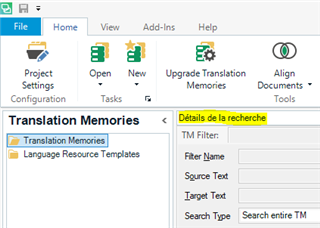
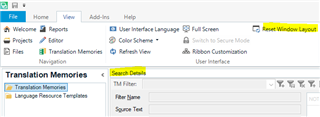
    In my case, one or more items remained in French when I switched from the English UI to French and back again. I didn't do anything about it because it wasn't a problem to me, so I can now post before and after screenshots here:

    Before:

    Screenshot of Trados Studio interface showing a section with French text 'Details de la recherche' in the Translation Memories tab.

    After clicking 'Reset window layout' on the View tab:

    Screenshot of Trados Studio interface with the View tab active and the 'Reset Window Layout' option highlighted.

    Sorted!

    All the best,

    Ali Slight smile

    emoji


    Generated Image Alt-Text
    [edited by: Trados AI at 8:28 PM (GMT 0) on 28 Feb 2024]
  • Ali, this is not what happens on my side!

    I don't even change user interface languages. I have a German Windows+Office365 etc. environment, and I have a (constantly!) English Trados Studio user interface.

    Usually, everything in Studio appears in English. But all of a sudden, without changing any UI language, if I create e new project or in other situations, a number of German Studio capture text comes in (like in my screenshot).

    This is not tolerable in my view. I could probably tell exactly how this happens, if I knew the Studio source and if I could check how the Studio interface chooses it's displayed language (i.e. where it gets its language code from in which situation and how it interprets that language code). There are 2 different language codes in the play: one from the system (Windows) and one from the Studio settings. Obviously, the displayed text captures in Studio are not generally based on the Studio settings, but use occasionally the Windows country code, which would be not correct.