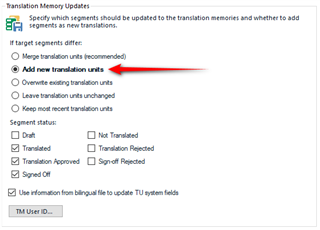
"Add new translation units" if target segments differ doesn't work (Studio 2015)

Different target segments are saved in the TM as merged, when this option is not ticked. It happens when the changes made to the segments are made directly in the sentence and if it is only two or three words.

This is annoying because the information is saved as if "merge units" were selected.

Thanks for your help,

Diana

Parents
  • Trados Studio 2015 is no longer supported so better to test with a more recent version of the software and report if this is still an issue.

    I don't completely follow your steps here so this is what I tested in Studio 2019:

    1. added a TU to my TM interactively.
    2. Disabled the update TM button
    3. Changed the target segment
    4. Updated my TM using the update TM batch task with this option:
      Trados Studio Translation Memory Updates dialog with options for merging translation units, adding new units, overwriting existing units, and segment status. Red arrow pointing at 'Add new translation units'.

    I didn't know which option to use because you only said this:

    Different target segments are saved in the TM as merged, when this option is not ticked.

    So I made sure it was not ticked.  The result was I got two segments and not a merged one.

    It would be worth you providing the proper steps to follow to reproduce your problem and I'll be happy to test in a supported version for you so you know whether the behaviour is what you would expect.

    Paul Filkin | RWS

    Design your own training!
    You've done the courses and still need to go a little further, or still not clear? 
    Tell us what you need in our Community Solutions Hub

    emoji


    Generated Image Alt-Text
    [edited by: Trados AI at 8:14 PM (GMT 0) on 28 Feb 2024]
Reply
  • Trados Studio 2015 is no longer supported so better to test with a more recent version of the software and report if this is still an issue.

    I don't completely follow your steps here so this is what I tested in Studio 2019:

    1. added a TU to my TM interactively.
    2. Disabled the update TM button
    3. Changed the target segment
    4. Updated my TM using the update TM batch task with this option:
      Trados Studio Translation Memory Updates dialog with options for merging translation units, adding new units, overwriting existing units, and segment status. Red arrow pointing at 'Add new translation units'.

    I didn't know which option to use because you only said this:

    Different target segments are saved in the TM as merged, when this option is not ticked.

    So I made sure it was not ticked.  The result was I got two segments and not a merged one.

    It would be worth you providing the proper steps to follow to reproduce your problem and I'll be happy to test in a supported version for you so you know whether the behaviour is what you would expect.

    Paul Filkin | RWS

    Design your own training!
    You've done the courses and still need to go a little further, or still not clear? 
    Tell us what you need in our Community Solutions Hub

    emoji


    Generated Image Alt-Text
    [edited by: Trados AI at 8:14 PM (GMT 0) on 28 Feb 2024]
Children