 Translate



HI,
I work on Studio 2017, and I do not know why it is now saving every time I touch a segment, with an obvious waste of time as a consequence.
Can you please tell me how to disable that?
Thanks,
Patrizia

HI,
I work on Studio 2017, and I do not know why it is now saving every time I touch a segment, with an obvious waste of time as a consequence.
Can you please tell me how to disable that?
Thanks,
Patrizia
How do you touch the segment? I mean, via mouse click, arrows keyboard, after confirming one segment and opening automatically the next segment?
Also, take into account that sometimes Trados Studio weird behaviors solve themselves after a simple restart of the application itself.

Hi Jesùs,
thanks for getting back to me. I actually clic on the segments with a mouse, but then I've noticed it saves every 2 seconds even if I do not clic.
I did restart the PC, but nothing. I'll try again.
Also, I am working on 2 different instances of Studio at the same time, but only 1 is giving me this issue.
Regards,
Patrizia

Hello Patrizia Cipolla ,
What exactly do you mean by
but then I've noticed it saves every 2 seconds even if I do not clic.
What exactly is saving?
Could you post a couple of screenshots, so we can visualize what is happening please.
Oana Nagy | QA Engineer | RWS Group
Thanks Steve,
I mean that every 2 seconds, without me asking to, 'Saving as' appears, and it saves the file over and over again, but unfortunately that is not something I can make a screenshot of, because it is a horizontal column moving from left to right.
Hope that helps,
Regards,
Patrizia
Hello Patrizia Cipolla ,
I have never come across such behaviour before to be honest.
First please check the autosave option in Studio- (the minimum allowed is 1 minute- default is set to 10)
minutes)-
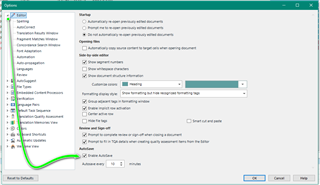
Next i would check the Keyboard shortcut options to rule out a conflict or an unwanted change
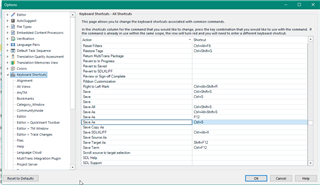
If the cause can still not be identified, then its worth looking at your actual keyboard to see if you have an issue with sticky keys.
If you have a spare keyboard- try using that to see if it helps.
Oana Nagy | QA Engineer | RWS Group

Thanks, but if the problem were the keyboard, I would have had the same issue in the other instance of Studio I was working on, which was not the case.
By the way, I've closed those jobs for now, I'll see what happens with the next job and let you know.
Kind regards,
Patrizia
Thanks, but if the problem were the keyboard, I would have had the same issue in the other instance of Studio I was working on, which was not the case.
By the way, I've closed those jobs for now, I'll see what happens with the next job and let you know.
Kind regards,
Patrizia
