 Translate



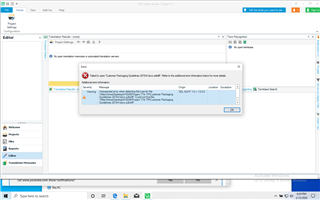
Still trialing this 2019 SDL product, I'm very new to it - any help much appreciated..
Generated Image Alt-Text
[edited by: Trados AI at 8:11 PM (GMT 0) on 28 Feb 2024]


Still trialing this 2019 SDL product, I'm very new to it - any help much appreciated..
Hello ,
We wouldn't normally expect to see such an error (which might suggest that the file is already corrupted).
Are you using Windows or MAC?
Where exactly are you saving the file?
Can you take a different docX file and create a new single file translation/project without a problem?
Oana Nagy | QA Engineer | RWS Group
Thank you Steven - this is my first project. I don't know the product well enough it feels like I'm slightly bluffing my way through this. I have a macOS Catalina working on a trial SDL Studio 2019 on a Parallel windows setup; any of which could be the issue as it took me a day to configure this set up. The project manager sent through a zipped file which I have now managed to access and have begun work on. It is a SDLXLIFF file (a 23 page catalogue). This may sound incredibly ignorant but I have no idea where I'm saving my work to as I was unable to access the project package in the way described in on-line tutorials. So basically I THINK I'm working on a single file translation but if I don't find a way to save this to send back, I will have lost all my work of 2 days. If you have any thoughts on how I proceed, I would most gratefully hear them. Thanks DK

Hello ,
Maybe we can have a remote session tomorrow (Friday or next week) what ever suits you for about half an hour.
I can show you the basics so you can get started.
Studio is a complex tool and can take some getting used to. Training is also something I would highly recommend.
Oana Nagy | QA Engineer | RWS Group
