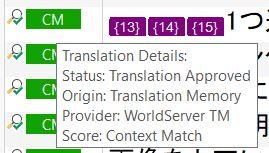
Context match from WorldServer TM

I found that context matches from WorldServer TM don't show in the Analyze Files Report as Context Match but they are included in 100% match. Here is what I found:

Analyze Files Report:
100% x 28 segments (incl. recognized tokens x 2)

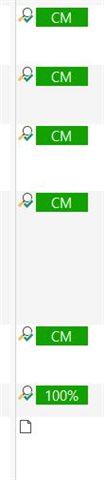
Actual count in Editor: 
Context match (WS) x 18 segments 
100% (WS) x 12 segments

Is this by design or a bug? Is there any way to show context matches of WS's TM accurately in the report? I'm using Studio 2019.
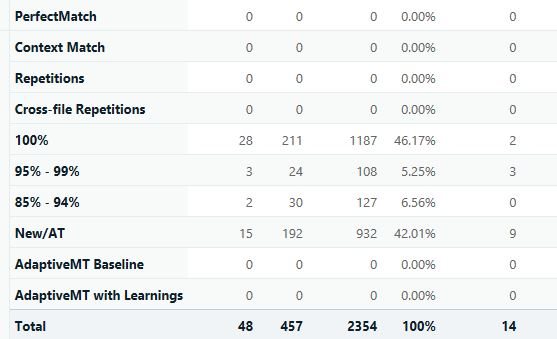
Screenshot of Trados Studio Analyze Files Report showing 28 segments at 100% match and no context matches listed.       

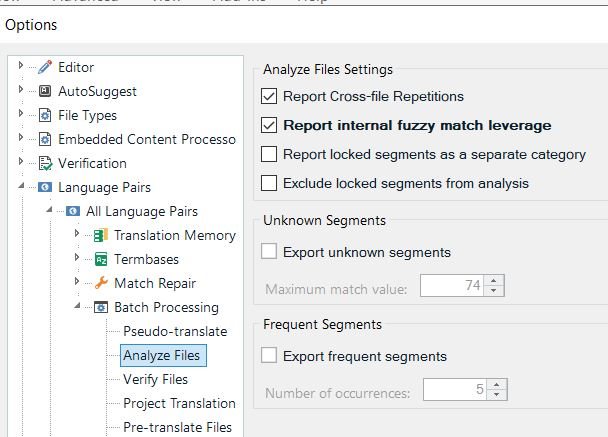
 Screenshot of Trados Studio Editor displaying multiple segments labeled as 'CM' for context match and one segment labeled as '100%' match.         Screenshot of Trados Studio Options menu with Analyze Files Settings showing options for reporting cross-file repetitions and internal fuzzy match leverage checked.


Generated Image Alt-Text
[edited by: Trados AI at 8:14 PM (GMT 0) on 28 Feb 2024]

emoji
Parents Reply
  • Hi Paul,

    I just realized that when I click on a segment with CM (from WorldServer), it shows as 100% in the Translation Results window. This is because it sees the local TM included in the project package, instead of showing the WorldServer TM.

    Now I see that my Analyze Files Report is also looking at the local TM, thus showing the complete match as 100%. I think the WorldServer TM in my end is the local TM on the client side, which is why it shows as the ICE match on their report.

    Is it possible to create an Analyze Files Report that takes into account the WorldServer TM instead of the local TM?

Children