
 Translate



Hi there,
I have updated Studio 2019 with the latest version : SR2 - 15.2.5.2145
Ever since then, I have been unable to create a project using xlf files (1.2 or 2.0) or wsxz (Worldserver package). Here is the error message that pops up when I try to add a file :
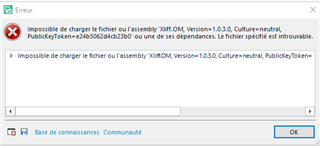
I have looked in the Knowledge base and it seems that a similar issue occured with SR1.
A hotfix was provided for this Studio version, but I'm not sure one exists for the 2019 SR2 one, or even if those issues are actually related...
Also note that the settings are the same as before (XLIFF type of files are ticked and should be working).
Can anyone help out?
.
[edited by: Paul at 9:55 AM (GMT 1) on 9 Jul 2025]


