Adding a comment to multiple segments at once

Hello everyone,

Is there a way to add a comment to multiple segments at once in Studio 2019? I would like to avoid having to add the same comment repeatedly, one by one, to multiple segments, as it is very inefficient and time-consuming. Is there a functionality or a plugin I could use?

Thank you! 

Parents
  • I don't think this was ever possible and it may be an enhancement request, I’m not sure, but the behaviour is strange.  Commenting…

    Scenario #1

    Select all the text and add a comment to the current selection

    Result: no comment is added

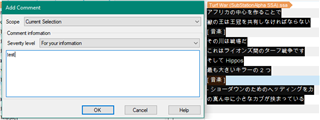
     Trados Studio 'Add Comment' dialog box with 'Current Selection' scope and empty comment field, alongside a partially obscured Trados Studio interface with Japanese text.

    Scenario #2

    Select partial text in the first segment and the last segment

    Result: comments are added to the first and last selected text but not the ones inbetween

     Trados Studio 'Add Comment' dialog box with 'Current Selection' scope and 'For your information' severity level, next to a Trados Studio interface with Japanese text and selected segments.

    It's not possibIe to select non-contiguous text across segments or that might work based on this test.  However, I do think this should be possible so I'll raise it with the teams and see what they think... in the meantime if I've missed the obvious I'll also be happy to find out!

    Paul Filkin | RWS

    Design your own training!
    You've done the courses and still need to go a little further, or still not clear? 
    Tell us what you need in our Community Solutions Hub

    emoji


    Generated Image Alt-Text
    [edited by: Trados AI at 8:44 PM (GMT 0) on 28 Feb 2024]
Reply
  • I don't think this was ever possible and it may be an enhancement request, I’m not sure, but the behaviour is strange.  Commenting…

    Scenario #1

    Select all the text and add a comment to the current selection

    Result: no comment is added

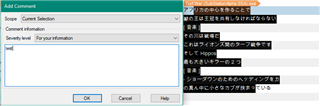
     Trados Studio 'Add Comment' dialog box with 'Current Selection' scope and empty comment field, alongside a partially obscured Trados Studio interface with Japanese text.

    Scenario #2

    Select partial text in the first segment and the last segment

    Result: comments are added to the first and last selected text but not the ones inbetween

     Trados Studio 'Add Comment' dialog box with 'Current Selection' scope and 'For your information' severity level, next to a Trados Studio interface with Japanese text and selected segments.

    It's not possibIe to select non-contiguous text across segments or that might work based on this test.  However, I do think this should be possible so I'll raise it with the teams and see what they think... in the meantime if I've missed the obvious I'll also be happy to find out!

    Paul Filkin | RWS

    Design your own training!
    You've done the courses and still need to go a little further, or still not clear? 
    Tell us what you need in our Community Solutions Hub

    emoji


    Generated Image Alt-Text
    [edited by: Trados AI at 8:44 PM (GMT 0) on 28 Feb 2024]
Children