SDL Trados Studio 2019 ٍٍٍٍٍٍٍSuddenly Crashed Many Times

Hi  ,

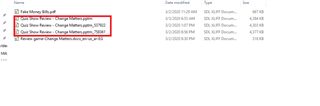
I'm using SDL Trados Studio 2019 and it suddenly crashed and produced the attached error message, but I noticed that studio keeps saving more than one version of the same file by renaming it and I think this what lead to the problem and made me re translate the file as I lost my work many times.

Please check the attached screenshot and let me know if there is any solution for that.
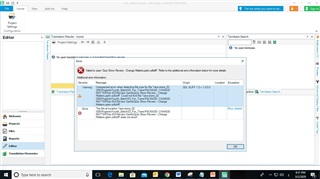
Error message in SDL Trados Studio 2019 indicating 'Object reference not set to an instance of an object' with options to continue, quit, or view error details.File explorer showing multiple versions of the same file in Trados Studio with different suffixes like '_RESTORED1', '_RESTORED2', and '_RESTORED3'.

Thanks,

Samar


Generated Image Alt-Text
[edited by: Trados AI at 8:23 PM (GMT 0) on 28 Feb 2024]
emoji
Parents Reply
  • Your error message says, that the translation file in the given location does not exist. Put the translation file back to the given location to resolve this error. Possibly your storage space is a cloud - store the file locally to avoid this problem happening. Using cloud as a storage place when working with Studio is a very bad idea.

    _________________________________________________________

    When asking for help here, please be as accurate as possible. Please always remember to give the exact version of product used and all possible error messages received. The better you describe your problem, the better help you will get.

    Want to learn more about Trados Studio? Visit the Community Hub. Have a good idea to make Trados Studio better? Publish it here.

Children
No Data