 Translate



I need to send a file analysis to a client, but I do not now how to exporte the analysis data. Please help.
Thank you.
Christian

I need to send a file analysis to a client, but I do not now how to exporte the analysis data. Please help.
Thank you.
Christian
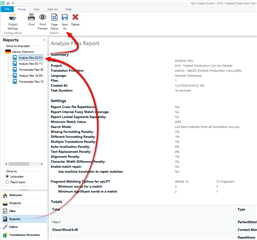
Presumably you've run your analysis already, so all you do is go to the reports view for the active project and then click on "Save-As":
Paul Filkin | RWS
Design your own training!
You've done the courses and still need to go a little further, or still not clear?
Tell us what you need in our Community Solutions Hub

Thank you Paul, but his does not fully relies to my question. With your method, I do not get a report showing the %-match-details like in the project view. I only get the number of segments, words, characters, etc.
Do you see what I mean?
best regards,
Christian

The default project preparation task, as long as you use a TM when you prepare your project, always creates an analysis report. If you don't have one then perhaps you are creating your projects without a TM and only adding it later?
If that's the case then run the analysis now by using Batch Tasks -> Analyze Files.
If that's not the case then please share a screenshot of your Reports View for the active project as this will be more helpful in finding the solution to your problem.
Paul Filkin | RWS
Design your own training!
You've done the courses and still need to go a little further, or still not clear?
Tell us what you need in our Community Solutions Hub

It works! Thanks a lot, Paul, you're the best.
Christian