The Trados cloud platform will be undergoing maintenance on Saturday, 9th May 2026 between 05:00 to 17:00 UTC. During this time, you will not be able to log in to the Trados platform.

Understanding Terminology

Hi guys ...
I still have to understand how to enter my data in Studio and how to use them ...

If I have an excel file like this

With english abbrevaition in the first column, then english, italian and russian ...

Excel file with four columns labeled A Eng.Abbreviation, B English, C Italian, D Russian, showing medical terms and their translations.

... well ... What should I do with this? What's the best way to su it?

I can build a termbase, of course ... But what then if ... If I have the same file with longer sentences ... Can I use it to build a TM? Or a TB in the same way?


Should I build a TermBase?
A Glossary?
A Translation Memory?

I know that TM are for sentences more, and TermBases for acronimes, words etc ... But, still don't understand very well how to organize my past translations to build a really good DB ...

Thank You in advance.
Pietro


Generated Image Alt-Text
[edited by: Trados AI at 8:40 PM (GMT 0) on 28 Feb 2024]
emoji
Parents Reply Children
  • Hello Christine, and hello Paul again!

    THANK YOU so much. I'll read your article asap, Christine! Thanks! :)

    If I am correct ... a TermBase can be multilingual ... this should meand that, for instance, if I have this file with ENG-ITA-RUS then I can use the same termbase in a project RUS-ITA and, then I could use it in a different project Eng-Ita, eventually.
    Correct?

    Not the same thing for TM ... Correct?
    From all these excel files, as You Christine wrote before, I can build 3 new TMs: 1 for EN-IT lang.pair, 1 for EN-RU and 1 for EN-IT.
    Am I right?

    What I would mainly need to understand is HOW a TB is structured ...
    How can I add COLUMS, Christine, as You ssugested ... if I do not know how they go to look or how they go to be be classified? How to put a field definition for example? Just a new column after ITA, a new one after RUS etc. ???

    Here for example I have two very similar files ... 1 as the abbreviations ... The other has not!
    So, If I want to made a single TermBase from these 2 files, some record will have an empty cell ...

    Screenshot of an Excel file with two sheets, the first sheet contains medical abbreviations in English, Italian, and Russian, with columns labeled A, B, C, and D.

    Paul suggested to use abbreviations as synonyms ... does it mean, simply delete 1 column after writing a new row?

    I dont think so.

    Because If I write a row like:

    "abd / addome / живот" Then I loose the connection between adb and adbomen


    Mmmmm ... I am a bit confused!
    Sorry!

    And thank You again for help!
    Pietro ^_^

    emoji


    Generated Image Alt-Text
    [edited by: Trados AI at 8:40 PM (GMT 0) on 28 Feb 2024]
  • (...PLS, read first my previous reply up here...)

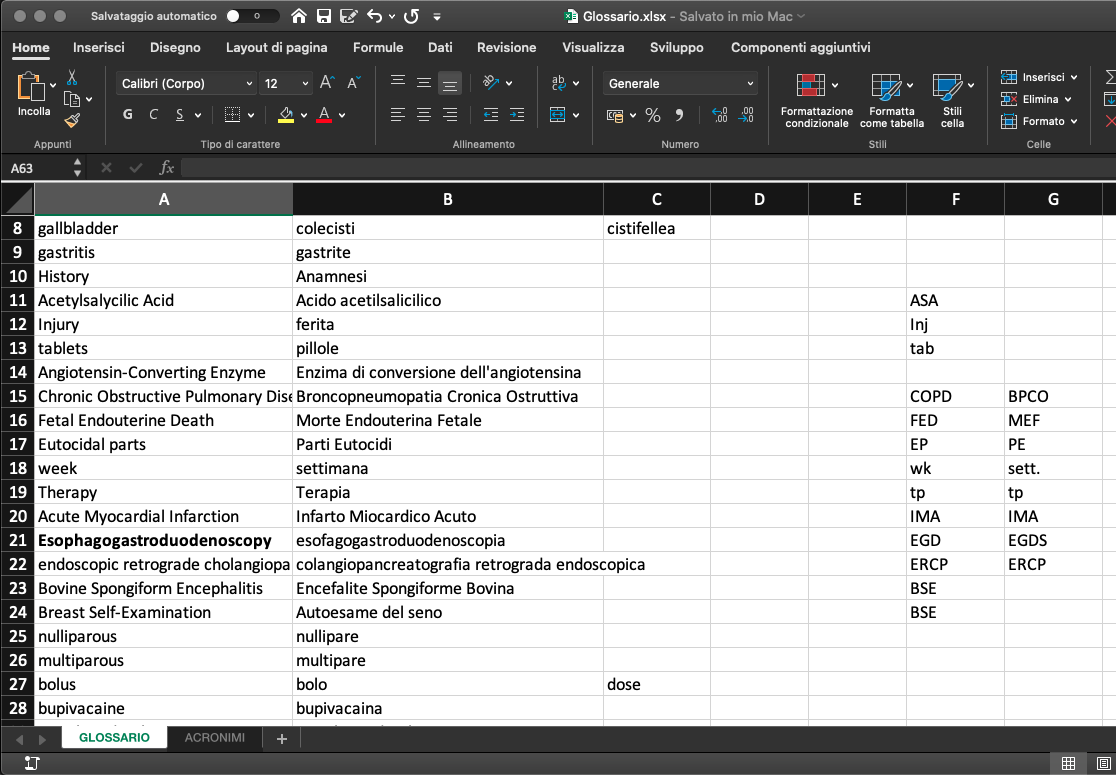
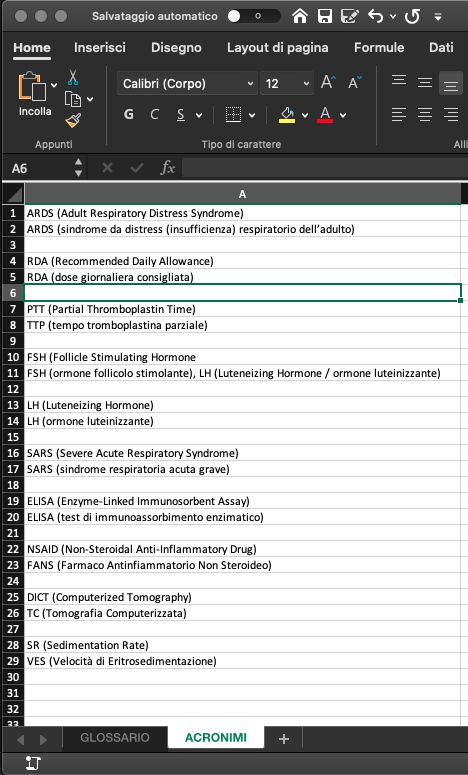
    For example ... Here I have a nother Excel Glossary ...
    Two sheets inside: one named Glossary, with something like 5 or six columns, I think ...
    And one named Acronims ... with 1 col with english abbreviation and explaination in 1 row and italian version in the row below (see next image, pls)

    Screenshot of an Excel glossary sheet with columns for English terms and their Italian translations, including medical terms like 'Acute Myocardial Infarction' and 'endoscopic retrograde cholangiopancreatography'.

    and next sheet:

    Screenshot of an Excel acronyms sheet with English abbreviations and their explanations, followed by Italian versions in the next row, including terms like 'ARDS' and 'RDA'.

    SO ...
    Ho to manage all this hell?

    Many thanks, like always!
    Pietro

    emoji


    Generated Image Alt-Text
    [edited by: Trados AI at 8:41 PM (GMT 0) on 28 Feb 2024]

  • Hello

    Indeed, termbases are multilingual, so you can have EN-IT-RU in your termbase and then you could use that termbase in translations with all combinations of these 3 languages (they don't have a direction).

    Translation memories are bilingual, with a direction, so the EN-IT memory you create can be used only for EN-IT translations (by default, but if you add it as AnyTM then this restriction does not apply).

    As for the termbase coversion: 
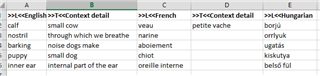
    In case you would like to columns with further details, so next to the column with the Italian terms you'd like to add an explanation for the terms, the Excel file needs to be modified further:
    - Add >>L<< before the language name
    -  Add >>T<< before the other headers containing textual information
    - The order of the columns should be: language > corresponding details in column > language 2 > corresponding details in column, like below:

    Excel spreadsheet showing a termbase conversion with columns labeled in English, French, and Hungarian, including terms and their corresponding details.

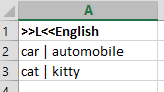
    As for synonyms, you can add them with the sign " | " between them:
    Excel spreadsheet showing a column with English terms and their synonyms separated by a vertical line.

    Hope this helps?

    Best wishes,
    Greta

    emoji


    Generated Image Alt-Text
    [edited by: Trados AI at 8:41 PM (GMT 0) on 28 Feb 2024]
  • Wooow. Thank You Greta!
    This is very helpfull!
    Thank You so much. I'll try a bit later and I'll let You know.

  • This Excel file would definitely have to be cleaned up indeed.

    So as for the first page, you would have to merge the columns per language.

    You could use the Excel function =CONCATENATE
    So here taking row 8 on your first picture as example, I understand B8 and C8 are synonyms, you into a new column, or a new page you could merge them with the following equation:

    =CONCATENATE(B8," | ",C8)

    And the end result will be:

    colecisti | cistifellea

    So it's joined as follows: B8+a space, a divider, a space+C8
    And by the end of this cleanup you would have two columns, English with all the EN terms and an Italian column with all the ITA terms.

    On the second page, this would be a bit more manual I think.
    They would definitely have to be added to different columns, and the corresponding explanation in the next.

    So:
    Screenshot of an Excel file with columns labeled for English and Italian terms, showing the need to merge synonym terms using CONCATENATE function.

    Please note the headers. >>L<<English means that this is the column containing the English language terms, >>T<<Explanation means that this is extra detail, in text form, to be added to the terms
    - this is how the Glossary Converter will understand it correctly.

    Please let me know if anything is unclear.

    emoji


    Generated Image Alt-Text
    [edited by: Trados AI at 2:44 PM (GMT 0) on 1 Mar 2024]
  • It seems to me TB are axtremely powerfull then!
    But ... anothe question would be ...
    While a do a translation (I'll have to start a new huge and quite tecnical one tomorrow) ... how do I save my terms or phrase in one specific TB or TM?

    For example ... what a nightmare ... Now I want to start this translation project and I do not really have a TermBase or a Translation Memory ... So I will translate from zero ... BUT ... I want to save what I am go to translate ... SO ...

    1. I build in the Translation Project and empty TM: a Project_TM.sdltm, let's call it
    2. Can I contextually create an empty TermBase?

    My idea is, that; once I've done with the project, I can work with this new Project TM and TB ... AND import them into my MAIN, big TM (or at least the thing I am thinking it will become my main RN_IT sdlTM)
    (or take the TB by itself, next to the others)

  • FANTASTIC!
    Thank You Greta!
    At the moment, everything seems clear to me!
    Than, I will see how I will apply all this! Smiley

    Blush

  • I fully agree with the powerfullness of termbases!

    You can absolutely start with a new, empty TM and TB.

    Just a quick overview of the two, as it might be best to see the difference between them:
    - The TM contains previously translated text in the form of sentence pairs. Each time you click into a segment in Studio, it will automatically look up whole the source segment in the TM to see if you have it in the TM, or something similar. So this works on a segment by segment basis, and it's automatically updated; each time you confirm a segment in the Editor it will be saved into the memory.
    This is your most important resource so you can build on your previous work, through instant reuse.

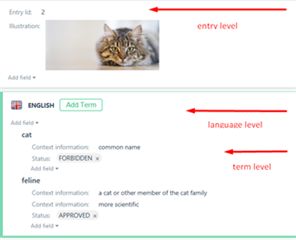
    - The TB however is more of a consulting resource, not for instant reuse necessarily. It contains terms in different languages (in entries) and next to each term you can add further details, such as images, context information, status, to help you better define your terminology. For this you will need SDL MultiTerm.
    Screenshot of a Trados Studio termbase entry showing a cat image at entry level, with terms 'cat' and 'feline' at language level, including status and context information.
    Each time you click into a segment in the Editor, Studio will look up the individual terms one by one in your termbase, and will show you in the Term Recognition window what is available, if you have a match. It will NOT be automatically inserted, you will have to decide to insert the term (you can use AutoSuggest for that, if you start typing the term Studio will offer you the rest and you can insert it with Enter).
    Therefore the termbase is not updated automatically as the TM. If you would like to add a term, select the source term, and also highlight its translation in the target segment, and then right-click on either and select 'Add New Term', which will add the term and its translation into the termbase, so you can reuse it instantly.

    So you can absolutely start with empty TM and TB, and gradually add to it while working.
    You can use several TMs and TBs for each project. For TMs, you can decide which TMs you would like to update while translating (tick or untick the Update column in project settings), but as for termbases, the first TB in the list will be the one always updated, so but the TB in first in the list you would like to add your terms to.

    You can create and manage TMs in Studio, and you can create TBs in Studio too, but to manage them like above, import and export content and so on you would need MultiTerm.

    Best,
    Greta

    emoji


    Generated Image Alt-Text
    [edited by: Trados AI at 8:41 PM (GMT 0) on 28 Feb 2024]
  • FANTASTIC! Thank You Greta!
    So I could  (I should) change this:

    Screenshot of Trados Studio showing a table with the term 'abandonment' and its translations in another language, with no visible errors or warnings.

    in something like this:

    Screenshot of Trados Studio displaying a side-by-side comparison of the term 'abandonment' in English and its translation in another language, with no visible errors or warnings.


    Ok ... I will see how I will apply all this! Blush

    At the moment, everything seems clear to me!

    I will let You know in the next days ... Blush

    emoji


    Generated Image Alt-Text
    [edited by: Trados AI at 8:41 PM (GMT 0) on 28 Feb 2024]