Getting started with Qualitivity

Hello

I am currently trying to get started with Qualitivity but I as I get started I come across the first questions...

What I need is a report about all changes made by the translator and how much time was spent. I am not sure what all I have to take into account when I want to create a trados project (for post editing) to exactly get these results.


- When I create a trados project (post editing project) for a translator, there seems to be no option to "add" Qualitivity as a feature to the project in order to run in the background and recording time and changes. Does that mean that the translator must have installed this plugin, too and is it the translator who has to have the plugin running in the background while translating?
- Is it the translator who has to create a Qualitivity report after he is done with the post editing or will I be able to create a report based on the post edited file to see how much time was spent and what changes have been made?
- Do I have to use the plugin TAUS DQF as an additional tool to Qualitivity?

I hope that my questions have been clear enough :) 

Many thanks in advance for your reply.

Parents
  • - When I create a trados project (post editing project) for a translator, there seems to be no option to "add" Qualitivity as a feature to the project in order to run in the background and recording time and changes. Does that mean that the translator must have installed this plugin, too and is it the translator who has to have the plugin running in the background while translating?

    Yes, the translator needs to have this installed and is actually the only person who can provide you with the report.

    - Is it the translator who has to create a Qualitivity report after he is done with the post editing or will I be able to create a report based on the post edited file to see how much time was spent and what changes have been made?

    It's the translator.  All the data is based on what the translator is doing and this is stored locally on the translator machine.  So they have to willingly work the tool configured as you want it and then provide you with the log files and reports.

    - Do I have to use the plugin TAUS DQF as an additional tool to Qualitivity?

    No.  But you could use TAUS DQF to have information recorded by the translator as they work sent to the TAUS server where you can create the reports yourself.  However, this also means having the translator work with the TAUS DQF plugin installed since it sends data to TAUS as they work.

    The only plugin we have that would allow you to do some sort of reporting without the need for the translator to install anything would be Post-Edit Compare.  This will get you some good comparative analysis but of course it won't include times because Studio doesn't record times in the project or SDLXLIFF and you'd need this from the translators machine.

    Paul Filkin | RWS

    Design your own training!
    You've done the courses and still need to go a little further, or still not clear? 
    Tell us what you need in our Community Solutions Hub

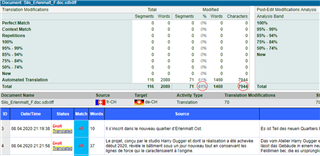
  • Hi Paul, we have been testing Qualitivity and we have just one more question regarding the qualitivity report.

    Are characters in the second red circle counted with or without spaces?

    Many thanks for your reply.

    Screenshot of Trados Studio's Qualitivity report showing translation match types and their respective word, segment, and character counts. Second red circle highlights character count column.

    emoji


    Generated Image Alt-Text
    [edited by: Trados AI at 9:32 PM (GMT 0) on 28 Feb 2024]
Reply Children