Sorry but ... I can't deal NUMBERS

Hello guys, and good morning everybody!

PLEASE ... I know I should have not open this ticket BUT, really, I am missing something.

I am getting crazy with tons of telefon numbers, auction numbers etc ... I do not understan how trados reads that token, why it changes them, with what logic! It is is making my 180 page translation harden than I had translated in microsoft word beacuse checking numbers is hard!

For example ... ho to prevent to change things like THIS ... ?

Screenshot showing Trados Studio translation segment where the original number '97766' is incorrectly translated to '7022'.

I understand it tries to translate доб. with ext. ... and this is ok ... But why then 97766 becomes 7022 ???
And, even worse ... the tel.number itself changes?

I did uncheck the number sostitution but it doesn't help ...

Screenshot of Trados Studio project settings with the 'Automatic Substitution' option for 'Numbers' unchecked.


PLEASE!
I really NEED to find a solution and fix this!
Thank You for comphension!
Pietro


Generated Image Alt-Text
[edited by: Trados AI at 8:26 PM (GMT 0) on 28 Feb 2024]
emoji
Parents
  • This can be problem when Studio doesn't recognise a string in one piece, which you can see because the broken blue lines under the source.  There are two fairly straightforward solutions to this depending on the context of your text.

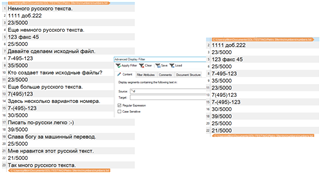
    If these are all as you have shown then simply filter on these segments using one of the display filters,then copy source to target and use a simple search & replace to correct the only part that needs translating at the end.

    Or use something like the regex auto-suggest provider and convert the string into exactly what you need interactively as you work.  If you give us the proper conversion I can show you how to do this?

    Paul Filkin | RWS

    Design your own training!
    You've done the courses and still need to go a little further, or still not clear? 
    Tell us what you need in our Community Solutions Hub

Reply
  • This can be problem when Studio doesn't recognise a string in one piece, which you can see because the broken blue lines under the source.  There are two fairly straightforward solutions to this depending on the context of your text.

    If these are all as you have shown then simply filter on these segments using one of the display filters,then copy source to target and use a simple search & replace to correct the only part that needs translating at the end.

    Or use something like the regex auto-suggest provider and convert the string into exactly what you need interactively as you work.  If you give us the proper conversion I can show you how to do this?

    Paul Filkin | RWS

    Design your own training!
    You've done the courses and still need to go a little further, or still not clear? 
    Tell us what you need in our Community Solutions Hub

Children