用語認識: 複数の単語を組み合わせた用語は認識されない?

 複数の単語 (日本語) を組み合わせた用語を登録すると、その用語内に含まれる単語単位の用語は認識されるけど、組み合わせ一式としては用語集に認識されません。用語ベースを検索すれば、該当の用語が出ますが、赤色のラインがひかれてあり、認識で自動表示されることはありません。2文字の用語は有効にしていますが、どのプロジェクトでも認識されません。  使用しているのは、SDL Trados Studio 2017 SR1 です。お忙しいところお手数おかけしますが、よろしくお願いします。

Parents
  •  複数の単語 (日本語) を組み合わせた用語を登録すると、その用語内に含まれる単語単位の用語は認識されるけど、組み合わせ一式としては用語集に認識されません。

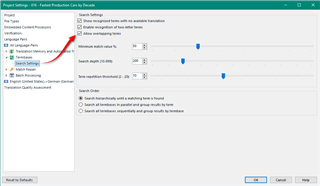
    You need to check this option "Allow overlapping terms":

    Trados Studio project settings dialog box with 'Allow overlapping terms' option highlighted in the Term Recognition section.

    2文字の用語は有効にしていますが、どのプロジェクトでも認識されません。

    I think I'd check and make sure I was using the project settings for this option, and not just File -> Options where it won't have any effect on your current project.

    Another likely problem is that languages without spaces like Japanese can be a problem for term recognition, so I don't know how effective this will really be for you.  Would be useful to hear from the experience of other CJK users.

    Paul Filkin | RWS

    Design your own training!
    You've done the courses and still need to go a little further, or still not clear? 
    Tell us what you need in our Community Solutions Hub

    emoji


    Generated Image Alt-Text
    [edited by: Trados AI at 8:31 PM (GMT 0) on 28 Feb 2024]
  • 閲覧・回答ありがとうございます。

    Paul氏に提案していただいた設定を試しました。ご提案ありがとうございます。

    用語検索をすると該当の用語がでるのですが、該当文節に赤色の線が引かれることはありませんでした。線の表示設定かと思いましたが、単一の単語の場合は表示されるので、原文がアジア言語のときには対応できないものなのでしょうか。

  • You should see red lines for all languages if the terms are recognised.  The problem is the lack of word delimiters and this can reduce the effectiveness of the term recognition.  So for example:

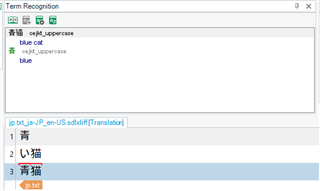
    Trados Studio Term Recognition window showing recognized terms 'blue' and 'blue cat' with red overlines, but missing the term 'cat'. Japanese characters are visible in the translation segment.

    Here I get the word blue which is in my termbase, and "blue cat" which is also in my termbase.  Using the overlapping terms options gets me them both and you can see the red overline splits the terms.  However, I don't get the word cat which is also in there and I think this is because it's not at the start of the string.

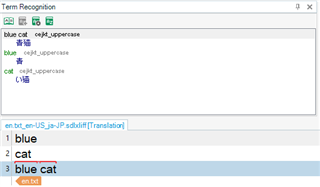
    In English I see them all recognised and displaying all three matches:

    Trados Studio Term Recognition window correctly displaying all three recognized terms 'blue', 'cat', and 'blue cat' with red overlines in English translation segment.

    Paul Filkin | RWS

    Design your own training!
    You've done the courses and still need to go a little further, or still not clear? 
    Tell us what you need in our Community Solutions Hub

    emoji


    Generated Image Alt-Text
    [edited by: Trados AI at 8:31 PM (GMT 0) on 28 Feb 2024]
  • Paul様

    ご検討いただき、ありがとうございます。

    そうですね。たとえば、「実行条件」という単語を用語登録しようとした場合、

    「実行」や「条件」では用語登録され、赤色の線も表示されるのですが、

    「実行条件」で用語登録をすると、「実行」も「条件」も赤色の線がひかれなくなり、

    代わりに、「実」や「条」を用語登録した別の単語として赤色の線が引かれる感じです。

    用語登録自体は行われていて、用語検索ではヒットがあり、メモリ検索でも同様にヒットがあります。

    ただ、赤色の線や、用語認識が自動では起動しないため、見落としやすくなっている状態です。

    登録できる用語に文字数制限があったり、特定の単語は登録できないようになっていたりするのでしょうか。

    プロジェクトの破損の可能性も考え、他のプロジェクトや新規プロジェクトでも試しましたが、

    やはり同じ状態です。

Reply
  • Paul様

    ご検討いただき、ありがとうございます。

    そうですね。たとえば、「実行条件」という単語を用語登録しようとした場合、

    「実行」や「条件」では用語登録され、赤色の線も表示されるのですが、

    「実行条件」で用語登録をすると、「実行」も「条件」も赤色の線がひかれなくなり、

    代わりに、「実」や「条」を用語登録した別の単語として赤色の線が引かれる感じです。

    用語登録自体は行われていて、用語検索ではヒットがあり、メモリ検索でも同様にヒットがあります。

    ただ、赤色の線や、用語認識が自動では起動しないため、見落としやすくなっている状態です。

    登録できる用語に文字数制限があったり、特定の単語は登録できないようになっていたりするのでしょうか。

    プロジェクトの破損の可能性も考え、他のプロジェクトや新規プロジェクトでも試しましたが、

    やはり同じ状態です。

Children
No Data