Trigger autopropagation but do NOT commit to TM

I am frequently in a situation where translated text contains a lot of very short segments, which I would classify as junk (for lack of a better word). Some examples of this would be acronyms, fragments of words, misspelled words or perhaps names of physical units. Generally I try to avoid cluttering my TMs with such junk entries. They cause a lot of problems later when you pre-translate and then have to correct a lot of segments which were not supposed to be pre-translated, but were replaced by these short junk entries. So here is my question.

Is there any way to control for each segment if it will be committed to TM but still have SDL Studio run its Autopropagation routine? What I am looking for is perhaps a key combination that would allow me to confirm a segment, run autopropagation but to avoid committing the segment to TM.

The way I do it now is go back one segment and delete TM entry manually. This involves too much effort and clicking. I would love to have a better solution.

If there is a solution, I would very much appreciate your help. If there isn't, let's make this a feature suggestion!

Thank you!

Parents
  • Use display filer for displaying just these segments, copy all source to target, select all segments and put them on "Sign-off rejected", then lock.

    Even if that seems to be more work, it is usually faster and certainly more reliable as any auto propagation. This way all the segments will appear as translated, but will NEVER get into the TM.

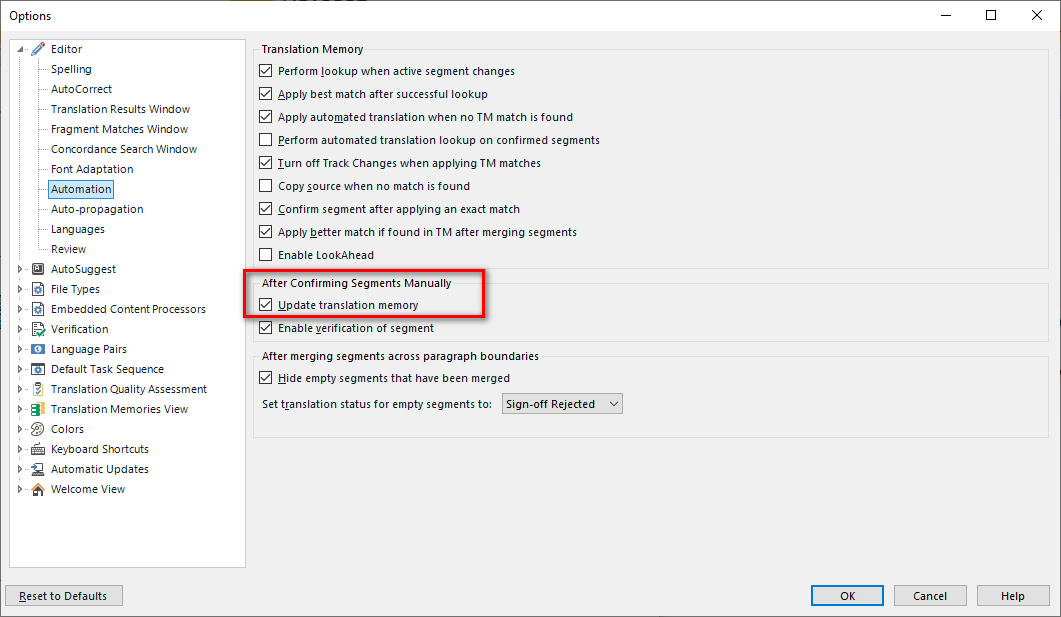
    You could also instead change this setting when dealing with such segments:

    Trados Studio options menu with 'After Confirming Segments Manually' section highlighted showing 'Update translation memory' and 'Enable verification of segment' options.

    _________________________________________________________

    When asking for help here, please be as accurate as possible. Please always remember to give the exact version of product used and all possible error messages received. The better you describe your problem, the better help you will get.

    Want to learn more about Trados Studio? Visit the Community Hub. Have a good idea to make Trados Studio better? Publish it here.

    emoji


    Generated Image Alt-Text
    [edited by: Trados AI at 8:33 PM (GMT 0) on 28 Feb 2024]
Reply
  • Use display filer for displaying just these segments, copy all source to target, select all segments and put them on "Sign-off rejected", then lock.

    Even if that seems to be more work, it is usually faster and certainly more reliable as any auto propagation. This way all the segments will appear as translated, but will NEVER get into the TM.

    You could also instead change this setting when dealing with such segments:

    Trados Studio options menu with 'After Confirming Segments Manually' section highlighted showing 'Update translation memory' and 'Enable verification of segment' options.

    _________________________________________________________

    When asking for help here, please be as accurate as possible. Please always remember to give the exact version of product used and all possible error messages received. The better you describe your problem, the better help you will get.

    Want to learn more about Trados Studio? Visit the Community Hub. Have a good idea to make Trados Studio better? Publish it here.

    emoji


    Generated Image Alt-Text
    [edited by: Trados AI at 8:33 PM (GMT 0) on 28 Feb 2024]
Children