HTML structure modified by Studio

Hi,


We have encountered a problem in translating HTML files for a client.


Studio has apparently modified the structure of the HTML files meaning that the client cannot reintegrate them.


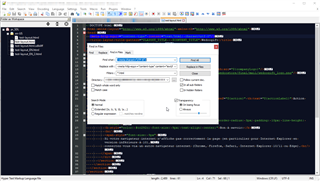
For example, one file that originally contained 60 lines in notepad++, contained just 36 in the target file after translation. All of the code is there, but has been grouped into blocks in some sections.


Unfortunately this is the case for several files, and we have translated over 200 in total.


Does anyone have an explanation or solution for this problem?


I can provide an example via PM if needed.


Many thanks for your help!


Clémentine

Parents Reply
  • The structure of the target HTML is not altered, nor is the layout. There is a difference in where CR/LFs ("line breaks") are put, but that does not matter for HTML. Any browser, CMS etc. can use either.

    Example source:

    Screenshot of Trados Studio showing HTML code with red underlines indicating errors in the code structure.

    Target:

    Close-up view of Trados Studio with red underlined HTML code, suggesting syntax errors or warnings.

    Did your customer TRY to use the HTML you provided? What error exactly occurred when they did? I am asking because line breaks in HTML are really arbitrary and every piece of software that turns out HTML code will do it a bit different, always (one hopes!) with the intent to make the code human-readable.

    You can remove all indentions and line breaks and the code is still perfectly valid (and works):

    Detailed view of HTML code in Trados Studio with multiple lines underlined in red, highlighting potential issues or errors.

    Your customer needs to understand that what you supplied is what they asked for - translations in valid formatting. 

    Daniel

    emoji


    Generated Image Alt-Text
    [edited by: Trados AI at 8:35 PM (GMT 0) on 28 Feb 2024]
Children