SDL Trados Studio SR2 extremely slow with a massive TM of 1,2 M entries

Hello, 

I am a Trados user since its very begining. I have been experiencing terrible slugishness on my SDL Trados Studio 2017, then, even though I read opinions in the Community that it would be worse, I installed SDL Trado Studio 2019 and its upgrade SR2 to get an extremely slow performance on a massive TM search, updating and verification.

Right now upon clicking to open the TM, the Studio es frozen as shown in this screenshot below:
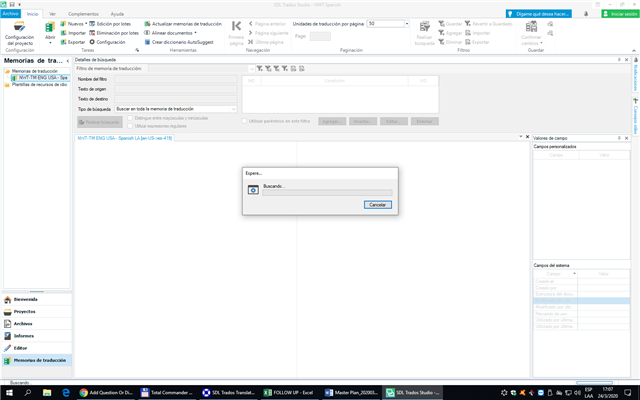
SDL Trados Studio 2019 interface frozen with an 'Export' dialog box showing a non-responsive progress bar, indicating a system hang or crash.

I did not click to search any word, just tried to open the TM... 15 minutes has elapsed already and nothing happens. I advance that I cancelled the Antivirus directly, has no plugins and also cancel the "frame repair or something like that" that I read as a soution on this SDL community, and nothing change at all!

Due to this kind of productivity issues, I returned to SDL Trados 2007, the TM opened in an instant, and upon searching or updating it, it worked so swiftly and quickly that I think that the only way out of this terrible issue is to ask my whole team to return to SDL Trados 2007.

Look forward to your reply.

Thanks!


Generated Image Alt-Text
[edited by: Trados AI at 8:56 PM (GMT 0) on 28 Feb 2024]
emoji
Parents Reply
  • Hi Florencia,

    I didn't mean to detract attention from the problem, which certainly is a problem. Studio is often just plain sluggish. Especially when importing/exporting/editing large TMs.

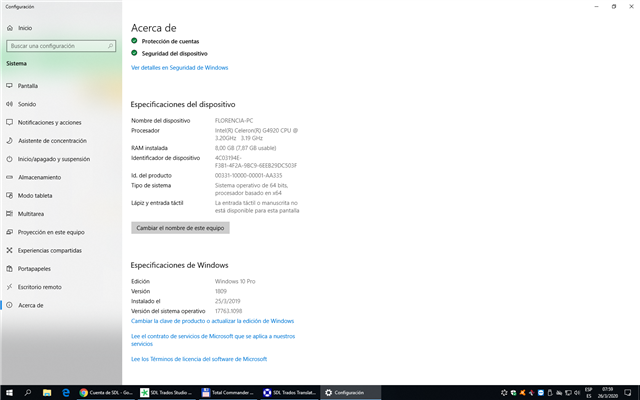
    However, I personally wouldn't even have used a computer with yr current specs 5 years ago anymore, for the kind of work we do (with CAT tools). A Celeron really just isn't powerful enough for professional work. 

    RAM is a bit more debatable, although I really don't think 8 GB is enough anymore these days. The minimum specs given by software vendors needs to be taken with a pinch of salt. Usually it is not a good idea to get a system matching the minimum specs and expect it to work well under many different conditions.

    These days, you can get a decent laptop/desktop with an i7 and 16GB of RAM for very little (especially refurbished!), so I always recommend my fellow translators to get the best they can afford, and always avoid budget CPUs (Celeron, Atom, mobile versions, etc.).

    Michael

Children
No Data