 Translate



This is the secont ime my Studio 2019 has caused this problem.
When I try to open a memory I get the error message above, any suggestions?

This is the secont ime my Studio 2019 has caused this problem.
When I try to open a memory I get the error message above, any suggestions?
Hello Sabina Clark ,
This sounds like a TM repository XML.
Please take a look at this SDL Gateway article which should help you resolve this-
First close Studio - then rename the mentioned file (just add _old) and then restart Studio
https://gateway.rws.com/csm?id=kb_article_view&sysparm_article=KB0035305
Please let us know if this helped.
Oana Nagy | QA Engineer | RWS Group

Thanks Steven, I tried this and hasn'twork. It only happens with one specific memory, the others open fine. This is the second time this year that a memory gets corrupted, it never happened before?

Hello Sabina Clark ,
Thanks for the quick reply.
If this is happening with only one TM- this might suggest that the TM itself is becoming corrupted.
You could try using the following (Free) SDLTM Repair app -
https://appstore.sdl.com/language/app/sdltm-repair/298/
If this doesn't fix it- then try exporting your TM to TMX- Then create a new TM and then reimport the TMX into the new TM.
Make a copy though of the original TM first to be safe.
Now see if the problems still occur.
Oana Nagy | QA Engineer | RWS Group
I will try that! thanks. How do I export a memory if I cannot open it? Is there a way around it? :-)
Hello Sabina Clark,
Are you able to see the TM in the TM view as follows-
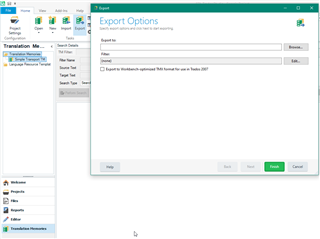
If not- maybe try SDLTMConvert https://appstore.sdl.com/language/app/sdltmconvert/228/
You should then be able to navigate to your TM folder and do the conversion
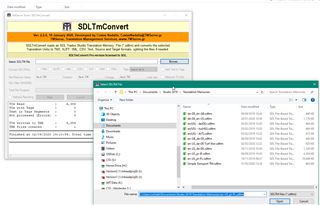
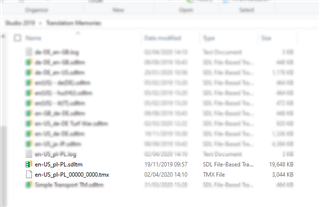
You should then be able to import the TMX into a new TM
Oana Nagy | QA Engineer | RWS Group

Man ythanks! the repair did no work I will try this now. Thanks again!
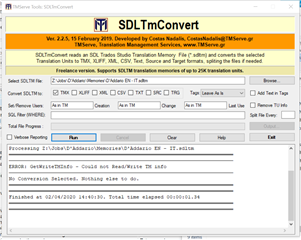
Nothing works, I think the memory is truly gone. I noticed that this happens mainly with memories I have upgraded.

Hello @SabinaClark ,
Although TM's are very robust, when they become too corrupted, they cannot be saved unfortunately.
Im happy to have a look myself though if you want to share it with me (swhale@sdl.com)- best zipped and sent through Dropbox or something similar.
You might find the following app interesting- to automate the back up of your TM's - ideal in such situations
Oana Nagy | QA Engineer | RWS Group

How do I export a memory if I cannot open it? Is there a way around it? :-)
Yes... don't export it!
The app works from the SDLTM and uses SQL to try and export the contents and rebuild the TM.
Paul Filkin | RWS
Design your own training!
You've done the courses and still need to go a little further, or still not clear?
Tell us what you need in our Community Solutions Hub
an ythanks! the repair did no work I will try this now. Thanks again!
Ah... ok. Sorry, missed this.
In this case I think it's highly likely your TM is corrupt.
This is the second time this year that a memory gets corrupted, it never happened before?
Where are you storing your TMs? If you have them in OneDrive, DropBox or something like that, or even on an external drive, you could risk problems especially if they are large. Part of the problem can be the time it takes for them to synch so if you have the synch occurring while you are still working with the TM you could corrupt it. Smaller TMs would be ok, but not large ones.
Better to always work with a Project TM so you have a smaller resource to contend with and only update the large one at the ed of the project.
Paul Filkin | RWS
Design your own training!
You've done the courses and still need to go a little further, or still not clear?
Tell us what you need in our Community Solutions Hub