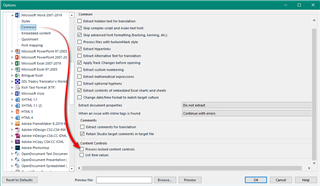
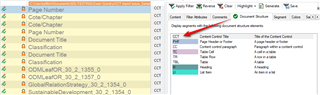
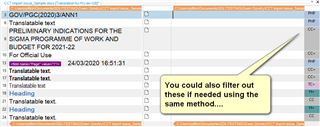
Is there a way to tell Studio to ignore Content control Text when converting an MSWord doc?

Hello,

We have to translate MSWord documents containing content control text (see "ODMLeaf..." below). 

We would like Studio to ignore these CCTs as they are not translatable text.

In the MSWord file type options, we chose not to import document properties, but this has no effect on CCTs. 

Is there a way to ask Studio 2019 to ignore strings of text like the CCT in the snapshot below?
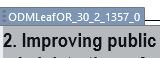
Screenshot showing a section of an MSWord document with content control text labeled 'ODMLeafOR_30_2_1357_0' above a heading titled '2. Improving public'.

Thanks very much in advance for your help.

Gwen


Generated Image Alt-Text
[edited by: Trados AI at 8:48 PM (GMT 0) on 28 Feb 2024]
emoji
Parents Reply
  • We're left with 2 options:

    1. not copying the CTT source segments into the target column or copying them but not confirming segments, so that these fields don't get thrown into our TMs. But then our project statistics will always be off;
    2. copying CTT source segments and confirming segments, but then our TMs will contain ENG>ENG segments.

    None of these 2 options is really satisfactory.

    Not sure I follow this.  You could do this using the SDLXLIFF Toolkit across an entire project in one go:

    1. copy source to target
    2. change status to translated (without adding to TM)
    3. lock them (so they are excluded from your stats)

    Wouldn't that help?

    Paul Filkin | RWS

    Design your own training!
    You've done the courses and still need to go a little further, or still not clear? 
    Tell us what you need in our Community Solutions Hub

Children
No Data