
 Translate



I have no clue why this is happening. I am also attaching an interesting video as to how adding a one term to the variable list would bring about the upgrade rectangle icon!
<SDLErrorDetails time="4/17/2020 3:57:34 PM">
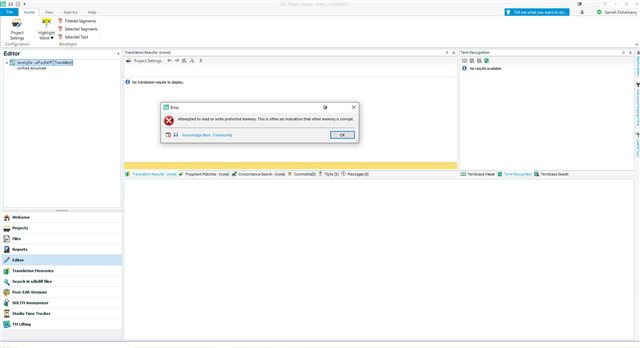
  <ErrorMessage>Attempted to read or write protected memory. This is often an indication that other memory is corrupt.</ErrorMessage>
  <Exception>
    <Type>System.AccessViolationException, mscorlib, Version=4.0.0.0, Culture=neutral, PublicKeyToken=b77a5c561934e089</Type>
    <HelpLink />
    <Source>Sdl.DesktopEditor.Control</Source>
    <HResult>-2147467261</HResult>
    <StackTrace><![CDATA[   at CT_CriticalSection.v_Enter(CT_CriticalSection* )
   at LayoutThread.Resume(LayoutThread* )
   at FilterFramework.Ptr<LayoutLock>.{dtor}(Ptr<LayoutLock>* )
   at FrameworkDocumentControl.{dtor}(FrameworkDocumentControl* )
   at FrameworkDocumentControl.__vecDelDtor(FrameworkDocumentControl* , UInt32 A_0)
   at AbstractFrameworkEditControl.~AbstractFrameworkEditControl()
   at AbstractFrameworkEditControl.Dispose(Boolean A_0)
   at FrameworkEditControl.Dispose(Boolean A_0)
   at System.ComponentModel.Component.Dispose()
   at SideBySideEditor.DestroyEditControls()
   at SideBySideEditor.~SideBySideEditor()
   at SideBySideEditor.Dispose(Boolean A_0)
   at Sdl.TranslationStudio.Editor.TranslationEditor.SideBySideDocumentEditingViewControl.Dispose(Boolean disposing)
   at System.ComponentModel.Component.Dispose()
   at System.Windows.Forms.Control.Dispose(Boolean disposing)
   at System.ComponentModel.Component.Dispose()
   at System.Windows.Forms.Control.Dispose(Boolean disposing)
   at Sdl.TranslationStudio.Editor.TranslationEditor.TranslatableDocumentViewPartControl.Dispose(Boolean disposing)
   at System.ComponentModel.Component.Dispose()
   at Sdl.TranslationStudio.Editor.TranslationEditor.TranslatableDocumentViewPart.Dispose()
   at Sdl.TranslationStudio.Editor.EditorView.RemoveDocumentViewPart(IViewPartReference documentViewPartReference)
   at Sdl.TranslationStudio.Editor.Shared.InternalEditorContext.CloseDocumentViewPart()
   at Sdl.TranslationStudio.Api.Editor.AbstractInternalDocument.CloseImpl()
   at Sdl.TranslationStudio.Api.Editor.AbstractInternalDocument.Close()
   at Sdl.TranslationStudio.Editor.TranslationEditor.TranslatableDocument.Close()
   at Sdl.TranslationStudio.Editor.EditorView.OnRemovingViewPart(IViewPartReference viewPartReference)
   at Sdl.Desktop.Platform.AbstractViewWithParts.Control_RemovingViewPart(IViewWithParts view, IViewPartReference viewPartReference, Boolean& cancel)
   at Sdl.Desktop.Platform.WinForms.DockingViewContentControl.OnRemovingViewPart(IViewPartReference viewPartReference)
   at Sdl.Desktop.Platform.WinForms.DockingViewContentControl.RemoveViewPartTab(IViewPartReference viewPartReference)
   at Sdl.Desktop.Platform.WinForms.DockingViewContentControl.RemoveViewPart(IViewPartReference viewPartReference)
   at Sdl.Desktop.Platform.WinForms.DockingViewContentControl.CloseTabButton.CloseTabButton_ElementClick(Object sender, UIElementEventArgs e)
   at Infragistics.Win.ButtonUIElementBase.FireClickEvent()
   at Infragistics.Win.ButtonWithTextUIElementBase.OnClick()
   at Infragistics.Win.ControlUIElementBase.ProcessMouseUpHelper(Object sender, MouseEventArgs e)
   at Infragistics.Win.ControlUIElementBase.ProcessMouseUp(Object sender, MouseEventArgs e)
   at Infragistics.Win.Utilities.ProcessEvent(Control control, ProcessEvent eventToProcess, EventArgs e)
   at Infragistics.Win.UltraControlBase.OnMouseUp(MouseEventArgs e)
   at System.Windows.Forms.Control.WmMouseUp(Message& m, MouseButtons button, Int32 clicks)
   at System.Windows.Forms.Control.WndProc(Message& m)
   at System.Windows.Forms.Control.ControlNativeWindow.OnMessage(Message& m)
   at System.Windows.Forms.Control.ControlNativeWindow.WndProc(Message& m)
   at System.Windows.Forms.NativeWindow.Callback(IntPtr hWnd, Int32 msg, IntPtr wparam, IntPtr lparam)]]></StackTrace>
  </Exception>
  <Environment>
    <ProductName>SDL Trados Studio</ProductName>
    <ProductVersion>15.0.0.0</ProductVersion>
    <EntryAssemblyFileVersion>15.2.6.2831</EntryAssemblyFileVersion>
    <OperatingSystem>Microsoft Windows 10 Pro</OperatingSystem>
    <ServicePack>NULL</ServicePack>
    <OperatingSystemLanguage>1033</OperatingSystemLanguage>
    <CodePage>1256</CodePage>
    <LoggedOnUser>ADMINSAM\Ahmed</LoggedOnUser>
    <DotNetFrameWork>4.0.30319.42000</DotNetFrameWork>
    <ComputerName>ADMINSAM</ComputerName>
    <ConnectedToNetwork>True</ConnectedToNetwork>
    <PhysicalMemory>50276084 MB</PhysicalMemory>
  </Environment>
</SDLErrorDetails>

Generated Image Alt-Text
[edited by: Trados AI at 8:53 PM (GMT 0) on 28 Feb 2024]

