Language pairs

I have Studio 2019 and I am trying to set a new TM with a new language pair (EN - FR). I already have 1 TM: EN-SP. My problem is: when I try to set a new language pair, I can't choose French, it is not on the list and I don't know why. Does someone have any suggestions on how to fix this?

Parents Reply
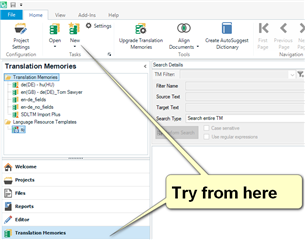
  • Have you also tried from the Translation Memories View?  It really does sound as though you simply don't have the language pairs in your options.  The default, under File -> Options, also only allows you to create TMs with the language pairs you have added.

    Trados Studio screenshot showing the Translation Memories View with a highlighted suggestion to 'Try from here'.

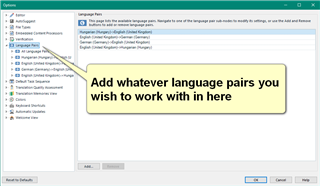
    Also try making sure you have got the language pairs you need in here, under File -> Options:

    Screenshot of Trados Studio Options menu with a callout saying 'Add whatever language pairs you wish to work with in here'.

    These are normally added when you create a project but if you are trying to simply add a TM then you need to make sure the languages are available.

    If none of this is the problem then perhaps you didn't select these languages when you installed the product?

    Paul Filkin | RWS

    Design your own training!
    You've done the courses and still need to go a little further, or still not clear? 
    Tell us what you need in our Community Solutions Hub

    emoji


    Generated Image Alt-Text
    [edited by: Trados AI at 8:56 PM (GMT 0) on 28 Feb 2024]
Children