How can I fix the error in language mapping when adding terms to multilingual termbases?

Hi everyone,
I have a problem with adding terms to multilingual termbases in SDLTrados 2019.
 Sometimes when I try to add a term by selecting the original and the target word, the program will map the target to the wrong language in the termbase (not the target language, but the third one that is not in use in the project in question)
Is there a way to fix this problem?

Thank you

Parents Reply Children
  • Hi Paul, 

    Thank you for the reply. 

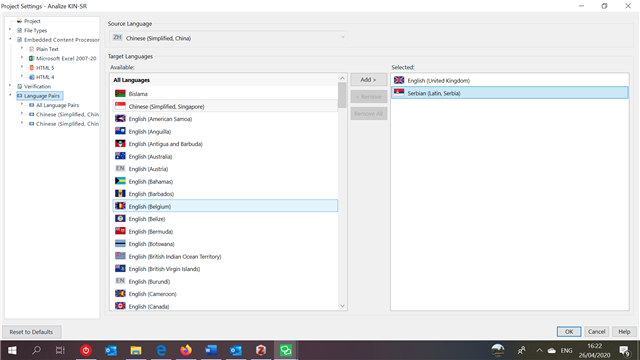
    In answer to your questions, the languages used in the project are Chinese Simplified (China) as source language and 

    Serbian (Latin, Serbia) and English (United Kingdom).

     Trados Studio project settings showing source language as Chinese Simplified (China) and target languages as Serbian (Latin, Serbia) and English (United Kingdom).

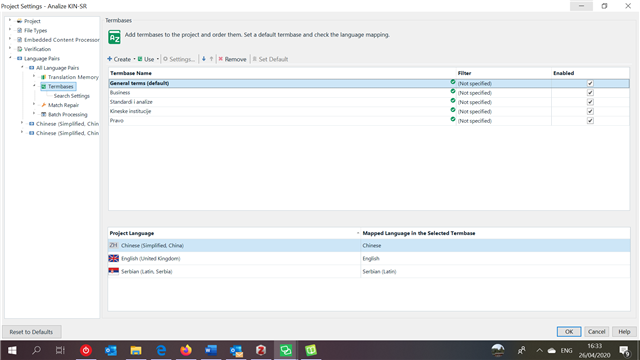
    The languages od the termbase include Serbian (Latin), Serbian (Cyrillic), Chinese, English and French, and you can see how they are mapped in the following snapshot:

    Trados Studio termbase settings showing languages mapped incorrectly with Serbian mapping to French instead of Serbian (Latin) or English.

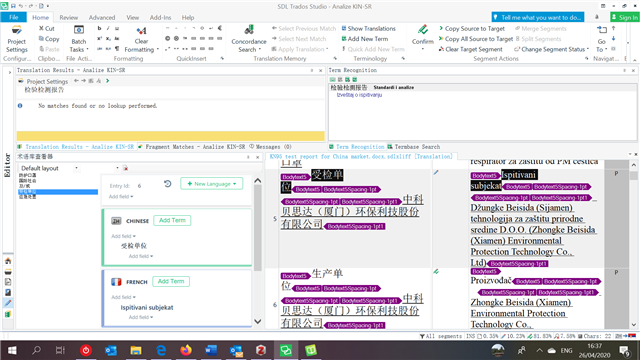
    However, when I add a new term, the term in Serbian maps into French (which is not even used in this project). See the snapshot below: 

    Trados Studio interface with a new term being added in Chinese with incorrect mapping to French highlighted in purple.

    I would appreciate your assistance with this issue. I am quite new with this and it's possible I didn't set up the project or termbase properly. 

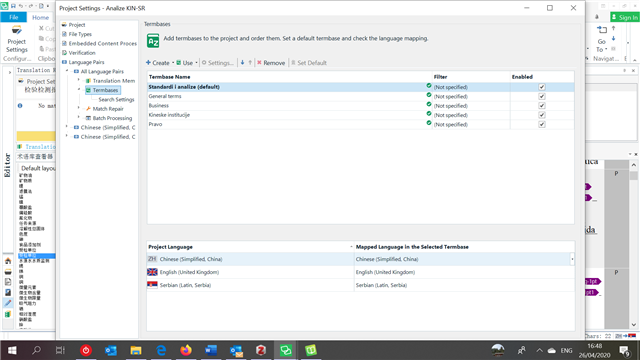
    I would just like to add that other termbases in this same project are mapping correctly, however, I do notice that the mapped languages in this case are perfectly aligned (this termbase includes the same languages as the previous one): Trados Studio termbase settings showing correct language mapping for other termbases in the same project with Chinese Simplified (China), Serbian (Latin, Serbia), and English (United Kingdom).

    Thank you.

    emoji


    Generated Image Alt-Text
    [edited by: Trados AI at 9:00 PM (GMT 0) on 28 Feb 2024]