 Translate



Hi, I've downloaded a bilingual Word document and want to hide some tags - even though the text is 'hidden' in Word, it still appears in Trados. Is there anything else that can be done? TIA

RWS Community
Hi, I've downloaded a bilingual Word document and want to hide some tags - even though the text is 'hidden' in Word, it still appears in Trados. Is there anything else that can be done? TIA
If it's a true bilingual Word file, so from the old Trados Workbench, or possibly Wordfast (although this isn't officially supported), then you need to make sure you use this filetype:
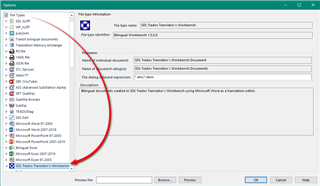
So when you prepare your project ensure that this is above the other word filetypes in the list otherwise you'll probably be using a monolingual word filetype which is why you see all the tags.
Paul Filkin | RWS
Design your own training!
You've done the courses and still need to go a little further, or still not clear?
Tell us what you need in our Community Solutions Hub

