Pre-translate and TM translation results unlinked?

Hi all,

I have been experiencing long search times for TM translation results per segment. I am unsure about the reasons and whether this can be easily improved. I found previous threads on this issue too vague to be helpful. However, what I did try to do, is to pre-translate the file up to 70% match, in the hope that pre-translate would provide assistance and expedite the TM translation results search per segment, but, alas, this did not happen.

Why does Studio disregard the pre-translation results in searching for translation results? is this not redundant use of the available resources?

Thank you!

Parents
  • I have been experiencing long search times for TM translation results per segment. I am unsure about the reasons and whether this can be easily improved.

    Did you try the suggestions in the knowledgebase?

    https://gateway.rws.com/csm?id=kb_article_view&sysparm_article=KB0032531

    Why does Studio disregard the pre-translation results in searching for translation results? is this not redundant use of the available resources?

    It might be easier to answer this question if you explained what you set, and where you set it?  Screenshots are also helpful as we might get a better idea of where your problems originate from.

    Also... you should always tell us what version of Studio you are using.  The full version number and not just 2017 or 2019.

    Paul Filkin | RWS

    Design your own training!
    You've done the courses and still need to go a little further, or still not clear? 
    Tell us what you need in our Community Solutions Hub

  • Hi Paul

    The slowness issue occurs specifically in the TM search per segment operation within the editor during translation, I might be waiting up to 5 minutes of search in some cases per segment. I do not feel that other operations demonstrate similar slowness, within or without the editor.

    I'm using TS 2019 freelance SR2 15.2.6.2831. I tried the knowledge base and found one of your responses mentioning vaguely the size of the TM as a possible cause. I have two main TMs (698 pages and 1545 pages) and two 'inverted' (AnyTM) TMs (of about the same sizes), respectively, per project. I do not use any anti-virus software.

    I set up the project normally for these four TMs. Initially my pre-translate setting for this project was 100%, as usual, but, as mentioned, I reran it on 70% in the hope that the TM search results per segment would be expedited by that but that, as mentioned, did not happen. I still had to wait those 5 minutes in some segments.

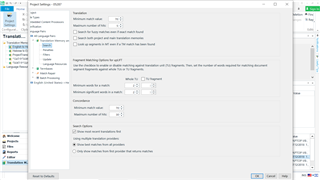
    I cannot attach a screenshot of how long it takes to get those TM search results but I am attaching a screenshot of the pre-translate function for your convenience although I have no problem at all with it; it executed quite quickly.

    Please let me know if you need more information to help me.

    Thanks!

    Screenshot of Trados Studio's Pre-translate Options window showing settings for minimum match value, segment filtering, and TM options without any visible errors or warnings.

    emoji


    Generated Image Alt-Text
    [edited by: Trados AI at 9:21 PM (GMT 0) on 28 Feb 2024]
  • I have two main TMs (698 pages and 1545 pages)

    ok - so these could be:

    6980 TUs and 15450 TUs

    Or they could be:

    698000 TUs and 1545000 TUs

    ... or somewhere in between.  The latter could contribute to slow performance, but primarily this depends on where you are storing it.  So where are you storing it?  Locally on your computer, onedrive/dropbox/googledrive etc., a NAS storage device or some other external drive?

    Paul Filkin | RWS

    Design your own training!
    You've done the courses and still need to go a little further, or still not clear? 
    Tell us what you need in our Community Solutions Hub

Reply Children
  • Sorry about that...the new one is 69713 TUs and the older is 154489 TUs, the inverted ones are about the same sizes, respectively, as they are the AnyTm version of these.

    I store them all on my hard drive locally.

  • In this case you don't have large TMs and you're working locally so they should be fast.  I think you should try switching off your AV or other security software for a short while and test.  See if this helps.  Clearly something is interfering with the operation of Studio so you'll need to try and narrow down what that is and eventually whitelist Studio.

    Paul Filkin | RWS

    Design your own training!
    You've done the courses and still need to go a little further, or still not clear? 
    Tell us what you need in our Community Solutions Hub

  • Thing is, I am not using any AV, or any other security software, just the native settings of Win 10. Also, it is strange that this is the only affected feature, including across all my software, and pre-translate is running just fine...What should I disable?

  • Hi Paul,

    Further to my sessions with an SDL rep. in this matter, I am pasting below, as requested by SDL support, my summary of the sessions we had, to the benefit of the community:

    "Let me summarize all the points that we found and discussed during our session:

    1. Studio slows down considerably when using more than one TM, and in particular when using AnyTM, even if they are not very large.
    2. The use of a local TM in Studio projects seems to be ill-advised(!), as, according to your recommendation, it seems to slow things down and create a malfunction in TM search during segment population (we have not tested this conclusion yet because I have not had one of those 'problem projects' since our session, but we have changed the project preparation wizard accordingly).
    3. Studio does not use all the resources of my machine for major functions, far from it, at most it uses about a third of my CPU capacity and my RAM capacity, which creates considerable inefficiency and loss of valuable time in, for example, project creation, TM search and TM upgrade.
    4. The TM upgrade operation seems to have changed my segmentation rules by returning them to the default settings without any notice. Luckily we had a session scheduled and we were able to discover that on time. This is a serious flaw in the TM upgrade process.
    5. The project preparation wizard is still bugged, the roll-down window for language setting does not roll down even before the file was uploaded to the project. This, as I mentioned, began after SR1."