


Error when starting Studio: Service 'Sdl.TranslationStudio.Api.ProjectManagement.lProjectManagementService' could not be started

When stating Studio 2019 SR2 in Windows 10, I get the above error message with additional information as in the screenshot below. I've been though other KnowledgeBase questions to no avail. Would a Studio Reinstall help?

Thank you in advance for any advice or suggestions.
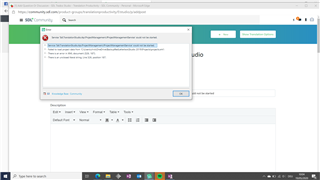
Error message in Trados Studio 2019 SR2 on Windows 10 stating 'Object reference not set to an instance of an object.' with a file path and 'There is an error in XML document (2, 2).'


Generated Image Alt-Text
[edited by: Trados AI at 9:16 PM (GMT 0) on 28 Feb 2024]
emoji
Parents
  • The problem is solved, although I have no idea how.

    When going to uninstall Studio 2019 I noticed an old Studio 2017 suite which I am sure was already removed and I didn't see this morning when checking things like old installations. I uninstalled that and got a message about being sure to return license unless I wanted to reinstall on this computer. I then tried Studio 2019 again which started up - although only with very old projects. I was able to add the most recent projects by hand.

    Thank you to all who replied and also to those in the background who gave the situation their thoughts.

Reply
  • The problem is solved, although I have no idea how.

    When going to uninstall Studio 2019 I noticed an old Studio 2017 suite which I am sure was already removed and I didn't see this morning when checking things like old installations. I uninstalled that and got a message about being sure to return license unless I wanted to reinstall on this computer. I then tried Studio 2019 again which started up - although only with very old projects. I was able to add the most recent projects by hand.

    Thank you to all who replied and also to those in the background who gave the situation their thoughts.

Children
No Data