Translate



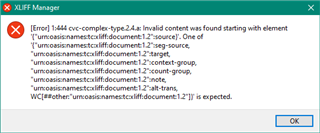
I've got this XLF file:
<xliff xmlns:xsi="">www.w3.org/.../XMLSchema-instance" xsi:schemaLocation="urn:oasis:names:tc:xliff:document:1.2 ">docs.oasis-open.org/.../xliff-core-1.2-strict.xsd" xmlns="urn:oasis:names:tc:xliff:document:1.2" xmlns:xhtml="">http://www.w3.org/1999/xhtml" version="1.2"><file original="course" datatype="plaintext" source-language="en-US"><body><trans-unit id="title"><source>Start with the following lines</source><source><g id="z5khTFmECoplFmmA" ctype="x-html-p"><g id="TNhp3F8wLji7a-Jl" ctype="x-html-span" xhtml:style="color: rgb(178, 255, 51);">Line 1,</g></g><g id="Ptz_papeGL9n33k6" ctype="x-html-p"><g id="2KBo8s2_32S5QDGf" ctype="x-html-span" xhtml:style="color: rgb(178, 255, 51);">Line 2</g></g></source></trans-unit></body></file></xliff>
Using the out-of-the-box XLIFF filetype I get this in Studio:
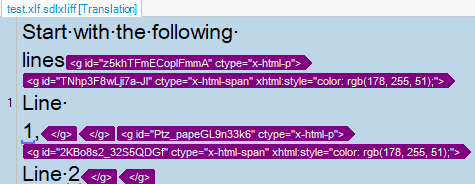
But of course, I'd like to have 3 segments instead of just 1:
Start with the following lines
Line 1,
Line 2.
And I can't get that working by using the Embedded content processor in the Project Settings. I guess that the reason is that it only processes the text non-processed by the XLIFF filter. Can anybody confirm that?
I attach the file type settings used with some regex rules in the embedded content processor:
If confirmed, I'll need to create a custom XML file type, but I'd like to avoid that route?
Thanks for your help,
Generated Image Alt-Text
[edited by: Trados AI at 9:19 PM (GMT 0) on 28 Feb 2024]