


Same words with different tag styles and update them to one same TM

Hi All

Today, I've got a small question on SDL Trados Studio 2019.

I've got two source file from the client and there are the term, 'Guest'.

(I'll call those two source files as A and B each from now on.)

Case1

In A source file, the term 'Guest' is surrounded the tag named 'MMI',
and this tagged term should be left as in English in target.

So, I was left it as it is and updated it to the TM. Then confirmed it was updated as it is in TM.

Case2

And then, when I work with B source file, there's also the term 'Guest'.
The only difference was the tag surrounding the term.

This time the term was tagged by 'C_Important-Semi', and this tagged term should be translated.

However, when I check the segment in B source file, the trados shows it was already translated and locked.
The TU was filled with the TU from Case1.

I.e, it was untranslated actually. However, it should have been no match or 99% match (due to the different style.)

Also, when I revise the term with translated form, the message appears 'Different target in translation memory'.
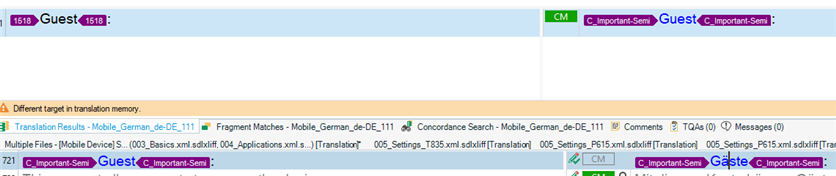
Screenshot of SDL Trados Studio showing a segment with the term 'Guest' surrounded by 'MMI' tags in source file A, left untranslated in the target language as per instructions.

(But it's actually different, they have different tag style:(.)

However our SDL Trados Studio acknowledges both are same thing and not allowed to keep both in one TM:(.

So, in this situation, what should I do to separate both different tag term and manage it separately?

Please kindly advise.


Generated Image Alt-Text
[edited by: Trados AI at 9:22 PM (GMT 0) on 28 Feb 2024]

emoji
Parents
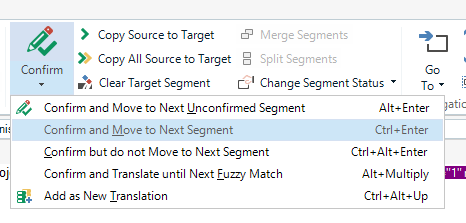
  • Formatting changes on a single word are no changes for a CAT tool. In your case you need singular and plural in TM, regardless the formatting. To keep both, you need to use the command "Add as a new translation", which can be found where the big confirmation button on the ribbon sits:

    Trados Studio screenshot showing the 'Confirm' dropdown menu with options such as 'Copy Source to Target', 'Confirm and Move to Next Unconfirmed Segment', and 'Add as New Translation' highlighted.

    _________________________________________________________

    When asking for help here, please be as accurate as possible. Please always remember to give the exact version of product used and all possible error messages received. The better you describe your problem, the better help you will get.

    Want to learn more about Trados Studio? Visit the Community Hub. Have a good idea to make Trados Studio better? Publish it here.

    emoji


    Generated Image Alt-Text
    [edited by: Trados AI at 9:22 PM (GMT 0) on 28 Feb 2024]
Reply
  • Formatting changes on a single word are no changes for a CAT tool. In your case you need singular and plural in TM, regardless the formatting. To keep both, you need to use the command "Add as a new translation", which can be found where the big confirmation button on the ribbon sits:

    Trados Studio screenshot showing the 'Confirm' dropdown menu with options such as 'Copy Source to Target', 'Confirm and Move to Next Unconfirmed Segment', and 'Add as New Translation' highlighted.

    _________________________________________________________

    When asking for help here, please be as accurate as possible. Please always remember to give the exact version of product used and all possible error messages received. The better you describe your problem, the better help you will get.

    Want to learn more about Trados Studio? Visit the Community Hub. Have a good idea to make Trados Studio better? Publish it here.

    emoji


    Generated Image Alt-Text
    [edited by: Trados AI at 9:22 PM (GMT 0) on 28 Feb 2024]
Children
No Data
