TM corruption following a TM upgrade - solutions?

Hi,

Upon the recommendation of SDL support staff, I let the machine perform an upgrade of my TMs. They said it would lead to better performance. The jury is still out on that improvement, however, two bad things happened:

1. The upgrade process deleted my custom segmentation rules and returned them to default without any notice to me. In view of the fact that my entire productivity in using my TMs relies on these parsing rules being consistent, this is a potential disaster. Luckily, we discovered that debacle by accident and were able to correct it.

2.  I started getting 2 error messages upon completing the project preparation wizard, that two TMs, one "straight" and one "AnyTM", for the same language pair, suddenly have a duplicate key issue.

What this seems to mean, if I understand what happened correctly, is that during the TM upgrade process these two TMs, used for the same language pair and used in the same projects, were assigned the same key somewhere, for some reason.

My first question, obviously, how do I correct this? I currently assume that this is only for those two specific TMs and not other TMS. These are two of my older TMs which I have been using since 2011, that form a considerable part of my TM resources.

My second comment, more of a rant really, why does SDL provide a TM upgrade process that is not well made, reliable and well tested? the issues I mentioned are not minor by any means. These TMs are my most precious business asset.

Thank you!

Parents
  • What this seems to mean, if I understand what happened correctly, is that during the TM upgrade process these two TMs, used for the same language pair and used in the same projects, were assigned the same key somewhere, for some reason.

    Might be related to using AnyTM that creates a reverse of the original when you use it for a language pair in the reverse direction to that of your TM. Needs testing... and I'm only guessing.  If you have some likely steps that cause this problem for you it would be helpful and I can add to the testing.

    My first question, obviously, how do I correct this? I currently assume that this is only for those two specific TMs and not other TMS. These are two of my older TMs which I have been using since 2011, that form a considerable part of my TM resources.

    Maybe... if you have AnyTM reverse TMs you can delete the reversed ones.  They'll be recreated when you open the real one anyway.  Unless of course you actually use the reverse ones by selecting them for projects in the reverse direction... which might also be a contributory factor worth testing since this is not how AnyTM is designed to work.

    My second comment, more of a rant really, why does SDL provide a TM upgrade process that is not well made, reliable and well tested? the issues I mentioned are not minor by any means. These TMs are my most precious business asset.

    How can we answer this? All the products are tested based on workflows and software and hardware that our QA teams believe are appropriate.  But there are obviously so many combinations of these things we could not possibly cover them all. So we do our best and if somebody finds a problem we can reproduce we fix it and add to the test process for the future.

    Nobody wants to release untested software, and nobody wants our users to have problems. I'm sorry you have encountered issues, and if we can reproduce them we'll fix them.

    Paul Filkin | RWS

    Design your own training!
    You've done the courses and still need to go a little further, or still not clear? 
    Tell us what you need in our Community Solutions Hub

  • Maybe I misunderstand the way to use reverse AnyTm. My 2 reverse AnyTms in a language pair are TMs that I created once a while back and maintain and update concurrently with their "straight" counterparts respectively in each project, they are a pair now for this language pair direction . I do not have them created for each project. Is that not the intended way? I am not aware of a setting that will create the counterpart reverse AnyTM as a source TM for a project automatically anew for each project.

    Also, the fix of just creating a new AnyTm using my current straight TMs sounds like it should work. Is that what you mean? or will I be losing the updates that were made to my reverse AnyTms directly all this time when used in projects?

    Obviously I was not expecting an answer per se to my closing rant, I was just pointing out that in the case of a system component that is so critical to the value of the software and to its power (the TM), too many mistakes and oversights were uncovered in the memory upgrade system tool (during the handling of my malfunction) that might indicate that the procedure pertaining to this tool in particular should be handled with more care and attention, and with more explanation to the user as to what will be carried out in the TM in actual fact. As in any software, when you have to explain what you are trying to achieve all manner of issues suddenly pop up during the development stage. Explaining the consequences is a very important debugging tool. Imagine what would have happened if we would not have caught that punctuation rules change immediately. I would have lost most of the functionality of my TMs and would not even know about it! Such critical development mistakes cannot be left unhandled and should be transmitted back to the developers of the tool for a reshuffling to the development process. Maybe this tool hides additional issues? who knows?

Reply
  • Maybe I misunderstand the way to use reverse AnyTm. My 2 reverse AnyTms in a language pair are TMs that I created once a while back and maintain and update concurrently with their "straight" counterparts respectively in each project, they are a pair now for this language pair direction . I do not have them created for each project. Is that not the intended way? I am not aware of a setting that will create the counterpart reverse AnyTM as a source TM for a project automatically anew for each project.

    Also, the fix of just creating a new AnyTm using my current straight TMs sounds like it should work. Is that what you mean? or will I be losing the updates that were made to my reverse AnyTms directly all this time when used in projects?

    Obviously I was not expecting an answer per se to my closing rant, I was just pointing out that in the case of a system component that is so critical to the value of the software and to its power (the TM), too many mistakes and oversights were uncovered in the memory upgrade system tool (during the handling of my malfunction) that might indicate that the procedure pertaining to this tool in particular should be handled with more care and attention, and with more explanation to the user as to what will be carried out in the TM in actual fact. As in any software, when you have to explain what you are trying to achieve all manner of issues suddenly pop up during the development stage. Explaining the consequences is a very important debugging tool. Imagine what would have happened if we would not have caught that punctuation rules change immediately. I would have lost most of the functionality of my TMs and would not even know about it! Such critical development mistakes cannot be left unhandled and should be transmitted back to the developers of the tool for a reshuffling to the development process. Maybe this tool hides additional issues? who knows?

Children
  • Also, the fix of just creating a new AnyTm using my current straight TMs sounds like it should work. Is that what you mean? or will I be losing the updates that were made to my reverse AnyTms directly all this time when used in projects?

    The way AnyTM should work is this:

    1. You create your TM, let's say HE => EN called "en-he.sdltm" because this is the direction you normally work in
    2. Then one day you get a project that goes EN => HE
    3. You create your project and add the HE => EN TM using AnyTM
    4. Since this isn't the right way round the reverse TM will be created based on the contents of the HE => EN TM and will be named "en-he.anytmreverse.sdltm"
    5. All translations will be added to both TMs, the HE => EN and the EN => EN.

    So the golden rule is never add the *.anytmreverse.sdltm, only work with the original, always added using AnyTM, and the application will take care of the rest.

    I just did a quick test to verify this and it worked... I did this:

    1. opened a small file with two sentences, EN => HE
    2. created a new TM and translated them
    3. opened another small file, this time HE => EN with three sentences.  The first two were in my EN => HE TM.
    4. I selected it with AnyTM and Studio created the reverse for me.
    5. I translated the file by getting 100% matches for the first two and then added the last one as a new one.
    6. I then opened an updated version of the very first file, EN => HE that contained three sentences, all translated in the HE => EN project.
    7. I added the EN => HE TM and received 100% matches for all the segments.

    So AnyTM maintained the matches both ways for me irrespective of the direction.

    As in any software, when you have to explain what you are trying to achieve all manner of issues suddenly pop up during the development stage. Explaining the consequences is a very important debugging tool.

    I totally agree.  I haven't verified this problem myself yet, but I would always keep my customisation in a language resource template just in case I needed to put them back at any time.

    Paul Filkin | RWS

    Design your own training!
    You've done the courses and still need to go a little further, or still not clear? 
    Tell us what you need in our Community Solutions Hub

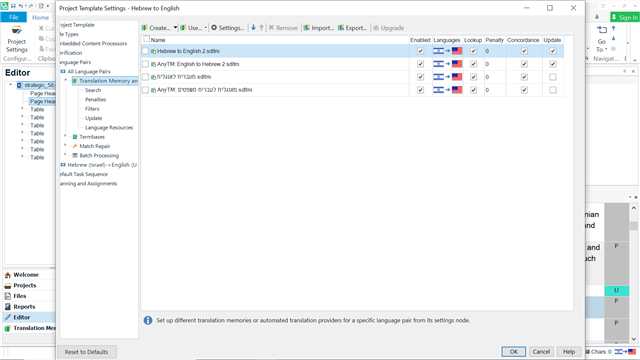
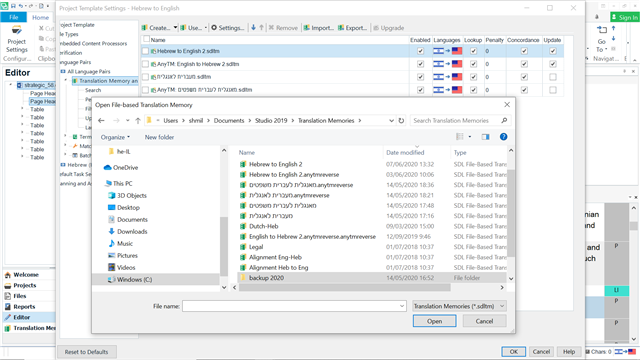
  • I checked just now, and my wizard is setup exactly like you described for the manual process, but the confusing thing is that the *anytmreverse.sdtlm files exist on the hard drive for all projects, one for each TM. They are not created locally for each project. They are seemingly like regular TMs. Accordingly, I keep one of them ticked for update. Which implies that the machine keeps them permanently and does not create them anew for each project. So in fact I cannot "remove" them and "reinstate" them unless I delete the actual *.anytmreverse.sdtlm file from my hard drive first, which will force the machine to recreate them from this point going forward once again. Otherwise it will just revert to the existing one. Is that correct? attaching a SS of the wizard setup and the hard drive TM folder.

    Screenshot of Trados Studio Project Template Settings showing Translation Memory and Automated Translation setup with Hebrew to English and English to Hebrew TMs listed.Screenshot of a file explorer window with Trados Studio 2019 Translation Memories folder open, displaying various .sdtlm files including Hebrew to English and English to Hebrew TMs.

    emoji


    Generated Image Alt-Text
    [edited by: Trados AI at 9:28 PM (GMT 0) on 28 Feb 2024]
  • the confusing thing is that the *anytmreverse.sdtlm files exist on the hard drive for all projects, one for each TM. They are not created locally for each project.

    That's not confusing... makes sense and it's how it works. It would be silly to keep creating them over and over again. You just need to create one TM and keep it somewhere safe, then refer to this with AnyTM all the time.  AnyTM will manage this for you.

    So in fact I cannot "remove" them and "reinstate" them unless I delete the actual *.anytmreverse.sdtlm file from my hard drive first, which will force the machine to recreate them from this point going forward once again. Otherwise it will just revert to the existing one. Is that correct?

    Why would you even do this?

    But yes... it will always revert to the existing one as this is what it's supposed to do. You don't want TMs all over your computer for the same thing.

    Paul Filkin | RWS

    Design your own training!
    You've done the courses and still need to go a little further, or still not clear? 
    Tell us what you need in our Community Solutions Hub

  • Bottom line first: my duplicate key error message is resolved, as follows:

    I removed the faulty anytmreverse.sdltm file from the wizard project preparation TM list.

    I selected the applicable TM to be reversed under AnyTm back into the wizard TM list.

    I did the same thing for the 'straight' TM with the duplicate key error message through regular TM selection.

    I ran the wizard on a project.

    Apparently, removing and adding the TMs in the wizard after upgrade cleared the error for the straight as well as the reversed one. Why? I have no idea.

    Thank you for your advice in this matter.