Error "La référence d'objet n est pas définie à une instance d un objet" after updating Trados 2019

Hi,

I updated TRADOS 2019 as required for the first time since I got license and after, It was impossible to open package sent by my project manager ( whereas, it never failed before with previous packages). So, I tried to work on the single file, left, I came back and when I tried to open the file, it was told "La référence d'objet n est pas définie à une instance d'un objet" and then, I can't open any files which ran well before this update.

I uninstalled Trados and, from my account, I installed once more Studio 2019 SR2, and the same occured with several files 

I tried to copy the word file of the previous document and after translation, I can't save it... so, what can I do?

Thanks for your help

Parents
  • <SDLErrorDetails time="05/06/20 19:51:07">
      <ErrorMessage>La référence d'objet n'est pas définie à une instance d'un objet.</ErrorMessage>
      <Exception>
        <Type>System.NullReferenceException, mscorlib, Version=4.0.0.0, Culture=neutral, PublicKeyToken=b77a5c561934e089</Type>
        <HelpLink />
        <Source>Sdl.TranslationStudio.Editor</Source>
        <HResult>-2147467261</HResult>
        <StackTrace><![CDATA[   à Sdl.TranslationStudio.Editor.TranslationMemory.TranslationMemoryViewPart.UpdateIcon()
       à Sdl.TranslationStudio.Editor.TranslationMemory.TranslationMemoryViewPart.UpdateTranslationProvider()
       à Sdl.TranslationStudio.Editor.TranslationMemory.TranslationMemoryViewPart.OnActiveDocumentChanged()
       à Sdl.TranslationStudio.Editor.TranslationMemory.TranslationMemoryViewPart.editorService_ActiveDocumentChanged(IDocument document)
       à Sdl.TranslationStudio.Api.Editor.DocumentEventHandler.Invoke(IDocument document)
       à Sdl.TranslationStudio.Editor.EditorService.set_ActiveDocument(IDocument value)
       à Sdl.TranslationStudio.Editor.EditorView.OnActiveViewPartChanged(IViewPartReference viewPartReference)
       à Sdl.Desktop.Platform.AbstractViewWithParts.Control_ActiveViewPartChanged(IViewWithParts view, IViewPartReference viewPartReference)
       à Sdl.Desktop.Platform.WinForms.DockingViewContentControl.OnActiveViewPartChanged(IViewPartReference viewPartReference)
       à Sdl.Desktop.Platform.WinForms.DockingViewContentControl.InternalActivateViewPart(IViewPartReference viewPartToActivate)
       à Sdl.Desktop.Platform.WinForms.DockingViewContentControl._tabControl_SelectedTabChanged(Object sender, SelectedTabChangedEventArgs e)
       à Infragistics.Win.UltraWinTabControl.UltraTabControlBase.OnSelectedTabChanged(SelectedTabChangedEventArgs e)
       à Infragistics.Win.UltraWinTabControl.UltraTabControlBase.RaiseEvent(UltraTabControlEventId id, EventArgs e)
       à Infragistics.Win.UltraWinTabControl.UltraTabControlBase.OnManagerSelectedTabItemChanged(Object sender, SelectedTabItemChangedEventArgs e)
       à Infragistics.Win.UltraWinTabs.TabManager.set_SelectedTabItem(ITabItem value)
       à Infragistics.Win.UltraWinTabControl.UltraTabControlBase.SetSelectedTab(UltraTab tab)
       à Infragistics.Win.UltraWinTabControl.UltraTabControlBase.set_SelectedTab(UltraTab value)
       à Sdl.Desktop.Platform.WinForms.DockingViewContentControl.AddViewPartTab(IViewPartReference viewPartReference)
       à Sdl.Desktop.Platform.WinForms.DockingViewContentControl.AddViewPart(IViewPartReference viewPartReference)
       à Sdl.Desktop.Platform.WinForms.DockingViewContentControl.NotifyViewPartAdded(IViewPartReference viewPartReference)
       à Sdl.Desktop.Platform.AbstractViewWithParts.AddViewPart(IViewPartReference viewPartReference)
       à Sdl.Desktop.Platform.AbstractDockingView.AddViewPart(IViewPartReference viewPartReference)
       à Sdl.TranslationStudio.Editor.Shared.InternalEditorContext.AddDocumentViewPart(IDocumentViewPart documentViewPart)
       à Sdl.TranslationStudio.Api.Editor.AbstractInternalDocument.AfterLoad(IJob job)]]></StackTrace>
      </Exception>
      <Environment>
        <ProductName>SDL Trados Studio</ProductName>
        <ProductVersion>15.0.0.0</ProductVersion>
        <EntryAssemblyFileVersion>15.2.6.2831</EntryAssemblyFileVersion>
        <OperatingSystem>Microsoft Windows 8.1 avec Bing</OperatingSystem>
        <ServicePack>NULL</ServicePack>
        <OperatingSystemLanguage>1036</OperatingSystemLanguage>
        <CodePage>1252</CodePage>
        <LoggedOnUser>PC\Diolinde</LoggedOnUser>
        <DotNetFrameWork>4.0.30319.42000</DotNetFrameWork>
        <ComputerName>PC</ComputerName>
        <ConnectedToNetwork>True</ConnectedToNetwork>
        <PhysicalMemory>4079888 MB</PhysicalMemory>
      </Environment>
    </SDLErrorDetails>

    Hello Steven,

    Thanks four your reply.

    There are different problems:

    1- When I try to open a single file document , I have the error mesage as above ( saved as required)

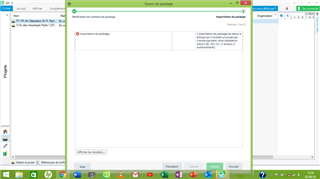
    2- When I try to open a return package, there is a problem for import it, as shown on the screen

    Trados Studio error message displaying 'Importation du package... An error occurred while trying to import a return package. Error details: Object reference not set to an instance of an object.'

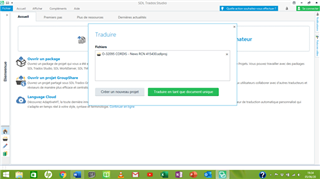
    3- When I try to open an old package ( without problem before updating), I had this screen

    Trados Studio interface showing a failed attempt to open a return package with an error message stating 'Object reference not set to an instance of an object.'

    So what to do?


    Generated Image Alt-Text
    [edited by: Trados AI at 9:30 PM (GMT 0) on 28 Feb 2024]
  • Hi 

    I'm guessing that  hasn't seen your reply. It helps if you include an active link to the person you're communicating with. In Steven's case that can be achieved by typing @ followed immediately by whale, or by copying the active link above his post.

    While waiting for Steven's reply...

    Firstly, have you also opened MultiTerm and updated it also?

    Next, when a problem occurs after an update, the first thing to try is a Windows Repair of Studio (and MultiTerm components depending what the problem is), as here:

    1. Close all SDL applications.
    2. Open the Control Panel:
      • Windows Vista/7Start > Control Panel > Programs > Programs and Features.
      • Windows 8: Right-click on the screen at bottom-left corner and choose Control Panel > Uninstall a Program.
      • Windows 10: Right-click on Start > Control Panel > Select View by: Small Icons > Programs and Features
      • - or type 'Control Panel' in the search line on your bottom Windows toolbar.
    3. Click/highlight the relevant SDL product from the list (e.g. SDL Trados Studio 2019 etc) and click 'Repair' either on the top toolbar or on the right-click dropdown menu.
    4. Restart Studio/MultiTerm.

    All the best,

    Ali Slight smile

Reply
  • Hi 

    I'm guessing that  hasn't seen your reply. It helps if you include an active link to the person you're communicating with. In Steven's case that can be achieved by typing @ followed immediately by whale, or by copying the active link above his post.

    While waiting for Steven's reply...

    Firstly, have you also opened MultiTerm and updated it also?

    Next, when a problem occurs after an update, the first thing to try is a Windows Repair of Studio (and MultiTerm components depending what the problem is), as here:

    1. Close all SDL applications.
    2. Open the Control Panel:
      • Windows Vista/7Start > Control Panel > Programs > Programs and Features.
      • Windows 8: Right-click on the screen at bottom-left corner and choose Control Panel > Uninstall a Program.
      • Windows 10: Right-click on Start > Control Panel > Select View by: Small Icons > Programs and Features
      • - or type 'Control Panel' in the search line on your bottom Windows toolbar.
    3. Click/highlight the relevant SDL product from the list (e.g. SDL Trados Studio 2019 etc) and click 'Repair' either on the top toolbar or on the right-click dropdown menu.
    4. Restart Studio/MultiTerm.

    All the best,

    Ali Slight smile

Children
  • Thanks Hello

    As Alison states - it's always worth tagging the person you are replying to, so they receive a notification.

    Further to Alison's reply- if a repair doesn't work in this case, I suspect a couple of possible issues- ( I cannot read the screenshots properly as these are too small).

    I would try the following solutions (in order)

    1)  remove the project from Studio 

    2) Update your AntiVirus 'exceptions' to include Studio/MultiTerm 

    3) Copy and save the original project and now rename it to a .zip file.

    Unzip the file and try to recreate the project (different name and folder) and open in Studio.

    Does this work now?

    If not, then this might suggest its the actual files within the project that are causing the issues.

    If you can, please send me the project to swhale@sdl.com and I'm happy to take a look for you.

    Oana Nagy | QA Engineer | RWS Group