Translate



DeepL Translator Provider is installed and enabled, and shows up in Studio 2017 under "Translation Results" but in the box below it says "No matches found"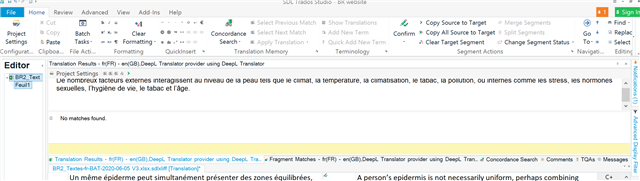
Generated Image Alt-Text
[edited by: Trados AI at 9:34 PM (GMT 0) on 28 Feb 2024]


DeepL Translator Provider is installed and enabled, and shows up in Studio 2017 under "Translation Results" but in the box below it says "No matches found"
Hello helene tammik ,
Please first log into Studio (top right- Signin) and install all updates (Studio and Plugins).
Now reopen the project and see if this makes a difference.
If not, please remove the plugin and reinstall the latest version -https://appstore.sdl.com/language/app/deepl-translation-provider/847/
Now restart your machine/Studio and see if the problem is now resolved.
Oana Nagy | QA Engineer | RWS Group

Thank you Steven, after going through this process several times I finally got there :-)
Yay!

Thanks helene tammik , for letting us know updating solved the issue.
Oana Nagy | QA Engineer | RWS Group

Thank you Helene and Steven, I encountered the exact same issue; updating Trados Studio 2017 fixed it!
Please first log into Studio (top right- Signin) and install all updates (Studio and Plugins).
By the way may be just me, but it was obscure as to how to update Trados Studio,
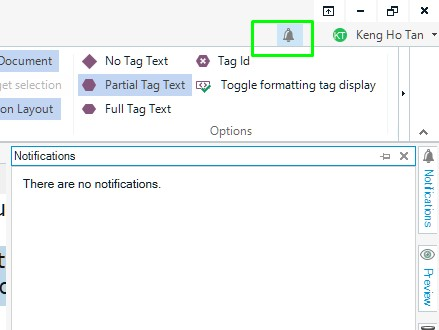
so here's a screenshot for anyone else who might be stuck at how to install all updates like I was.
In your usual Studio page, log in at the top right as Steven mentioned, then click the bell icon as following screenshot – any software updates would then show up
(below screenshot says "There are no notifications" because I've already updated to the latest version of Studio)