sdlppx files

Hi Paul et al, 

I have been sent and been working on an sdlppx file. I have now lost the structure for the sdlppx file that the client originally sent me. How do I restore this please without losing the work already completed?  

Thank you very much for your help. 

Best wishes, 

Rob 

Parents
  • Hi Jerzy,

    Yesterday I was working on the Trados files and working through the sdlppx structure the client has used to insert the files.

    Today when I go into the project, it now appears as a single list of Trados files and the sdlppx structure has disappeared.

    Where do I find the sdlppx structure to continue working through the files as before so that I can return the files to the client with the sdlppx structure? I am running SDL Trados Studio 2019 Freelance. Thank you very much for your help.

    Rob

  • Sorry, I do not understand a word from what you are saying. How can you work through the structure of a SDLPPX package? You need to receive the package in Studio. Then you see the project in your project list and the corresponding files in your files view.

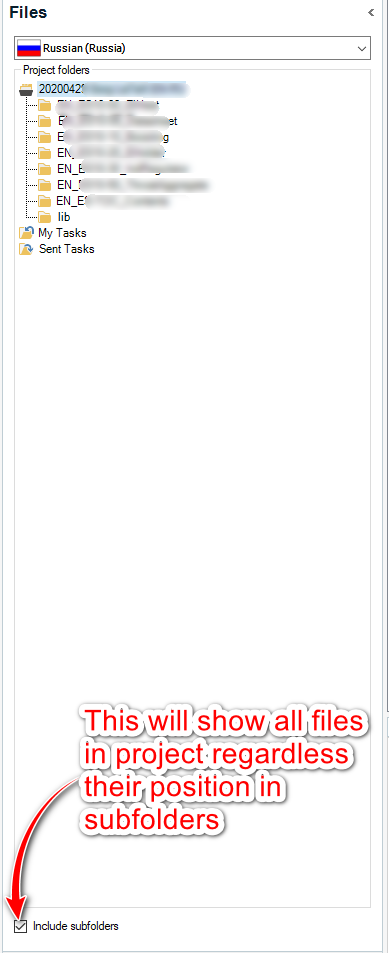
    Or do you mean the package has subfolders? In that very case the answer could be simple:

    Trados Studio Files view showing a project folder with subfolders. A red arrow points to 'Include subfolders' checkbox with a note: 'This will show all files in project regardless their position in subfolders.'

    _________________________________________________________

    When asking for help here, please be as accurate as possible. Please always remember to give the exact version of product used and all possible error messages received. The better you describe your problem, the better help you will get.

    Want to learn more about Trados Studio? Visit the Community Hub. Have a good idea to make Trados Studio better? Publish it here.

    emoji


    Generated Image Alt-Text
    [edited by: Trados AI at 9:30 PM (GMT 0) on 28 Feb 2024]
Reply
  • Sorry, I do not understand a word from what you are saying. How can you work through the structure of a SDLPPX package? You need to receive the package in Studio. Then you see the project in your project list and the corresponding files in your files view.

    Or do you mean the package has subfolders? In that very case the answer could be simple:

    Trados Studio Files view showing a project folder with subfolders. A red arrow points to 'Include subfolders' checkbox with a note: 'This will show all files in project regardless their position in subfolders.'

    _________________________________________________________

    When asking for help here, please be as accurate as possible. Please always remember to give the exact version of product used and all possible error messages received. The better you describe your problem, the better help you will get.

    Want to learn more about Trados Studio? Visit the Community Hub. Have a good idea to make Trados Studio better? Publish it here.

    emoji


    Generated Image Alt-Text
    [edited by: Trados AI at 9:30 PM (GMT 0) on 28 Feb 2024]
Children
No Data