Translate



Hi,
We are having problems translating xliff files.
The initial source files that we have translated and converted back to xliff format, have got the following structure (after translation):
<trans-unit id="common.button.cancel" xml:space="preserve">
<source>Cancel</source><seg-source><mrk mtype="seg" mid="2">Cancel</mrk></seg-source>
<target state="vertaald"><mrk mtype="seg" mid="2">Annulla</mrk>Annulla</target>
</trans-unit>
The customer needs the translated files back in this structure:
(original structure xliff file)
<trans-unit id="common.button.cancel" xml:space="preserve">
<bron>Annuleren</bron>
<target> Annulla</target>
<nota/>
</trans-unit>
What could the problem be?
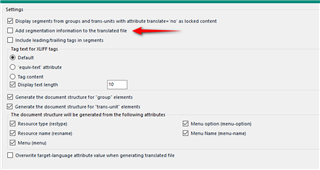
Do we have to do sthg with the xliff files first, before we start translating them? Change anything in the file type settings?
How can we get the structure of the translated file that the customer actually needs?
Looking forward to your reply,
Kind regards,
Veronika