The Trados cloud platform will be undergoing maintenance on Saturday, 9th May 2026 between 05:00 to 17:00 UTC. During this time, you will not be able to log in to the Trados platform.

Studio 2019 continues to open on wrong monitor. How can I fix it?

I’m using Studio 2019 on a multimonitor setup.

Recently, I noticed that when I open Studio (whether from double-clicking a project, or from a shortcut, or from the start menu) it opens on a secondary monitor, and not on the main monitor.

Is there a way I can ensure it always opens on the main monitor (or at least on the secondary monitor I want)?

Thanks!

Lorenzo Post

Parents Reply
  • Hi 

    I've only just set up a second screen and my stepson who put it all together for me uses several screens and recommended DisplayFusion. He uses the Pro version but the free version is fine for me. I have used it to remove the bottom toolbar from the second screen (which I have mounted in portrait to read A4 reference documents) so I control everything from the main landscape screen bottom toolbar. 

    My second screen is totally empty until I place something there...

    Acer monitor startup screen with Acer logo and decorative pattern on the right side.

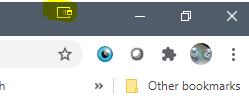
    When I want to send something to the second screen, I click an icon on the top toolbar...

    Browser window showing an icon on the top toolbar highlighted in yellow, indicating the feature to send the window to a second screen.

    highlighted in the above image in yellow.

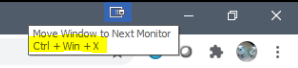
    Or I use a shortcut:

    Close-up of the browser toolbar with a tooltip for an icon showing 'Move Window to Next Monitor Ctrl + Win + X' shortcut.

    Ctrl+Win+X

    That shortcut moves the ACTIVE window to the other monitor (or the next in the sequence if you have more than 2) and using the shortcut again takes it back or to the next monitor.

    There are lots of other features but I've only been using it a day and so haven't tried them out. This level of control already suits me fine. I was thinking you wouldn't need to worry about Studio opening on the second screen because you'd only have to click Ctrl+Win+X to bring it back.

    The software also opens the program in the same screen as it was previously opened. Useful for me as I have PDFs and JPGs open on my portrait screen one above the other.

    So far, Studio hasn't 'jumped' but because I'd already read of people having this problem, I decided to follow my stepson's advice and use a tool that would keep things under control Wink

    Hope this helps,

    Ali Slight smile

    emoji


    Generated Image Alt-Text
    [edited by: Trados AI at 9:39 PM (GMT 0) on 28 Feb 2024]
Children