The Trados cloud platform will be undergoing maintenance on Saturday, 9th May 2026 between 05:00 to 17:00 UTC. During this time, you will not be able to log in to the Trados platform.

Error message while trying to save first segment (SDL Trados Studio 2017)

Hello!

I'm translating a document from German to Italian with version 2017. When I try to save the first segment I get the following error message: Impossibile trovare il file specificato (The specified file could not be found). This is the second time it happens with the same client, but they couldn't help me...

Can anybody help with this?

Thank you.

Barbara 
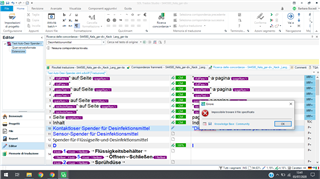
Trados Studio 2017 interface showing a German to Italian translation project with an error message popup reading 'Impossibile trovare il file specificato'.


Generated Image Alt-Text
[edited by: Trados AI at 9:43 PM (GMT 0) on 28 Feb 2024]
emoji
Parents
  • Hello ,

    Could you please post the full error stack

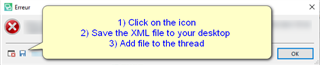
    -Error message in Trados Studio with instructions: 1) Click on the icon, 2) Save the XML file to your desktop, 3) Add file to the thread.

    This should help identify the issue.

    Oana Nagy | QA Engineer | RWS Group

    emoji


    Generated Image Alt-Text
    [edited by: Trados AI at 9:43 PM (GMT 0) on 28 Feb 2024]
  • <SDLErrorDetails time="06/07/2020 09:46:46">
      <ErrorMessage>Impossibile trovare il file specificato</ErrorMessage>
      <Exception>
        <Type>System.ComponentModel.Win32Exception, System, Version=4.0.0.0, Culture=neutral, PublicKeyToken=b77a5c561934e089</Type>
        <NativeErrorCode>2</NativeErrorCode>
        <ErrorCode>-2147467259</ErrorCode>
        <HelpLink />
        <Source>System</Source>
        <HResult>-2147467259</HResult>
        <StackTrace><![CDATA[   in System.Diagnostics.Process.StartWithShellExecuteEx(ProcessStartInfo startInfo)
       in System.Diagnostics.Process.Start()
       in LanguageToolStudioPlugin.LanguageToolStudioPluginMain.validLang(String lang)
       in LanguageToolStudioPlugin.LanguageToolStudioPluginMain.Initialize(IDocumentProperties documentInfo)
       in Sdl.FileTypeSupport.Framework.Core.Utilities.BilingualApi.BilingualContentHandlerAdapter.Initialize(IDocumentProperties documentInfo)
       in Sdl.FileTypeSupport.Framework.Core.Utilities.BilingualApi.BilingualContentHandlerAdapter.Initialize(IDocumentProperties documentInfo)
       in Sdl.FileTypeSupport.Framework.Core.Utilities.BilingualApi.BilingualContentHandlerAdapter.Initialize(IDocumentProperties documentInfo)
       in Sdl.FileTypeSupport.Framework.Core.Utilities.BilingualApi.BilingualContentHandlerAdapter.Initialize(IDocumentProperties documentInfo)
       in Sdl.FileTypeSupport.Framework.Integration.AbstractBilingualProcessorContainer.Initialize(IDocumentProperties documentInfo)
       in Sdl.FileTypeSupport.Framework.Integration.MultiFileConverter.Initialize(IDocumentProperties documentInfo)
       in Sdl.FileTypeSupport.Framework.BilingualApi.AbstractBilingualContentProcessor.Initialize(IDocumentProperties documentInfo)
       in Sdl.FileTypeSupport.Framework.Integration.AbstractBilingualProcessorContainer.Initialize(IDocumentProperties documentInfo)
       in Sdl.TranslationStudio.Editor.TranslationEditor.TranslatableDocument.SingleParagraphUnitBilingualParser.ParseNext()
       in Sdl.FileTypeSupport.Framework.Integration.FileExtractor.ParseNext()
       in Sdl.FileTypeSupport.Framework.Integration.MultiFileConverter.ParseNext()
       in Sdl.FileTypeSupport.Framework.Integration.MultiFileConverter.Parse()
       in Sdl.TranslationStudio.Editor.TranslationEditor.TranslatableDocument.VerifySegment(ISegmentContainerNode segmentContainerNode, IParagraphUnitContainerNode paragraphContainerNode, IFileContainerNode fileContainerNode)
       in Sdl.TranslationStudio.Editor.TranslationEditor.SideBySideDocumentEditingView.VerifySegment()
       in Sdl.TranslationStudio.Editor.TranslationEditor.Actions.AbstractConfirmSegmentAction.ExecuteActiveSegment()
       in Sdl.TranslationStudio.Editor.TranslationEditor.Actions.AbstractConfirmSegmentAction.Execute()
       in Sdl.Desktop.Platform.Implementation.CommandBars.ActionService.<>c__DisplayClass30_0.<ExecuteAction>b__0()
       in Sdl.Desktop.Platform.Implementation.Services.Log.Resources(Object message, Action action)
       in Sdl.Desktop.Platform.Implementation.CommandBars.ActionService.ExecuteAction(IAction action, ActionOrigin origin, Boolean allowToggle)
       in Sdl.Desktop.Platform.Implementation.CommandBars.ActionService.ExecuteActionForShortcut(Keys shortcut)
       in Sdl.Desktop.Platform.WinForms.StudioWindowForm.OnKeyDown(KeyEventArgs e)
       in System.Windows.Forms.Control.ProcessKeyEventArgs(Message& m)
       in System.Windows.Forms.Form.ProcessKeyPreview(Message& m)
       in System.Windows.Forms.Control.ProcessKeyPreview(Message& m)
       in System.Windows.Forms.Control.ProcessKeyPreview(Message& m)
       in System.Windows.Forms.Control.ProcessKeyPreview(Message& m)
       in System.Windows.Forms.Control.ProcessKeyPreview(Message& m)
       in System.Windows.Forms.Control.ProcessKeyPreview(Message& m)
       in System.Windows.Forms.Control.ProcessKeyPreview(Message& m)
       in System.Windows.Forms.Control.ProcessKeyPreview(Message& m)
       in System.Windows.Forms.Control.ProcessKeyPreview(Message& m)
       in System.Windows.Forms.Control.ProcessKeyPreview(Message& m)
       in System.Windows.Forms.Control.ProcessKeyPreview(Message& m)
       in System.Windows.Forms.Control.ProcessKeyPreview(Message& m)
       in System.Windows.Forms.Control.ProcessKeyPreview(Message& m)
       in System.Windows.Forms.Control.ProcessKeyPreview(Message& m)
       in System.Windows.Forms.Control.ProcessKeyPreview(Message& m)
       in System.Windows.Forms.Control.ProcessKeyPreview(Message& m)
       in System.Windows.Forms.Control.ProcessKeyPreview(Message& m)
       in System.Windows.Forms.Control.ProcessKeyMessage(Message& m)
       in System.Windows.Forms.Control.WmKeyChar(Message& m)
       in System.Windows.Forms.Control.WndProc(Message& m)
       in System.Windows.Forms.Control.ControlNativeWindow.OnMessage(Message& m)
       in System.Windows.Forms.Control.ControlNativeWindow.WndProc(Message& m)
       in System.Windows.Forms.NativeWindow.Callback(IntPtr hWnd, Int32 msg, IntPtr wparam, IntPtr lparam)]]></StackTrace>
      </Exception>
      <Environment>
        <ProductName>SDL Trados Studio</ProductName>
        <ProductVersion>14.0.0.0</ProductVersion>
        <EntryAssemblyFileVersion>14.1.10018.54792</EntryAssemblyFileVersion>
        <OperatingSystem>Microsoft Windows 10 Home</OperatingSystem>
        <ServicePack>NULL</ServicePack>
        <OperatingSystemLanguage>1040</OperatingSystemLanguage>
        <CodePage>1252</CodePage>
        <LoggedOnUser>LAPTOP-JV84N7UM\barba</LoggedOnUser>
        <DotNetFrameWork>4.0.30319.42000</DotNetFrameWork>
        <ComputerName>LAPTOP-JV84N7UM</ComputerName>
        <ConnectedToNetwork>True</ConnectedToNetwork>
        <PhysicalMemory>4032784 MB</PhysicalMemory>
      </Environment>
    </SDLErrorDetails>

    emoji
Reply
  • <SDLErrorDetails time="06/07/2020 09:46:46">
      <ErrorMessage>Impossibile trovare il file specificato</ErrorMessage>
      <Exception>
        <Type>System.ComponentModel.Win32Exception, System, Version=4.0.0.0, Culture=neutral, PublicKeyToken=b77a5c561934e089</Type>
        <NativeErrorCode>2</NativeErrorCode>
        <ErrorCode>-2147467259</ErrorCode>
        <HelpLink />
        <Source>System</Source>
        <HResult>-2147467259</HResult>
        <StackTrace><![CDATA[   in System.Diagnostics.Process.StartWithShellExecuteEx(ProcessStartInfo startInfo)
       in System.Diagnostics.Process.Start()
       in LanguageToolStudioPlugin.LanguageToolStudioPluginMain.validLang(String lang)
       in LanguageToolStudioPlugin.LanguageToolStudioPluginMain.Initialize(IDocumentProperties documentInfo)
       in Sdl.FileTypeSupport.Framework.Core.Utilities.BilingualApi.BilingualContentHandlerAdapter.Initialize(IDocumentProperties documentInfo)
       in Sdl.FileTypeSupport.Framework.Core.Utilities.BilingualApi.BilingualContentHandlerAdapter.Initialize(IDocumentProperties documentInfo)
       in Sdl.FileTypeSupport.Framework.Core.Utilities.BilingualApi.BilingualContentHandlerAdapter.Initialize(IDocumentProperties documentInfo)
       in Sdl.FileTypeSupport.Framework.Core.Utilities.BilingualApi.BilingualContentHandlerAdapter.Initialize(IDocumentProperties documentInfo)
       in Sdl.FileTypeSupport.Framework.Integration.AbstractBilingualProcessorContainer.Initialize(IDocumentProperties documentInfo)
       in Sdl.FileTypeSupport.Framework.Integration.MultiFileConverter.Initialize(IDocumentProperties documentInfo)
       in Sdl.FileTypeSupport.Framework.BilingualApi.AbstractBilingualContentProcessor.Initialize(IDocumentProperties documentInfo)
       in Sdl.FileTypeSupport.Framework.Integration.AbstractBilingualProcessorContainer.Initialize(IDocumentProperties documentInfo)
       in Sdl.TranslationStudio.Editor.TranslationEditor.TranslatableDocument.SingleParagraphUnitBilingualParser.ParseNext()
       in Sdl.FileTypeSupport.Framework.Integration.FileExtractor.ParseNext()
       in Sdl.FileTypeSupport.Framework.Integration.MultiFileConverter.ParseNext()
       in Sdl.FileTypeSupport.Framework.Integration.MultiFileConverter.Parse()
       in Sdl.TranslationStudio.Editor.TranslationEditor.TranslatableDocument.VerifySegment(ISegmentContainerNode segmentContainerNode, IParagraphUnitContainerNode paragraphContainerNode, IFileContainerNode fileContainerNode)
       in Sdl.TranslationStudio.Editor.TranslationEditor.SideBySideDocumentEditingView.VerifySegment()
       in Sdl.TranslationStudio.Editor.TranslationEditor.Actions.AbstractConfirmSegmentAction.ExecuteActiveSegment()
       in Sdl.TranslationStudio.Editor.TranslationEditor.Actions.AbstractConfirmSegmentAction.Execute()
       in Sdl.Desktop.Platform.Implementation.CommandBars.ActionService.<>c__DisplayClass30_0.<ExecuteAction>b__0()
       in Sdl.Desktop.Platform.Implementation.Services.Log.Resources(Object message, Action action)
       in Sdl.Desktop.Platform.Implementation.CommandBars.ActionService.ExecuteAction(IAction action, ActionOrigin origin, Boolean allowToggle)
       in Sdl.Desktop.Platform.Implementation.CommandBars.ActionService.ExecuteActionForShortcut(Keys shortcut)
       in Sdl.Desktop.Platform.WinForms.StudioWindowForm.OnKeyDown(KeyEventArgs e)
       in System.Windows.Forms.Control.ProcessKeyEventArgs(Message& m)
       in System.Windows.Forms.Form.ProcessKeyPreview(Message& m)
       in System.Windows.Forms.Control.ProcessKeyPreview(Message& m)
       in System.Windows.Forms.Control.ProcessKeyPreview(Message& m)
       in System.Windows.Forms.Control.ProcessKeyPreview(Message& m)
       in System.Windows.Forms.Control.ProcessKeyPreview(Message& m)
       in System.Windows.Forms.Control.ProcessKeyPreview(Message& m)
       in System.Windows.Forms.Control.ProcessKeyPreview(Message& m)
       in System.Windows.Forms.Control.ProcessKeyPreview(Message& m)
       in System.Windows.Forms.Control.ProcessKeyPreview(Message& m)
       in System.Windows.Forms.Control.ProcessKeyPreview(Message& m)
       in System.Windows.Forms.Control.ProcessKeyPreview(Message& m)
       in System.Windows.Forms.Control.ProcessKeyPreview(Message& m)
       in System.Windows.Forms.Control.ProcessKeyPreview(Message& m)
       in System.Windows.Forms.Control.ProcessKeyPreview(Message& m)
       in System.Windows.Forms.Control.ProcessKeyPreview(Message& m)
       in System.Windows.Forms.Control.ProcessKeyPreview(Message& m)
       in System.Windows.Forms.Control.ProcessKeyPreview(Message& m)
       in System.Windows.Forms.Control.ProcessKeyMessage(Message& m)
       in System.Windows.Forms.Control.WmKeyChar(Message& m)
       in System.Windows.Forms.Control.WndProc(Message& m)
       in System.Windows.Forms.Control.ControlNativeWindow.OnMessage(Message& m)
       in System.Windows.Forms.Control.ControlNativeWindow.WndProc(Message& m)
       in System.Windows.Forms.NativeWindow.Callback(IntPtr hWnd, Int32 msg, IntPtr wparam, IntPtr lparam)]]></StackTrace>
      </Exception>
      <Environment>
        <ProductName>SDL Trados Studio</ProductName>
        <ProductVersion>14.0.0.0</ProductVersion>
        <EntryAssemblyFileVersion>14.1.10018.54792</EntryAssemblyFileVersion>
        <OperatingSystem>Microsoft Windows 10 Home</OperatingSystem>
        <ServicePack>NULL</ServicePack>
        <OperatingSystemLanguage>1040</OperatingSystemLanguage>
        <CodePage>1252</CodePage>
        <LoggedOnUser>LAPTOP-JV84N7UM\barba</LoggedOnUser>
        <DotNetFrameWork>4.0.30319.42000</DotNetFrameWork>
        <ComputerName>LAPTOP-JV84N7UM</ComputerName>
        <ConnectedToNetwork>True</ConnectedToNetwork>
        <PhysicalMemory>4032784 MB</PhysicalMemory>
      </Environment>
    </SDLErrorDetails>

    emoji
Children