
 Translate



Hello!
I've been aligning a document and then I've exported the alignment file to a TM.
I don't know if this information is important, but I imported the file to the TM when the alignment wasn't already complete, so there were some segments that weren't exported to the TM.
Now, I want to export the complete alignment, but I get an error message when I do it from the Alignment screen: "An item with the same key has already been added". Source: ProcessSdlAlignPackage.
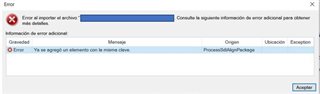
If I import the alignment file from the Translation Memory screen, there are no errors, but no segments get imported, just read.

But the last part of the alignment work I've done it's not in the TM, so it hasn't been imported now nor before.
Does anyone know if the file is corrupted because I imported it incomplete, or is this an error I can solve in any form?
I've tried with the solutions some colleagues have posted in other threads, but none worked for me.
Thank you very much!
Best,
Cristina
Generated Image Alt-Text
[edited by: Trados AI at 9:47 PM (GMT 0) on 28 Feb 2024]


