The Trados cloud platform will be undergoing maintenance on Saturday, 9th May 2026 between 05:00 to 17:00 UTC. During this time, you will not be able to log in to the Trados platform.

Trados not exporting numbers into excel correctly: is it a bug or is there a solution?

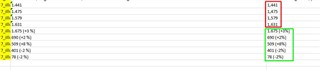
I have issue with Trads not propertly Exporting the numbers into Excel. This got me into real trouble and I have to say that I am really really angry about this. Please see screenshots.

Trados
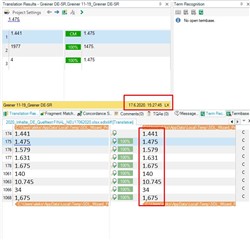
Screenshot of Trados Studio showing incorrect number formatting in exported Excel file, with a red box highlighting the issue in the 'Translation Results' window.

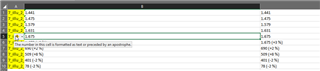
Excel

Close-up of Excel file with numbers incorrectly formatted, some cells highlighted in green indicating text format, and a red box around numbers not matching the source.

Most of the cells were "general" but even in those which were set up as text cells, the numbers were not reproduced the right way. I noticed that it exported correctly if trados and/or Excel didn't it interprete as numbers (green square).


Generated Image Alt-Text
[edited by: Trados AI at 9:44 PM (GMT 0) on 28 Feb 2024]
emoji
  • Can you share the source Excel file, or at least just the part of the file containing the problem numbers... you should be able to delete everything apart from these four numbers as a simple test.

    Paul Filkin | RWS

    Design your own training!
    You've done the courses and still need to go a little further, or still not clear? 
    Tell us what you need in our Community Solutions Hub

  • Hello Paul,

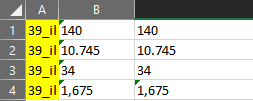
    thank you for your help. This is the excel file with the numbers. I imported and translated it in Trados as bilingual excel translating from column B to column C. There are 2 tabs. I deleted everything else, except the cells containing the numbers.

    I experienced already an issue with Trados and numbers few years ago. It was a Word file. The file had a lot of numbers. In language A was a point used for decimal numbers (like 5.75), when I changed it in the translation to comma (5,75), a giant mess happened with the auto-propagation. Some numbers were even recognized as hours (00.00 -> 00:00).

     excel numbers issue.xlsx

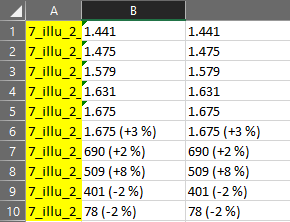
  • I can't reproduce this problem.  I copied source to target because the formats look a little inconsistent and that seems to be what you have done as well.  When I save the target I get exactly what is shown in Studio:

    Screenshot of Trados Studio showing a table with inconsistent formatting between source and target columns for numerical values.

    Screenshot of Trados Studio displaying a table where numerical values have been correctly formatted in the target column, including percentage changes.

    There are some differences with some of the cells now formatted without being added as text, but the end result is correct.

    I experienced already an issue with Trados and numbers few years ago. It was a Word file. The file had a lot of numbers. In language A was a point used for decimal numbers (like 5.75), when I changed it in the translation to comma (5,75), a giant mess happened with the auto-propagation. Some numbers were even recognized as hours (00.00 -> 00:00).

    Not anything I can comment on without being able to see the files. Studio 2019 and earlier isn't the most flexible when it comes to numbers but things are normally explainable, and there is usually a sensible workaround.

    Paul Filkin | RWS

    Design your own training!
    You've done the courses and still need to go a little further, or still not clear? 
    Tell us what you need in our Community Solutions Hub

    emoji


    Generated Image Alt-Text
    [edited by: Trados AI at 9:44 PM (GMT 0) on 28 Feb 2024]
  • First of all, thank you for your effort.

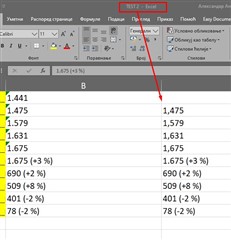
    Well, this makes no sense to me. I just created a new project. I imported only the file I uploaded here for you. Then I translated it twice (with auto-propagation activated and deactivated), then I clicked "Save traget as" and I reproduced the problem. If needed I could maybe record the steps and upload a video. I am getting this issue reproduced.

    Screenshot of Trados Studio showing a 'Save target as' error with a red arrow pointing to the error message.

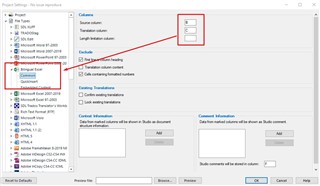
    Did you translated it as a bilingual excel file?

    Screenshot of Trados Studio project settings with a red box highlighting the 'Bilingual Excel' file format option.

    Can the issue be related to language pairs? I am translating German -> Serbian.

    I copied source to target because the formats look a little inconsistent and that seems to be what you have done as well. 

    Yes, I copied sorce to traget too. The numbers are not incosistent. There is just one decimal (1,675), the others are thousends.

    emoji


    Generated Image Alt-Text
    [edited by: Trados AI at 9:45 PM (GMT 0) on 28 Feb 2024]
  • Hello and

    I followed your conversation, and I also translated your sample file using Studio 2019 SR2 with the bilingual Excel file type filter. It works fine for me:

    Screenshot of Trados Studio 2019 SR2 showing a bilingual Excel file with numbers in cells. Some cells have a green corner indicating literal string formatting.

    Close-up screenshot of Trados Studio with a single row from a bilingual Excel file. The row shows matching numbers in source and target columns with no visible errors.

    Could the explanation be in the Excel settings? My Excel is set to EN-US, but if you set it to German, the decimal comma and the thousands separator change. The numbers in cells with a green corner would not be affected by that, as they are literal strings, which the author of the document instructed Excel NOT to treat as numbers. This is not cell value, but cell formatting. I wonder if this formatting is copied to the target cell when you use a bilingual file type. It does not show on mine or Paul's screenshots, because our versions of Excel are set to English, but it would show on yours.

    Hope that makes sense.

    Daniel

    emoji


    Generated Image Alt-Text
    [edited by: Trados AI at 9:45 PM (GMT 0) on 28 Feb 2024]
  • Thanks ,

    Your explanation is a good one... certainly part of the problem here will be around the way Excel handles formatting (which can also be incredibly problematic at times). 

    Maybe worth making sure that the properties of the target language column in the Excel source file is as you would expect prior to translating the file.  This might help to ensure the result you are looking for.

    Paul Filkin | RWS

    Design your own training!
    You've done the courses and still need to go a little further, or still not clear? 
    Tell us what you need in our Community Solutions Hub

  • Thank you both for your effort.

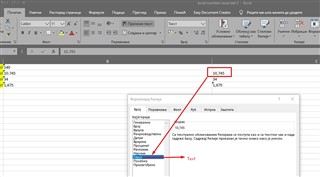
    Well, I still don't understand why it makes such changes in cells which are set up as textual cells. As far I know, those cells are showing text just as it is written (regardles of formating, numbers etc.). So, it does not make any sense that Excel changes the numbers there. I'll try and switch Excel to English and see what happens.

    Screenshot of Trados Studio showing an error message in a dialog box indicating an issue with number formatting in textual cells.

    emoji


    Generated Image Alt-Text
    [edited by: Trados AI at 9:45 PM (GMT 0) on 28 Feb 2024]
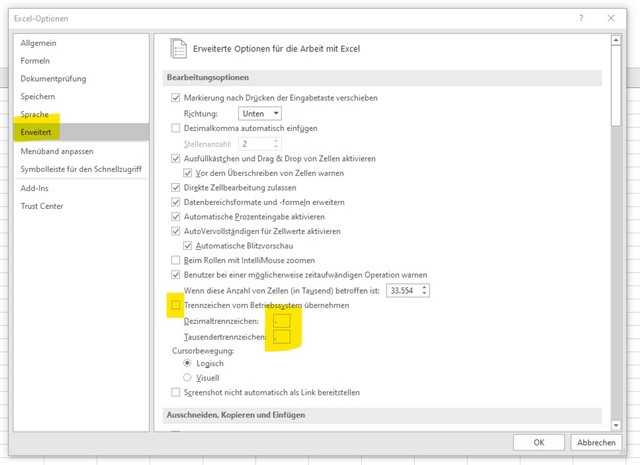
  • I have had this problem in Excel before now - have you checked the Excel options (File > Options) for the separator characters for decimal places and thousands separators. I am running Excel in German but the highlighted bits of the screengrab might be worth checking in Excel

    Screenshot of Excel options with 'Advanced options for working with Excel' highlighted, showing settings for decimal and thousands separators.

    emoji


    Generated Image Alt-Text
    [edited by: Trados AI at 9:45 PM (GMT 0) on 28 Feb 2024]
  • Well, I still don't understand why it makes such changes in cells which are set up as textual cells.

    Might be because the numbers were entered by adding an apostrophe at the start to force Excel to see them as text.  No idea why this was done, but all it does is tell excel to format the cells this way.

    Then when you put the numbers, as Studio sees them as numbers and not as plain text (because this is what they really are), into the target column Excel will now try to recognise them as numbers.

    I don't think there is a simple solution to this problem.  Working with Excel is almost always problematic.  I don't know if you have done a lot of work importing files into Excel but getting numbers/dates etc. can be extremely problematic to get right.  Even with the EN version it's difficult and given other languages do odd things (take csv for example) I think there is plenty of room for error.

    I think the mixing of these in one file is also difficult to handle:

    1,234

    1.234

    How does the software know that this isn't a badly formatted file rather than this:

    1,234

    1.234,000

    or this:

    1,234.000

    1.234

    Once it gets back into Excel each cell will be handled on its own merit... so what exactly should it do if you have not told it how to handle the numbers correctly in the first place.  Too much ambiguity in here in my opinion.

    Paul Filkin | RWS

    Design your own training!
    You've done the courses and still need to go a little further, or still not clear? 
    Tell us what you need in our Community Solutions Hub