 Translate



Hi,
Under Setup > Project Templates (Studio 2019) you can import, edit or remove templates but you cannot add new ones, why?
regards,
Pascal

Hi,
Under Setup > Project Templates (Studio 2019) you can import, edit or remove templates but you cannot add new ones, why?
regards,
Pascal


Hello Pascal Zotto ,
You create the project template directly from the project(s) in Studio. Once you have created the project, you can then add this to the templates folder.
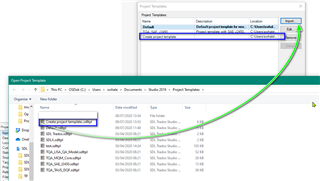
Then once you have created the template, you can import this and edit as required, setting your preferred template as required.
Oana Nagy | QA Engineer | RWS Group


Hi,
Just tried that but well, that create template from project task does not work as users would expect it to work, as it does not take all project settings but only part of them. It completely ignores all language settings except those for all languages.
Where's the point of creating a template for a fully set project in terms of specific language settings, if you then have to go through all these settings again by editing the template another time? That's not very user friendly.
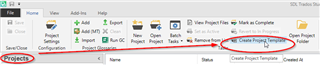
I thought the standard way would be to use the "create project template" button in the "projects" view:
Daniel

righ-click or via button does not make any difference, the settings are not properly copied to the template.:(
…thinking of it, I guess I mark this one as closed and open another thread for the issues with creating templates.