The Trados cloud platform will be undergoing maintenance on Saturday, 9th May 2026 between 05:00 to 17:00 UTC. During this time, you will not be able to log in to the Trados platform.

Unable to find the specified file Studio 2017

While opening the file, the following message appeared: " Unable to find the specified file." I followed the instructions from the page gateway.sdl.com/.../communityknowledge of this project was created. The creation of new termbases did nothing, the same error still occurs. How can you solve this problem?

  • Hello ,

    Please post the full error stack as this contains useful information

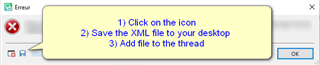
    Error message dialog box with an 'X' icon indicating an error. Instructions include: 1) Click on the icon, 2) Save the XML file to your desktop, 3) Add file to the thread.

    Also, please let us know if this is a single file project or a project package and where you have saved the files(s)

    You can also check your project settings and ensure any Termbase you have has been removed

    https://gateway.rws.com/csm?id=kb_article_view&sysparm_article=KB0029080

    Oana Nagy | QA Engineer | RWS Group

    emoji


    Generated Image Alt-Text
    [edited by: Trados AI at 9:52 PM (GMT 0) on 28 Feb 2024]
  • <SDLErrorDetails time="16.07.2020 09:54:38">
      <ErrorMessage>Nie można odnaleźć określonego pliku</ErrorMessage>
      <Exception>
        <Type>System.ComponentModel.Win32Exception, System, Version=4.0.0.0, Culture=neutral, PublicKeyToken=b77a5c561934e089</Type>
        <NativeErrorCode>2</NativeErrorCode>
        <ErrorCode>-2147467259</ErrorCode>
        <HelpLink />
        <Source>System</Source>
        <HResult>-2147467259</HResult>
        <StackTrace><![CDATA[   à System.Diagnostics.Process.StartWithShellExecuteEx(ProcessStartInfo startInfo)
       à System.Diagnostics.Process.Start()
       à LanguageToolStudioPlugin.LanguageToolStudioPluginMain.validLang(String lang)
       à LanguageToolStudioPlugin.LanguageToolStudioPluginMain.Initialize(IDocumentProperties documentInfo)
       à Sdl.FileTypeSupport.Framework.Core.Utilities.BilingualApi.BilingualContentHandlerAdapter.Initialize(IDocumentProperties documentInfo)
       à Sdl.FileTypeSupport.Framework.Core.Utilities.BilingualApi.BilingualContentHandlerAdapter.Initialize(IDocumentProperties documentInfo)
       à Sdl.FileTypeSupport.Framework.Core.Utilities.BilingualApi.BilingualContentHandlerAdapter.Initialize(IDocumentProperties documentInfo)
       à Sdl.FileTypeSupport.Framework.Core.Utilities.BilingualApi.BilingualContentHandlerAdapter.Initialize(IDocumentProperties documentInfo)
       à Sdl.FileTypeSupport.Framework.Integration.AbstractBilingualProcessorContainer.Initialize(IDocumentProperties documentInfo)
       à Sdl.FileTypeSupport.Framework.Integration.MultiFileConverter.Initialize(IDocumentProperties documentInfo)
       à Sdl.FileTypeSupport.Framework.BilingualApi.AbstractBilingualContentProcessor.Initialize(IDocumentProperties documentInfo)
       à Sdl.FileTypeSupport.Framework.Integration.AbstractBilingualProcessorContainer.Initialize(IDocumentProperties documentInfo)
       à Sdl.TranslationStudio.Editor.TranslationEditor.TranslatableDocument.SingleParagraphUnitBilingualParser.ParseNext()
       à Sdl.FileTypeSupport.Framework.Integration.FileExtractor.ParseNext()
       à Sdl.FileTypeSupport.Framework.Integration.MultiFileConverter.ParseNext()
       à Sdl.FileTypeSupport.Framework.Integration.MultiFileConverter.Parse()
       à Sdl.TranslationStudio.Editor.TranslationEditor.TranslatableDocument.VerifySegment(ISegmentContainerNode segmentContainerNode, IParagraphUnitContainerNode paragraphContainerNode, IFileContainerNode fileContainerNode)
       à Sdl.TranslationStudio.Editor.TranslationEditor.SideBySideDocumentEditingView.VerifySegment()
       à Sdl.TranslationStudio.Editor.TranslationEditor.Actions.AbstractConfirmSegmentAction.ExecuteActiveSegment()
       à Sdl.TranslationStudio.Editor.TranslationEditor.Actions.AbstractConfirmSegmentAction.Execute()
       à Sdl.Desktop.Platform.Implementation.CommandBars.ActionService.<>c__DisplayClass30_0.<ExecuteAction>b__0()
       à Sdl.Desktop.Platform.Implementation.Services.Log.Resources(Object message, Action action)
       à Sdl.Desktop.Platform.Implementation.CommandBars.ActionService.ExecuteAction(IAction action, ActionOrigin origin, Boolean allowToggle)
       à Sdl.Desktop.Platform.Implementation.CommandBars.ActionService.ExecuteActionForShortcut(Keys shortcut)
       à Sdl.Desktop.Platform.WinForms.StudioWindowForm.OnKeyDown(KeyEventArgs e)
       à System.Windows.Forms.Control.ProcessKeyEventArgs(Message& m)
       à System.Windows.Forms.Form.ProcessKeyPreview(Message& m)
       à System.Windows.Forms.Control.ProcessKeyPreview(Message& m)
       à System.Windows.Forms.Control.ProcessKeyPreview(Message& m)
       à System.Windows.Forms.Control.ProcessKeyPreview(Message& m)
       à System.Windows.Forms.Control.ProcessKeyPreview(Message& m)
       à System.Windows.Forms.Control.ProcessKeyPreview(Message& m)
       à System.Windows.Forms.Control.ProcessKeyPreview(Message& m)
       à System.Windows.Forms.Control.ProcessKeyPreview(Message& m)
       à System.Windows.Forms.Control.ProcessKeyPreview(Message& m)
       à System.Windows.Forms.Control.ProcessKeyPreview(Message& m)
       à System.Windows.Forms.Control.ProcessKeyPreview(Message& m)
       à System.Windows.Forms.Control.ProcessKeyPreview(Message& m)
       à System.Windows.Forms.Control.ProcessKeyPreview(Message& m)
       à System.Windows.Forms.Control.ProcessKeyPreview(Message& m)
       à System.Windows.Forms.Control.ProcessKeyPreview(Message& m)
       à System.Windows.Forms.Control.ProcessKeyPreview(Message& m)
       à System.Windows.Forms.Control.ProcessKeyPreview(Message& m)
       à System.Windows.Forms.Control.ProcessKeyMessage(Message& m)
       à System.Windows.Forms.Control.WmKeyChar(Message& m)
       à System.Windows.Forms.Control.WndProc(Message& m)
       à System.Windows.Forms.Control.ControlNativeWindow.OnMessage(Message& m)
       à System.Windows.Forms.Control.ControlNativeWindow.WndProc(Message& m)
       à System.Windows.Forms.NativeWindow.Callback(IntPtr hWnd, Int32 msg, IntPtr wparam, IntPtr lparam)]]></StackTrace>
      </Exception>
      <Environment>
        <ProductName>SDL Trados Studio</ProductName>
        <ProductVersion>14.0.0.0</ProductVersion>
        <EntryAssemblyFileVersion>14.1.10018.54792</EntryAssemblyFileVersion>
        <OperatingSystem>Microsoft Windows 10 Pro</OperatingSystem>
        <ServicePack>NULL</ServicePack>
        <OperatingSystemLanguage>1045</OperatingSystemLanguage>
        <CodePage>1250</CodePage>
        <LoggedOnUser>L03978\user</LoggedOnUser>
        <DotNetFrameWork>4.0.30319.42000</DotNetFrameWork>
        <ComputerName>L03978</ComputerName>
        <ConnectedToNetwork>True</ConnectedToNetwork>
        <PhysicalMemory>8301712 MB</PhysicalMemory>
      </Environment>
    </SDLErrorDetails>

  • At the outset, sorry, I don't know English and I use google translate. This is a single project saved on my external drive. The problem appears already in an open project when I want to go to the next segment by clicking ctrl + enter. I even tried changing the source file location, like moving it to the desktop, and it keeps getting the same error. And it applies to every project I want to translate. GData antivirus has been installed on my computer for 2 years, but there were never any problems until yesterday.

  • Thanks ,

    It would appear the issue is coming from the Language Tool Plugin.

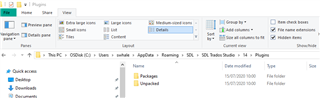
    Please remove this from Studio and ensure that it is removed from these folders

    C:\Users\YourName\AppData\Roaming\SDL\SDL Trados Studio\14\Plugins

    File Explorer window showing SDL Trados Studio plugins folder with a 'Packages' and 'Unpacked' subfolder.

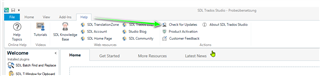
    Now install the latest updates for Studio (and MultiTerm if you have it installed)

    SDL Trados Studio application with an arrow pointing to the 'Check for Updates' option in the Help menu.

    Add Studio/Multiterm to your AV providers exceptions list and restart Studio.

    Are you now able to work with the file?

    If so, you can reinstall the Plugin (latest version 2.5.0.2017) and set up this app using the contained instructions

    https://appstore.sdl.com/language/app/languagetool-grammar-and-spell-checker/725/

    Oana Nagy | QA Engineer | RWS Group

    emoji


    Generated Image Alt-Text
    [edited by: Trados AI at 9:52 PM (GMT 0) on 28 Feb 2024]
  • I am out of my office at the moment, I will be available after  13 and I will try to solve the problem according to the tips provided.

  • Could there be a possibility of a remote session after  1 afternoon because I'm not very good at IT?