The Trados cloud platform will be undergoing maintenance on Saturday, 9th May 2026 between 05:00 to 17:00 UTC. During this time, you will not be able to log in to the Trados platform.

XLIFF embedded content

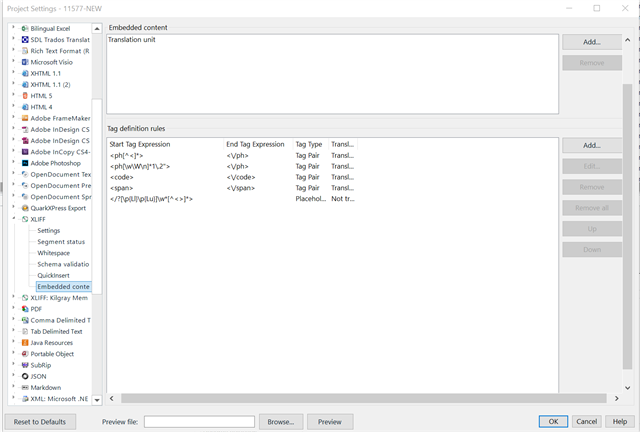
Hello, I am trying to process a file using the XLIFF Document filter. As the yellow section is currently omitted in the translation, I added the embedded content feature

<source>In this example, each upload client command would need to include either <ph
           id="1" xmlns="urn:oasis:names:tc:xliff:document:1.2">&lt;code&gt;--environment grch37&lt;/code&gt;&lt;span&gt; or &lt;/span&gt;&lt;code&gt;--environment grch38&lt;/code&gt;</ph>.</source>

Trados Studio Project Settings window showing the Embedded content section with Tag definition rules for start and end tag expressions.

I tested in an regex tester  he first and second line to recognize the <ph...> </ph> tag so I can present the text for translation, but no matter what I try, the content of <ph...> </ph> is not presenter for translation, but as one big online tag.

If anyone has been able to process such inline tags so that the text between can be presented to translation, let me know.


Generated Image Alt-Text
[edited by: Trados AI at 2:47 PM (GMT 0) on 1 Mar 2024]

emoji
Parents Reply
  • In fact.. the last rule is considered first, not last.  However, that isn't the issue.  I discussed this with the filetype developer this morning and your problem is because this text is wrapped in the ph inline element.  In XLIFF this element is used as a placeholder and not as translatable text, so by default it's rendering exactly as it should be... a placeholder:

    http://docs.oasis-open.org/xliff/v1.2/os/xliff-core.html#ph

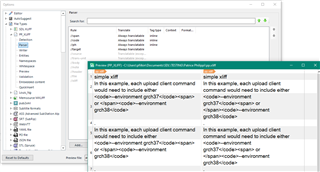
    So if you can't get your client to use this properly, and if this content really is supposed to be translated, then your best option would be to handle this as a monlingual XML filetype instead.  For example, doing this gets you this:

    Trados Studio interface showing a comparison of source and target text with XML code and placeholder elements.

    Which is also not what you want, and the reason for that is because your file is a mix of XML entities telling the parser to handle this as text.  So you need to convert these entities into reserved characters like this:

    Close-up of Trados Studio error message indicating issues with ph inline element as a placeholder in XLIFF file.

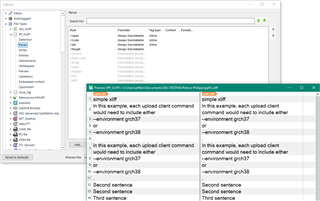
    Now I get this:

    Trados Studio interface with source and target text panels, displaying XML code with converted entities to reserved characters.

    Also note that to handle this as a mono-lingual file I needed to do three important things:

    1. convert the entities to reserved characters
    2. copy the source content into the target element
    3. create a custom XML filetype with *.xliff as the wildcard for the filetype identifier

    Paul Filkin | RWS

    Design your own training!
    You've done the courses and still need to go a little further, or still not clear? 
    Tell us what you need in our Community Solutions Hub

    emoji


    Generated Image Alt-Text
    [edited by: Trados AI at 9:57 PM (GMT 0) on 28 Feb 2024]
Children