 Translate



hi,
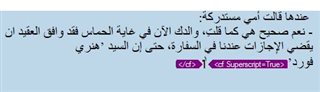
when I insert subscripted number to use it later for a footnote, I can't retain the original target font. it continues to write in small letters! I need help plz

hi,
when I insert subscripted number to use it later for a footnote, I can't retain the original target font. it continues to write in small letters! I need help plz

Brothers Paul and Jerzy
I am sorry gentlemen but nothing is working out  .
.
The cursor is trapped between the tags and I can't get it out


If you press CTRL+A, the complete segment will be selected. With CTRL+Space bar the complete formatting must be removed.
Or simply click before the tag, press DEL, then delete the remaining ghost tag the same way.
_________________________________________________________
When asking for help here, please be as accurate as possible. Please always remember to give the exact version of product used and all possible error messages received. The better you describe your problem, the better help you will get.
Want to learn more about Trados Studio? Visit the Community Hub. Have a good idea to make Trados Studio better? Publish it here.
but I don't want to lose the tag. I need the superscripted number. I just want to continue writing in the original font.
Remove the tag, type all the text you need and then apply the tag to the number.
To avoid such effect you have to place the cursor after the closing tag and then start typing. In your screenshot all looks as it should, only the piece of text between the tags will be formatted accordingly.
_________________________________________________________
When asking for help here, please be as accurate as possible. Please always remember to give the exact version of product used and all possible error messages received. The better you describe your problem, the better help you will get.
Want to learn more about Trados Studio? Visit the Community Hub. Have a good idea to make Trados Studio better? Publish it here.
Thanks for the video. It is strange, that you cannot place the cursor BEHIND the closing tag, this seems to be a bug to me.
As a workaround I suggested to type the WHOLE translation and only then apply the necessary formatting to the characters needed. What you do is, however, applying the formatting, BEFORE you typed further text in the original font. Please type the complete sentence first and apply superscript afterwards.
_________________________________________________________
When asking for help here, please be as accurate as possible. Please always remember to give the exact version of product used and all possible error messages received. The better you describe your problem, the better help you will get.
Want to learn more about Trados Studio? Visit the Community Hub. Have a good idea to make Trados Studio better? Publish it here.
It seems this is the only solution. thank you brother for your time and effort

Thank for the video... I agree it looks buggy. But I tried this into Arabic and after reproducing your problem I noticed I can use the END key on my keyboard to achieve this. Try that.
Paul Filkin | RWS
Design your own training!
You've done the courses and still need to go a little further, or still not clear?
Tell us what you need in our Community Solutions Hub
you are right. End key totally fixed the problem. thank you very much brother Paul