Translate



Hi,
I am a bit confused about the "Update file" function (this is for Studio 2019 SR2). The manual is not very in-depth about this funciton at all. (See here)
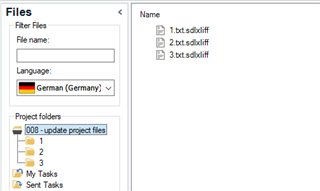
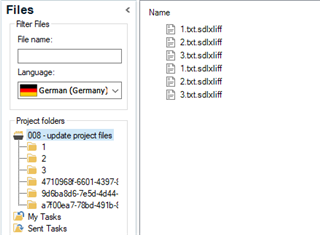
I a current project, I had to update several files. It resulted in three subfolders being created and both old and updated files being in the project. That is mildly confusing for a bear of little brain.
To gain more clarity, I created a fresh project and added a text file with the content "Old content." Then I updated it with a text file with a different name and the content "New content.". Contrary to what I expected, no new folder is generated and the content of the old file is simply replaced by the new file.
So my questions are:
- Why were folders created in the first project and old and new content are part of the project? Why not in the second?
- Does it matter whether I do the right-click-update-file action in the source or in the target language view?
- Is there a way to control this behavior?
Any help is welcome!
Daniel