 Translate



Can anyone please tell me why I can't import TMX file into my TM? I keep getting this same error. Please help! Thank you.
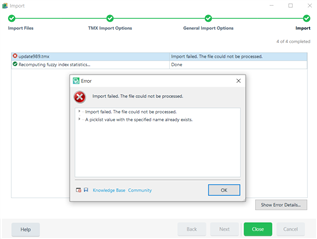
Generated Image Alt-Text
[edited by: Trados AI at 10:23 PM (GMT 0) on 28 Feb 2024]


Can anyone please tell me why I can't import TMX file into my TM? I keep getting this same error. Please help! Thank you.
You can click the arrowhead to the left of the error message "A picklist value..." and it should expand the details. If you click the left-hand icon at bottom left of the Error window, you might also get more details about the processing, There are 'picklists' used in the TM fields associated with each TU and maybe there is a clash with one of these. In TM view, open the TM and look at Settings-Fields to see the names of the available fields. To do the same in the TMX you'll need to use a text file editor and search the tmx for the names of the fields - they will appear in a line or lines within each TU beginning <prop type> and ending </prop>.

Thank you Simon. Yes, it gives me more details when I click the arrow, but sadly I have no idea what they mean.. I opened the tmx file with notepad and searched <prop type> as you said, but no result.
Some part of the tmx has been imported into my TM before, do you think that's probably why I am getting this error? Am I not supposed to import the same TUs twice?
Thank you Simon. Yes, it gives me more details when I click the arrow, but sadly I have no idea what they mean.. I opened the tmx file with notepad and searched <prop type> as you said, but no result.
Some part of the tmx has been imported into my TM before, do you think that's probably why I am getting this error? Am I not supposed to import the same TUs twice?

Try searching for simply this:
prop type
Paul Filkin | RWS
Design your own training!
You've done the courses and still need to go a little further, or still not clear?
Tell us what you need in our Community Solutions Hub
