 Translate



Where can I find information about the differences between language pairs?
I'm setting up a new memory, and I'm trying to decide what language pair (US-EN to MX-SP or US-SP) will be better for my projects.
Thank you!
Mónica

Where can I find information about the differences between language pairs?
I'm setting up a new memory, and I'm trying to decide what language pair (US-EN to MX-SP or US-SP) will be better for my projects.
Thank you!
Mónica
In my opinion I think you need to base this decision on the market your work is for. If you don't see any difference in the language used whether it's es-MX or es-US then it probably doesn't matter which you use.
You can always use all your TMs for Spanish using AnyTM so there won't really be any restrictions in practice.
But good to get some advice from people like Nora Díaz for example....
Paul Filkin | RWS
Design your own training!
You've done the courses and still need to go a little further, or still not clear?
Tell us what you need in our Community Solutions Hub

Hi Paul,
Thank you for getting back to me. I thought there might be something like a list of the settings or rules each language contains. For example, whether the target language is set-up to change from decimal periods to decimal commas, curly quotes to << >> quotes or straight quotes, etc.
I've had files sent by clients where Studio uses these Spanish quotes automatically, and changing them to curly quotes (used in México) is no easy task.
Right now, I'm assuming that the closest SP for US EN would be the US SP, but I'd like to make sure and know what I'm getting into.
Mónica

Hi Monica,
It doesn't matter what language pair you choose for your TM, as Paul has explained. Auto-substitution settings like the ones you've mentioned come from the project settings, so that's the language combination that matters.
For example, here's a project with ES-MX as the target language and an ES-ES TM added via AnyTM:

Conversely, here's a project with ES-ES as the target language and an ES-MX TM added via AnyTM:

In both cases, auto-substitution follows the rules of the Project's target language.
In Studio 2021, these settings can be customized under Project Settings:
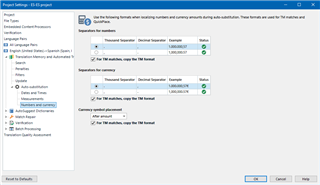
Note that you can decide what happens when there are matches in the TM: either to copy the TM format, in which case you may see different localizations if the TM target language doesn't match the Project's target language, or to not copy the TM format, which means that the Project Settings will override any content in the TM.
When there's a match in the TM, with "Copy the TM format" checked (default), in a Project that is ES-ES but has an ES-MX TM added via AnyTM:

Same project and TM, with "Copy the TM format" unchecked:


Hi Nora,
Thank you for your wonderful explanation! Now I know how this works. Have a great weekend!
Mónica
Hi Nora,
Thank you for your wonderful explanation! Now I know how this works. Have a great weekend!
Mónica
