The Trados cloud platform will be undergoing maintenance on Saturday, 9th May 2026 between 05:00 to 17:00 UTC. During this time, you will not be able to log in to the Trados platform.

F8 verification crashes Studio 2021 in packages

I am finding that running the F8 Quality Verification in Studio 2021 is causing the software to crash. This does not happen when I create my own projects from source files.

It is possible and even likely that the packages (from agencies) were created using an earlier version of Studio. I tried opening the project and running F8 in Studio 2019, but same thing - CRASH.

Of course this means that if the project package was configured to require F8 verification as part of creating a return package, then I can't create the return package!

Anyone any ideas, please?

Parents Reply
  • Hi Simon Cole,

    Yes, I know Gaetan, I presume you meant Gaetan Chretiennot though I didn't realise he'd been a beta tester as long as I though I should do as we weren't as many in those days.

    There could be any number of reasons why this happens, though I've never found it to be due to PMs who don't know...what they are doing. The wonderful agency who I do most of my work for are super, I'm happy to say.

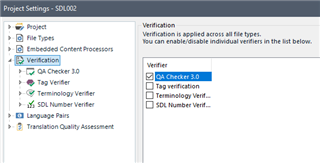
    When it happens to me, I run the individual components of the verification separately, by ticking only one of them at a time, here in Project Settings:

    Trados Studio Project Settings window showing Verification options with QA Checker 3.0 and Tag Verifier selected.

    Sometimes, if I run one process at a time, I can push the whole verification through successfully. If not, I can at least ascertain which process is causing the failure.

    If I really can't achieve the full verification, I deliver the SDLXLIFF file zipped...

    Maybe or can impart wisdom on this subject...

    All the best,

    Ali

    (a workaround enthusiast) Slight smile

    emoji


    Generated Image Alt-Text
    [edited by: Trados AI at 10:32 PM (GMT 0) on 28 Feb 2024]
Children