I get an error message "selectedtab cannot be set before the pane has been added to a panes collection" when trying to open the file for the translation in the editor. I have tried Resetting Window View to no avail. Please help!
It helps to know which version of Studio so the advice is more relevant, and it also helps to see the full error message (which would tell us the version anyway):

But in the absence of all this I'll assume you have Studio 2021, so try a reset. Rename this folder (just add _old to the end or something, it's not important what you rename it to) and restart Studio:
c:\Users\[USERNAME]\AppData\Roaming\SDL\SDL Trados Studio\Studio16
So the path would become this:
c:\Users\[USERNAME]\AppData\Roaming\SDL\SDL Trados Studio\Studio16_old
If you can't find this folder then you need to unhide your hidden files/folders:
Paul Filkin | RWS
Design your own training!
You've done the courses and still need to go a little further, or still not clear?
Tell us what you need in our Community Solutions Hub
Dear Paul,
I have tried your solution but it didn't help.
I'm attaching the screenshot (and my version is Studio 2019).

That was quick... what exactly did you try? Can you tell me which folder you renamed? You also didn't provide the xml error message which is what I asked for.
Paul Filkin | RWS
Design your own training!
You've done the courses and still need to go a little further, or still not clear?
Tell us what you need in our Community Solutions Hub
c:\Users\[USERNAME]\AppData\Roaming\SDL\SDL Trados Studio\Studio19
to
c:\Users\[USERNAME]\AppData\Roaming\SDL\SDL Trados Studio\Studio19_old
as per your suggestion.
I'm not sure how I can check xml error message?
The error that pops up is the one you can see on the photo. And when I click "OK", it redirects me to "Home" where all files for this project are listed :(
Exactly as I showed:

Paul Filkin | RWS
Design your own training!
You've done the courses and still need to go a little further, or still not clear?
Tell us what you need in our Community Solutions Hub
Oh, I'm sorry!
Here it is:

c:\Users\[USERNAME]\AppData\Roaming\SDL\SDL Trados Studio\Studio19
There is no such folder.
Please take another look and rename this one:
c:\Users\[USERNAME]\AppData\Roaming\SDL\SDL Trados Studio\15.0.0.0\
Paul Filkin | RWS
Design your own training!
You've done the courses and still need to go a little further, or still not clear?
Tell us what you need in our Community Solutions Hub
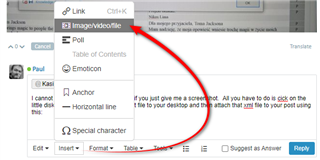
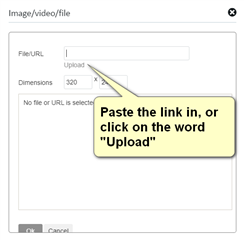
I cannot read anything about this error if you just give me a screenshot. All you have to do is click on the little disk symbol as I showed, save that file to your desktop and then attach that xml file to your post using this:


Paul Filkin | RWS
Design your own training!
You've done the courses and still need to go a little further, or still not clear?
Tell us what you need in our Community Solutions Hub
<SDLErrorDetails time="06/09/2020 23:35:01">
<ErrorMessage>SelectedTab cannot be set before the pane has been added to a panes collection</ErrorMessage>
<Exception>
<Type>System.NotSupportedException, mscorlib, Version=4.0.0.0, Culture=neutral, PublicKeyToken=b77a5c561934e089</Type>
<HelpLink />
<Source>Infragistics.Win.UltraWinDock</Source>
<HResult>-2146233067</HResult>
<StackTrace><![CDATA[ at Infragistics.Win.UltraWinDock.DockablePaneBase.set_IsSelectedTab(Boolean value)
at Sdl.Desktop.Platform.WinForms.DockingViewContentControl.ShowViewPart(IViewPartReference viewPartReference)
at Sdl.Desktop.Platform.AbstractViewWithParts.ShowViewPart(IViewPartReference viewPartReference)
at Sdl.TranslationStudio.Editor.EditorService.ShowTranslationMemoryWindow()
at Sdl.TranslationStudio.Editor.TranslationEditor.SideBySideDocumentEditingView.Document_TranslatingSegment(ITranslatableDocument document, ISegmentContainerNode segment, IEditorTranslationResults results)
at Sdl.TranslationStudio.Api.Editor.SegmentTranslationEventHandler.Invoke(ITranslatableDocument document, ISegmentContainerNode segment, IEditorTranslationResults results)
at Sdl.TranslationStudio.Editor.TranslationEditor.TranslatableDocument.OnTranslatingSegment(ISegmentContainerNode segmentNode, IEditorTranslationResults results)
at Sdl.TranslationStudio.Editor.TranslationEditor.TranslateSegmentWorker.Translate()
at Sdl.TranslationStudio.Editor.TranslationEditor.TranslatableDocument.TranslateSegment(ISegmentContainerNode segmentNode, ITranslatorFactory translatorFactory)
at Sdl.TranslationStudio.Editor.TranslationEditor.SideBySideDocumentEditingView.TranslateActiveSegment()
at Sdl.TranslationStudio.Editor.TranslationEditor.SideBySideDocumentEditingView.TryTranslateActiveSegment()
at Sdl.Desktop.Common.DelayedExecutable.Execute()
at Sdl.Desktop.Common.DelayedExecutionEngine.Timer_Tick(Object sender, EventArgs e)
at System.Windows.Forms.Timer.OnTick(EventArgs e)
at System.Windows.Forms.Timer.TimerNativeWindow.WndProc(Message& m)
at System.Windows.Forms.NativeWindow.Callback(IntPtr hWnd, Int32 msg, IntPtr wparam, IntPtr lparam)]]></StackTrace>
</Exception>
<Environment>
<ProductName>SDL Trados Studio</ProductName>
<ProductVersion>15.0.0.0</ProductVersion>
<EntryAssemblyFileVersion>15.2.7.2849</EntryAssemblyFileVersion>
<OperatingSystem>Microsoft Windows 10 Home</OperatingSystem>
<ServicePack>NULL</ServicePack>
<OperatingSystemLanguage>2057</OperatingSystemLanguage>
<CodePage>1252</CodePage>
<LoggedOnUser>LAPTOP-3H2U14O0\podli</LoggedOnUser>
<DotNetFrameWork>4.0.30319.42000</DotNetFrameWork>
<ComputerName>LAPTOP-3H2U14O0</ComputerName>
<ConnectedToNetwork>True</ConnectedToNetwork>
<PhysicalMemory>16526964 MB</PhysicalMemory>
</Environment>
</SDLErrorDetails>
Thanks Kasia Podlipska... that's easier for me.
The error stack is pointing towards a problem that should be resolved either by resetting the View -> Reset Window Layout OR more certainly by renaming this folder:
c:\Users\[USERNAME]\AppData\Roaming\SDL\SDL Trados Studio\15.0.0.0
to
c:\Users\[USERNAME]\AppData\Roaming\SDL\SDL Trados Studio\15.0.0.0_old
Please can you make sure you have done this.If you have, and the problem continues I'll log a support case on your behalf. The first thing the support team will do is exactly what I have suggested here, but they probably won't get to this until tomorrow at the earliest. So good to make sure you have done this exactly as asked to save having to wait.
Paul Filkin | RWS
Design your own training!
You've done the courses and still need to go a little further, or still not clear?
Tell us what you need in our Community Solutions Hub